4K HDMI Capture Card for Teaching & Gaming: A Comprehensive Guide
4K HDMI Capture Card for Teaching & Gaming: A Comprehensive Guide
Introduction to HDMI 4K Capture Card
The HDMI 4K capture card is a powerful tool that enables seamless streaming, live broadcasting, and video conferencing for both teaching and gaming purposes. This article aims to provide a comprehensive guide to help users understand the key features, benefits, compatibility, and software support of this device.
Key Features & Benefits
The HDMI 4K capture card offers several key features and benefits that make it a popular choice among educators, gamers, and content creators. Some of these include:
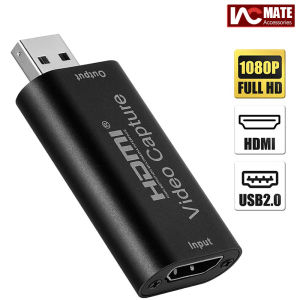
- Max input resolution of 3840×2160@30Hz
- Max output resolution of 1920×1080@30Hz
- Support for YUV/JPEG video output formats
- Compatibility with 8/10/12bit deep color video formats
- Support for L-PCM audio format
- Support for AWG26 HDMI standard cable up to 15 meters
- Support for Windows, Android, and MacOS operating systems
- Conformity to USB Video and UVC standards
- Conformity to USB Audio UAC standards
- Max working current of 0.4A/5V DC
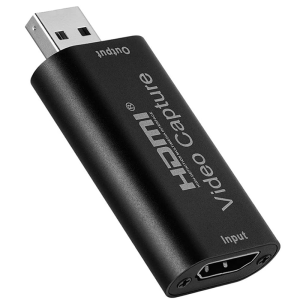
- Compact and portable design (dimensions: 64x28x13 mm)
These features and benefits make the HDMI 4K capture card an ideal choice for those looking to stream, broadcast, or record high-quality video and audio content for teaching, gaming, or other purposes.
Compatibility & Software Support
The HDMI 4K capture card is compatible with a wide range of operating systems, including Windows, Android, and MacOS. It also supports popular acquisition software such as VLC, OBS, and Amcap, making it easy to integrate into existing workflows.
The device conforms to USB Video and UVC standards, ensuring compatibility with a wide range of devices and software applications. Additionally, it conforms to USB Audio UAC standards, ensuring high-quality audio capture and output.
How to Use HDMI 4K Capture Card for Streaming & Live Broadcasting
Using the HDMI 4K capture card for streaming and live broadcasting is simple and straightforward. Follow these steps to get started:
- Connect the HDMI input cable to your source device (e.g., gaming console, camera, or computer)
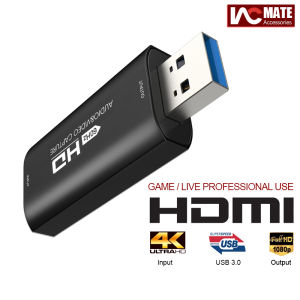
- Connect the USB 3.0 output cable to your computer
- Install any necessary drivers or software applications (e.g., VLC, OBS, Amcap)
- Configure your settings and start streaming or broadcasting
Setting Up Your HDMI 4K Capture Card
To set up your HDMI 4K capture card, follow these steps:
- Connect the HDMI input cable to your source device
- Connect the USB 3.0 output cable to your computer
- Install any necessary drivers or software applications
- Configure your settings (e.g., resolution, frame rate, audio settings)
Recording & Broadcasting Live Streams
To record and broadcast live streams using the HDMI 4K capture card, follow these steps:
- Set up your source device (e.g., gaming console, camera, or computer)
- Connect the HDMI input cable to your source device
- Connect the USB 3.0 output cable to your computer
- Install any necessary drivers or software applications
- Configure your settings (e.g., resolution, frame rate, audio settings)
- Start streaming or broadcasting
Tips for Optimal Performance
To achieve optimal performance when using the HDMI 4K capture card, consider the following tips:
- Ensure that your source device and computer meet the minimum system requirements
- Use a high-quality HDMI cable (e.g., AWG26 HDMI standard cable)
- Use a reliable power supply (e.g., USB 3.0 port)
- Keep your software and drivers up-to-date
- Optimize your settings for your specific use case (e.g., resolution, frame rate, audio settings)
HDMI 4K Capture Card for Teaching & Video Conferencing
The HDMI 4K capture card is also an excellent choice for teaching and video conferencing purposes. Here's how it can enhance your online presence and integrate with existing tools:
Capturing High-Quality Video & Audio
With its support for deep color video formats and L-PCM audio format, the HDMI 4K capture card allows you to capture high-quality video and audio content for teaching and video conferencing purposes. This ensures that your students or colleagues can clearly see and hear you during virtual lessons or meetings.
Enhancing Your Online Presence
By using the HDMI 4K capture card, you can enhance your online presence by providing high-quality video and audio content that engages and connects with your audience. This can help you build trust and credibility with your students or colleagues, leading to better learning outcomes or business results.
Integrating HDMI 4K Capture Card with Existing Tools
The HDMI 4K capture card is compatible with a wide range of software applications, making it easy to integrate into existing workflows. Whether you're using Zoom, Microsoft Teams, Google Meet, or any other video conferencing tool, the HDMI 4K capture card can help you achieve optimal performance and deliver high-quality content.
Conclusion
In conclusion, the HDMI 4K capture card is a versatile and powerful tool that enables seamless streaming, live broadcasting, and video conferencing for both teaching and gaming purposes. With its key features, benefits, compatibility, and software support, it is an ideal choice for educators, gamers, and content creators looking to deliver high-quality video and audio content. By following the steps outlined in this guide, you can easily set up and use the HDMI 4K capture card to enhance your online presence and achieve optimal performance.

IAC MATE
Review
You May Also Like
ZDSSY Projector Screen 16:9 Metal Anti Light Curtain Reflective Fabric Cloth For YG300 XGIMI H3 HALO Mogo Xiaomi DLP Projector
Expose Smart TV 32" Inch LED Digital Android 12 UHD Flat Screen TV Bluetooth Google TV Digital Television
EVA Hard Outdoor Travel Carrying Case for Play6 Portable Video Projectors Storage Bag Protections Box
Q1 Smart TV Box Android 14 8GB 128GB Streaming Media Player Allwinner H313 Bluetooth 5.4 Netflix Google Assistant Set Top Box

MONOZ H00 Projector 4K Full HD 3000 Lumens Android With Bluetooth Projector Home Theater
ZDSSY Newly X8mini projector android tv Coolita OS 180° Flexible Rotating Dual Wifi6 BT5.2 1080P 1280*720P Home Cinema Outdoor Projetor with 1000+ free TV Live Channels

Wanbo Dali 1 Portable Projector Auto Focus Obstacle Avoidance Android 9.0 HIFI Speaker Fully Automatic Android Smart Portable WiFi Bluetooth LED Projector 720p Full HD 1080P Android TV Support Auto Focus Keystone Home Office Classroom Projector VMI

AUN【Genuine HY300pro】with HDMI 5G WIFI 6000 Lumens android projector 4k ultra hd and bluetooth portable movie mini projector for phone and laptop wanbo t2 max xiaomi smart wireless projector with screen
Universal Replacement Remote Control for RP017F RP016F HCP-320X 3250 R001 Projector Models And More Black

Top Sale Original MXQ Pro 5g 8K TV 128GB + 8GB RAM Android Ultra HD Video Resolution
TVCON Android TV box 4K UHD 2.4G/5G Dual WiFi 6 16+256GB TV box Google chromecast Supports 360° Bluetooth Remote Voice Control