


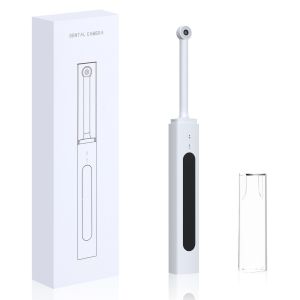
VV DENTAL | Wireless Dental Intraoral Camera Oral Endoscope 300W Pixel Intraoral Camera HD Video for Android PC Wifi Link Dental Endoscope
Intraoral Dental Camera Wireless Wifi Oral Endoscope 300W Pixel Intraoral Camera Teeth Inspect Endoscope HD Video for IOS Android Free ShipBasic Technical Parameters:1.Model:EC-32.Size:2102520mm3.Image pixel:300W4.Frame Rate:20fps5.LED:8 PCS6.Operate Time:About 150minAPP Download:【Method 1】Open the mobile app store, Search “EndoCamera”, and click Download and Install. (Huawei Application Market/ Xiaomi App Store /OPPO App Store VVO App Store /iPhone App Store/, Tencent App treasure /360 mobile phone assistant can be searched and Download.)【Method 2】Scan the QR code, select "EndoCamera.apk" to download and install the APP.Note: When installing App “Endocamera”, please allow all the authority request it need.Application:1. Keep press the switch/Photo button for 2 seconds to start the machine.2.When using by mobile phone, manually connect to a WiFi hotspot in WLAN 1. Settings. Open the downloaded APP, enter the interface in Figure 1, and click "EC-3" to connet. Enter the interface shown in Figure 2, manually connect the WIFI "EC3_XXXXX" and return Then enter the device interface as shown in Figure 3. Click the "Start" button to start showing image. Click the "Close" button to power off the device and exit the APP.3. For computer using, it needs to manually connect to the WiFi in WLAN Settings. Type in the website on web browser ” vvdental.com.cn”, Click the "Data Download" column to download EndoCamera_install.exe to install, After the installation, open the PC client software, manually connect the hot spot "EC-3-XXXX", and click the" Start playing " button in the page to showing image.Packing List:1.Main unit *12.Type-C charging cable *13.User manual *1

Prime Supply_ChicEdit
Review

You May Also Like
Aluminum Armor Bumper Frame Phone Case For Google Pixel 10 9 8 Pro XL 9A Irregular Metal Cutting Process Edge Protection Cover

LPO Laptop Battery 69KF2 Compatible with Dell G15 5510 5511 5515 5520 5521 Dell G7 15 7500 XPS 15 9500 9510 9520 Inspiron 7510 7610 Precision 5550 5560 5570

LPO Cellphone Battery B-O8 3.8V 5000mAh 19.35Wh Compatible with Vivo Y51 2020 Y31 Y52s

Feadship Case for POCO C65 5G REDMI 13C 2023 4g phone casing Softcase Silicone shockproof Cover new design aesthetic cute Burgundy with holder for girls KNXCDZJ1
2IN1 Phone & Tablet Holder Stand for Working Livestream Shooting Video

powerbank original 50000mah Waterproof Solar Charger 2USB solar power bank fast charging Heavy Duty for iphone
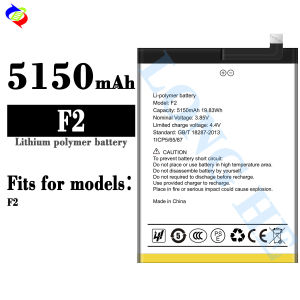
Dimi for UMI F2 Mobile Phone Battery 5150MAh Battery Brand New

【CANAMEK 】 20PCS Lot Vacuum Cup Suction Cups For Pad Pasting 20mm Bathroom Mushroom Head

PLNBFG Outdoor Mobile Power Portable LED Lamp Pocket Card Lamp Mini USB Light Ultra Low Power Night Light

10PCS Plastic Threader Cross Stitch Sliver Bow Wire Needles Multicolor Insertion Tools Sewing Machine DIY Craft Accessories

MINIFELE 262 Bow Design Card Sleeve Keychain Transparent DIY Design Photo Card Protector INS Bag Pendant Card Cover