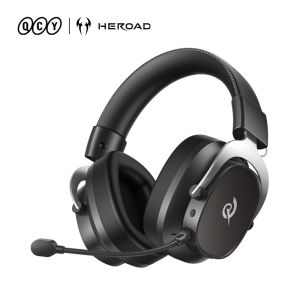
QCY | QCY Heroad VT200 BH25H8GMB Gaming Headset Detach Mic Over Ear Headphone Tri-Mode 7.1 Surround Sound for PC/PS4/PS5 Headset Gamer
QCY Heroad VT200Tri-Mode Wireless Gaming HeadsetFeatures● 53mm driversPowered by a 53mm neodymium driver, the HEROAD VT200 delivers powerfulbass, clear highs, and rich sound detail.● 7.1 Virtual Surround SoundThe 7.1 virtual surround sound system creates an immersive 3D audio experience.● Ultra-Low 20ms LatencyAudio stays perfectly in sync with yourgameplay. No noticeable delay.● Up to 130 Hours Battery LifeEnjoy longer gaming and entertainment without frequent charging.Standby Time: Up to 130 HoursPlay Time: Up to 60 Hours● Pro-grade tuningHEROAD VT200 is built for gaming, music, and movies and the dedicated software lets you win the game with Custom EQ, MIC Gain control, and Magic Voice effects.● Ergonomic design for all-day comfortDetachable High-Sensitivity Mic, Metal Frame & Adjustable Headband, thick headband padding, and soft, breathable ear cushions, ensuring a comfortable fit and easy cleaning.● Three-Mode Connectivity ( 2.4G Wireless / Bluetooth 6.0 / 3.5mm Wired )One headset for all your devices easily switch between three connection modes.About WarrantyWe offer 12-month warrantyHow-to videoQ: How to install the Driver?A: Please visit the QCY Official website -- Select "English" as the website language -- find "Support Center"-- "Product Support" --"Heroad" -- find "VT200 Pro", then click Documents & Drivers, and download "Heroad VT200 Pro PC Driver". (compatible with Windows 10/11 operating systems but only supported on Windows systems). Follow the installation guide to complete installation and unlock all functions.7.1 Virtual Surround SoundA True 3D Gaming SoundstageThe 7.1 virtual surround sound system creates an immersive 3D audio experience.Hear enemy footsteps, gunfire, and movement from every direction,helping you react faster in every match.53mm Large Dynamic DriverHear Every DetailPowered by a 53mm neodymium driver, the HEROAD VT200 delivers powerfulbass, clear highs, and rich sound detail.From subtle footsteps to game effects, every sound is clear andeasy to hear.Ultra-Low 20ms LatencyFast. Stable. Perfectly SyncedWith ultra-low latency under 20ms, audio stays perfectly in sync with yourgameplay.No noticeable delay. Just smooth and responsive sound for competitive gaming.Three-Mode ConnectivityOne Headset for All Your DevicesEasily switch between three connection modes.Made to Feel ComfortableDesigned to feel light on your head, even after long listening sessions.Driver Software. Tuned to YouFine-tune your gaming audio on PC, from personalized EQ tuning to voice-changer controls, for a setup that's uniquely yours.One Headset. Every MomentThe HEROAD VT200 is built for gaming, music, and movies. Switch sound modes to enjoy the best audio for every moment.Long Battery Life performanceAlways Ready for ActionThe HEROAD VT200 is built for long gaming sessions with reliable batteryBluetooth ModeStandby Time: Up to 130 HoursPlay Time: Up to 60 HoursEnjoy longer gaming and entertainment without frequent charging.Control Buttons1. Volume +/-2. Power On/Off3. Mode Switch4. Mic ButtonWhat's in the Box?Specifications● Connection: 2.4GHz, Bluetooth, AUX 3.5mm● Audio codec: SBC● Speaker: 53mm● Frequency range: 20Hz-20kHz● Microphone: Omni-directional Electret Condenser● Play time: Bluetooth approx 60h● Charging time: approx 2h● Bluetooth version: V6.0● Sound mode: Game, Music, Movie● Speaker impedance: 16Ω ± 15%● Speaker sensitivity: 105dB ± 3dB● Battery capacity: 1000mAh / Lithium Polymer Battery, 1000mAh● Charging input: DC 5V=1A● Headset weight: approx 300gAbout HeroadHeroad is a gaming brand evolved from QCY — a team with years of expertise in audio engineering and mass production.We combine QCY's proven audio technology with a gamer-first design approach to deliver precise sound, immersive experience, and reliable performance — all at a price that makes sense.Heroad — For Gamers. For Winners.FAQQ:What is the warranty period?A:QCY products come with a 12-month warranty from the date of receipt.Q:What should I do if the headset received unable to turn on?A:Confirm that the over ear headset has power left (press the power button and check LED light is illuminated).If headset power off, please connect the headset with your included USB cable and plug it into a USB power source for charging.Q:How to solve the problem that the mobile phone prompts that it cannot connect?A:Delete the pairing record on the mobile phone, and then search for pairing and connect again.Q:How to solve the problem that there is no sound when listening to music or calling?A: There is a settings icon on the right side of the Bluetooth connection name on Android phones. Click to enter, turn off the mobile phone audio and media audio, and then turn them on again. If there is still no sound, please re-pair the earphones with the mobile phone.Q: Why is there a delay in video or games?A: Affected by factors such as the use environment, network, and mobile phone Codec, there will be different degrees of delay when the mobile phone transmits audio data to the earphone.Q: How to solve the problem of stuck or intermittent sound?A:If there are a lot of Wi-Fi, 5G and 4G signals, high-power electrical appliances around, it may cause stuck and intermittent sound. Please Change the environment or re-pairing can solve the problem.Q: How do I update the version of my headphones?A: Application: Device,Settings,Firmware Upgrade. If it prompts that the upgrade cannot be made, it indicates that it is already the latest version.Q: How to install the Driver?A: Please visit the QCY Official website -- find "Support Center"-- "Product Support" --"Heroad" -- find "VT200 Pro", then click Documents & Drivers, and download "Heroad VT200 Pro PC Driver". (compatible with Windows 10/11 operating systems but only supported on Windows systems). Follow the installation guide to complete installation and unlock all functions.Q: The headphones can't connect to the APP?A: You can set the language of the application to English before connecting the headphones.Other Tips1. Before using the earbuds, please read the manual carefully and keep it for future references.2. The earbuds need to be fully charged prior to first-time use.3. lf the earbuds are left unused for over two weeks, please recharge.4. Please use the chargers made by qualified manufacturer.5. lf earbuds fail to be found by phone, please re-turn them connectable or restore factory settings.6.lf a program error of phone occurs, please turn off and on Bluetooth function or reboot the phone.

Prime Supply_Play Life
Review

You May Also Like
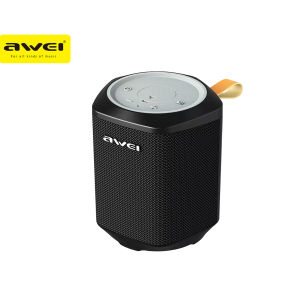
Awei Y379 Outdoor Wireless Speaker Bluetooth V5.0 Long Battery Life Bluetooth/ Micro-SD/ AUX/ TWS Series Connection
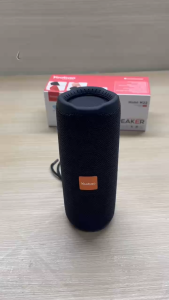
Yoobao M22 V5.3 TWS with Hanging Strap support USB/TF Card/FM Radio/AUX Function Portable Bluetooth Stereo Sound Speaker
![[TSSH] JBL by Harman Wired Microphone 68S Heart Shaped Dynamic Stage Microphone Excellent Frequency Good for Live Performance](https://img.lazcdn.com/g/ff/kf/Sfd23d75342304e1abaea20ea4bf0d96cJ.jpg_300x300q80.jpg)
[TSSH] JBL by Harman Wired Microphone 68S Heart Shaped Dynamic Stage Microphone Excellent Frequency Good for Live Performance
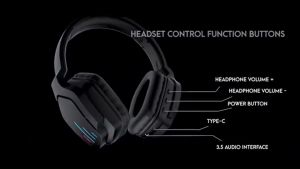
Onikuma B60 LED Light Bluetooth Gaming Headset with Microphone Over-Head Gamer Headphones Wireless Gaming Headset Gamer Bluetooth-compatible 5.2 Headphones

JBL Wave 300 TWS True Wireless Earbuds Bluetooth Earphones Music Sports Headphones with Mic Bass Magnetic Waterproof Headphones with Charging Case Feiy
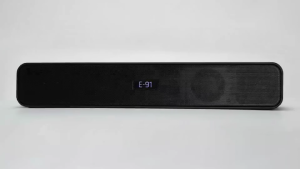
Meridos Bluetooth Speaker TV SoundBar Wireless Bluetooth Home Surround SoundBar For PC Theater Multi Connection AUX USB Bluetooth Gaming Movie Sound System
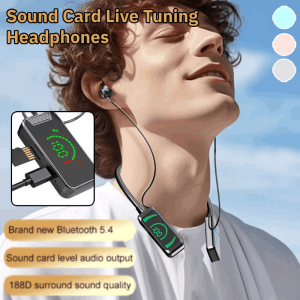
Wireless Sound Card Live Broadcasting Audio Editing Earphones Bluetooth Neckband Headphones Waterproof Sport Noise-Cancelling Headset 无线声卡直播修音耳机
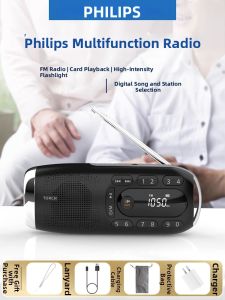
Philips | Senior-friendly Portable Radio Player
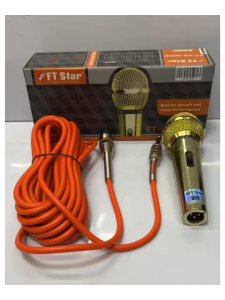
【suso】FTstar FT-KS-5000 Wired Microphone Gold Color with Orange Cable 100% Original
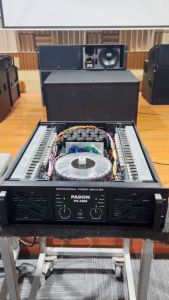
PADON PX3000 Professional amplifier 3u3 level power supply two channels3000Wx2 129v Class H dual 18 inch subwoofer

W4 Wireless Bluetooth Speaker Marshall Style Subwoofer Card Insert Portable Outdoor Sound