


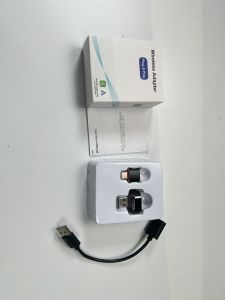
Upgraded Wireless CarPlay Adapter with Broader Compatibility & Reliable Connection Compact Stable Dongle for iPhone Android Car
Features- Converts factory wired CarPlay / Android Auto to fully wireless CarPlay / Android Auto.Package Contents:1* Wireless adapter1* USB C to USB A adapter1* User manualInput Voltage: 5VRequired Equipment & System Specifications:- Mobile phone with Bluetooth and Wi Fi capability- Connection to the adapter is completed via Bluetooth pairingOperating System Requirements- iPhone: iOS 12 or newer- Android phone: Android 11 or newer- Vehicle Infotainment System- Factory system with native wired CarPlay or Android Auto supportPre Setup Check- Verify your vehicle’s built in wired CarPlay / Android Auto function first:- Plug your phone into the car’s USB port using the original factory charging cable. If wired CarPlay or Android Auto launches normally, this wireless adapter is compatible with your vehicle to upgrade to a wireless connection.- Note: If you cannot confirm whether your vehicle supports wired CarPlay or Android Auto, consult your vehicle dealer for assistance.Step by Step Setup Instructions:1. Start your vehicle and wait for the infotainment system to fully boot up.2. Some car models require the engine to be fully running to finish system initialization.3. Locate your vehicle’s data USB port4. Your car may be equipped with multiple USB ports; some ports only supply charging power without data transfer. Ensure you plug the adapter into the port that links to the car’s infotainment system.5. Connect the adapter to the vehicle6. Insert the USB A end of the converter into the wireless adapter, then plug the assembly into your car’s infotainment data USB port.7. Prepare your phone for Bluetooth pairing8. Open your mobile device’s Bluetooth settings and scan for nearby available devices.9. If the guide screen does not pop up on your car display, skip this prompt and continue with the pairing steps below.10. Recommendation for Android users: Complete Bluetooth pairing within 30 seconds. If pairing takes longer than 30 seconds, unplug the adapter, reinsert it, and restart the pairing process.11. Complete device pairing12. Locate the device named Smartbox XXXX in your Bluetooth device list and tap it to initiate pairing.13. Accept the pairing request on your mobile device14. Once the adapter and phone connect, a pairing approval prompt will appear on your phone screen; confirm the pairing request.Operation Instructions:Connection Mechanism- After pairing succeeds, the adapter will use both Bluetooth and Wi Fi to establish a stable, secure dual connection between your smartphone, the adapter and your car’s infotainment system.System Initialization- Leave the system idle for several minutes and avoid pressing extra buttons to let the device finish initialization.Enter CarPlay / Android Auto Mode- Once initialization completes, tap the corresponding icon on your car’s touchscreen to launch wireless CarPlay or Android Auto.Function Control- You may now operate all CarPlay and Android Auto features directly through your vehicle’s built in screen.Concurrent Phone Usage- You can continue using your phone normally while connected to the adapter. For example, navigation directions set on your phone’s Maps app will automatically sync and display on your car’s screen.LED Status Indicator Guide:Status Mode - LED Light BehaviorStandby Mode - Solid Blue LightPairing Mode - Flashing Blue LightSuccessfully - Connected Solid Green LightContinued information available on the reverse side of the manual

Global Merch Park
Review

You May Also Like
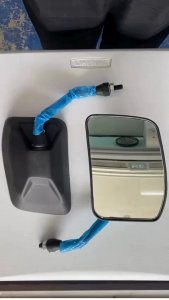
Bajaj RE Facelift Side Mirrors L/R - AA221042 AA221043 (Set of 2pcs.)
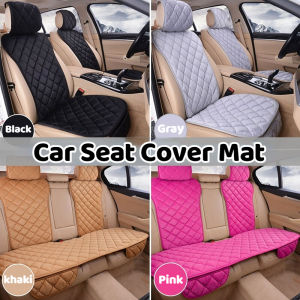
Accessories Car Seat Cover Protector Universal Front Rear Cushion Warm Plush Covers Sedan Hatchback SUV

300Pcs Green Welding Rods 2.0 Galvanized Electrode Thin Part Welding Iron Sheet Color Steel Special
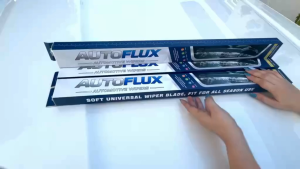
AutoFlux Wiper Blade Class A+ Mitsubishi Adventure 1998 To Present Windshield Glass Washer 20+20

YAMAHA MIO SPORTY FUEL COCK SOUL CARB INDONESIA GENUINE PARTS 4TTF450000 LJME
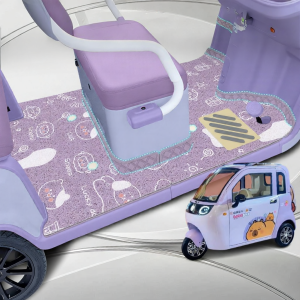
Interior Floor Mat
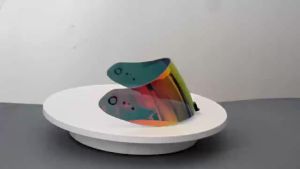
R420 Visor Shield Repalcement for R420 Motorcycle Accessories

AEROX V1/V2/V3 Radiator Cover – 2-Layer Acrylic Plug & Play with Back Adhesive + Free Sticker

Motorcycle Rear Tire Hugger Click 125i 150i v3/v2 Carbon White Motorcycle Mud Flaps Splash Guard
Honda Brv 2015-2022 Diamond Deep Dish Car Floor Mats
YAMAHA Mio Sporty 115 MOTORCYCLE DOMINO HANDLE GRIP SMOOTH RUBBER WITH ALLOY BAR END UNIVERSAL ACCESSORIES