Nux | NUX Optima Air Dual-Switch Acoustic Guitar Simulator with A PreampIR Loader Capturing Mode
Product description
.aplus-v2 .container-with-background-image { width: 100%; height: 100%; background-repeat: no-repeat; background-size: cover; }
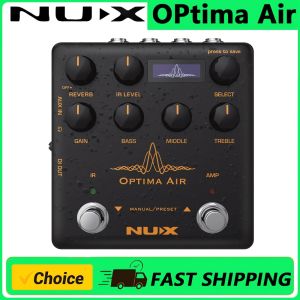
Control Panel
Reverb: One Knob Reverb effect control. It adjusts the Dry/Wet and Decay parameters. Or you can turn it OFF by tweaking to 0.
IR Level: Adjusts the simulated signal (Impulse Response file) LEVEL.
Select (Push to Save): In manual mode, you can choose the IR file. And you can save your customized preset by pushing the knob.
Gain: Adjusts the signal input Gain level.
3-Band EQ: Bass: Adjusts the low frequency level Middle: Adjusts the middle frequency level Treble: Adjusts the high frequency level.
IR Footswitch: Manual Mode: Engage/disengage the selected IR file. Acoustic guitar simulation ON/OFF
Preset Mode: Bank DOWN.
AMP Footswitch: Manual Mode: Activates the pre-amp section. When you engage the AMP, you can use the Gain and the 3-band EQ.
Preset Mode: Bank UP.
Input/Output Jack
Input: 6.35mm (1/4-inch) jack input
Output: 6.35mm (1/4-inch) jack output
Send/Return: 6.35mm (1/4-inch) effect loop inputs
Micro B USB Port: You can connect the pedal to your computer to use the Optima Air software to create, edit and save your presets. And update the pedal when a new firmware released.
Power Input: 9V Negative TIP power adapter input
3.5mm (1/8-inch) Auxiliary Input: You can connect music player to play along with music
3.5mm (1/8-inch) Headphones Output: For silent practicing or recording
XLR DI Output: For direct connection to mixer (or PA system)
Impulse Response (IR) Function / Pre-amp
Optima Air is loaded with 15 impulse response files. Each impulse response file optimized for the guitar type and the pickup type. The IR file names are included the guitar profile, optimized guitar type, and the pickup type. Press the IR footswitch to activate/deactivate the IR function.
NUX Optima Air is equipped with a pre-amp that allows you to enhance your sound by using a 3-band equalizer.
The beauty of an analog circuit is that chaos makes the muse. While you tweak the knob, it affects itself and also other parameters.
Driven by NUX's white box algorithm (physical modeling) of Neve 1073, Optima Air can replicate the chaos in a compact size, while providing lots of features like USB audio stream, Reverb function, and IR Capture.
Editor Software
You can load 3rd party IRs and edit preset names through editor software.
Optima Air also supports USB audio stream, which means you could use Optima Air as recording interface. You can adjust USB AUDIO routing through editor software. For WINDOWS operating system, please download NUX ASIO Driver from SUPPORT. The editor software offers you built-in LEVEL adjust knob, so you can tweak the 3rd party IR level.
Capturing a Guitar Profile
Run the pedal in capturing mode; press the IR footswitch and hold, plug in the power cable.
You need to use a condenser microphone for better result. Connect the acoustic guitar to the Optima Air's input, place the microphone and connect to a microphone to a microphone preamp. And connect the microphone preamp's output to the Optima Air's Return
Make sure everything's connected, and you are all set to capture.
Specifications
		 .
		 24-bit, 48-kHz Sampling Quality


		 .
		 Acoustic Guitar Impulse Response and Pre-Amp controls


		 .
		 15 built-in acoustic guitar profiles with IR level control


		 .
		 9 Preset Slots


		 .
		 Reverb Effect


		 .
		 Gain, Bass, Middle and Treble controls


		 .
		 6.35mm (1/4-inch) Send/Return, effects loop / 3.5mm (1/8-inch) Auxiliary input / 3.5mm (1/8-inch) Headphones input


		 .
		 XLR DI Out / Micro B USB Port for USB Audio Stream and Edit Software

Prime Supply_Play Life
Review

You May Also Like

Entry Level 17 Keys Kalimba
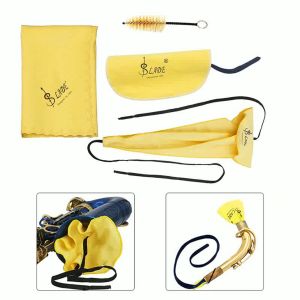
Saxophone Sax Cleaning Care Kit 3pcs Cleaning Cloth + Mouthpiece Brush Musical Instrument Maintenance Tool

Bansid Large Jazz Drum Set Music Instrument Pretend Play Set for Kids Beginner Drum Set for Kids

IRIN | 2.4G Wireless Guitar System IW‑30 Transmitter Receiver 2‑in‑1 Plug 4 Channels Rechargeable Box Wireless Adapter For Guitar Bass
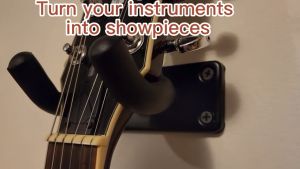
Guitar Wall Mount RIXTON Guitar Hangers for Wall Upgraded Version Guitar Wall Hangers with Screws 4 Holes Guitar Hooks for Wall 2 Pack Professional Wall Guitar Hook Wall Guitar Mount Guitar Hooks for Wall

12-Pack 130mm Nickel Silver Guitar Fret Wire 5.12-Inch Pre-Radiused Frets for Acoustic & Electric Guitars Ukuleles
![Haunting Adeline & Hunting Adeline Cat and Mouse Duet (2 book series) Paperback By: H. D. Carlton[Fast Shipping]](https://img.lazcdn.com/g/p/5194a5675be39940da499f83cb95bc8e.jpg_300x300q80.jpg)
Haunting Adeline & Hunting Adeline Cat and Mouse Duet (2 book series) Paperback By: H. D. Carlton[Fast Shipping]

Anatomy & Physiology Lab Manual (Customized) - 9789815242652 - C&E Bookshop

Preschool Handwriting Practice - 80 pages of Tracing Activities

Bud Brothers Unlimited 13: The Bloomer Bandits (Hutch)
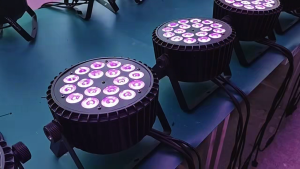
18PCS RGBW 6‑Segment Slim Par Wall Washer Light IP20 DMX512 RDM Fan‑less Silent Stage Wash Light for Indoor Stage Show