



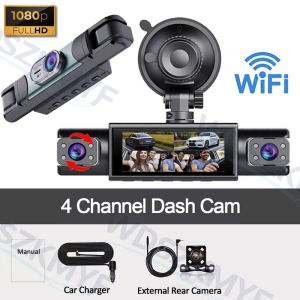
FHD 1080P 4/3 Channel Car Dash Cam WIFI Car Camera Recording for car way Front Left Right Rear Vehicle Recorder car accessories
Note:The dashcam's built-in battery is designed to save date, time and settings. The battery capacity is small and cannot be recharged! Please keep the car charger connected during daily use!Please always use the original car charger included in the box ! ! !Mobile phone chargers or USB cables are not supported by the dashcam as they may cause the rear/cabin camera to not activate, or the dashcam to not start, etc.Please note: There are two models available—a three-channel option and a four-channel option.Three-channel: Front and left/right side dash cams (no rear camera)Four-channel: Front, rear, and left/right dash camsRear Camera is an optional accessory and not included as standard. If you need Rear Camera, please select the configuration option that includes it. Product images will indicate whether Rear Camera is included.Please check carefully before purchasing. Thank you.1080P Car Dvr 3/4 Lens Dash Cam for Cars WIFI Front Inside Camera Recorder Video Camera for Vehicle Black Box4-channel Driving Camera1080P FHD DVR camera is composed of a front lens, a left lens, a right lens, and an rear lens to cover as many aspossible directions when you drive.Night VisionThe cabincamera has an F1.8 aperture and 8 infrared lights.In addition to producing incredibly clearrecordings, its image performance will be farsuperior to that of other driving recorders at night.Theycan capture stunning images even in pitch-blackspaces at night.WiFi-APP ControlThe device can be connected to the WIFI hotspot ofthe mobile phone.lt is convenient for the functionoperation and scren preview of the equipment.At the same time,it is easy to upload and share keyvideos to the memory of the phone.About WIFI Connection:Before connecting to the DVR on the phone, it is necessary to install the WIFI connection app "Viidure APP" in advance.You can search for "Viidure" installation in the Google App Market.Steps:(1) In standby mode, long press the "M" key to enter the DVR menu and enter the WIFl setting menu;(2)In the wifi menu of the DVR, check to obtain the wifi name and password;(3)Open the "Viidure" APP on your phone, enter the configuration mode, turn on the wifi function of the phone, follow the prompts to find the wifi signal of the DVR and enter the password to connect;(4)After successful configuration, you can connect and operate the DVR through the "Viidure" APP.Loop Recording & G-SensorAutomaticallyoverwrite the past videos when the memory cardis full. G-sensor will be activated when there is acollision to lock the key video you need andprevent it from being overwritten.24-hour parking monitor-hardwire (optional)(If you need the 24 hour parking monitoring function, you can order the hardwire accessories)Waiting 24 hours a day (to ensure that the car itself has electricity). When the car is started, it is recorded normally. After the car is turned off, if it is hit or vibrated, the machine will immediately wake up to record and keep the video as evidence. Don't worry about the situation that the car is turned off and you can't record the video.Reversing Assist FunctionIf the kit you ordered includes a rearview camera and you need to implement the reversing assist function, you need to connect the red signal wire of the rearview camera to the car's reversing light (the light will come on when reversing). If you don't need the reverse assist function, just disconnect the red signal wire and leave it unconnected.Installation Diagram1.Secure the recorder to the windshield of the vehicle , recommended near the rearview mirror area2.Hide the power cord in the window gap3.Insert the car charge wire into the cigarette lighter, connect the power supply, and complete the installation4.Rear camera if you need reverse camera function please connect the red wire, the red wire connects to the power supply of the reverse light behind the car.5.All car recorders need to be connected to the power supply to use, please understand the small battery safety design of the recorder. The battery of electrical appliances in the car is not allowed to be installed too large.About Formatting The Memory Card:When installing a memory card for the first time, be sure to format the memory card. After formatting, can correctly match the memory card.Formatting Steps: After installing the memory card, Press and hold the “M” button to enter the menu, find the format option, and click to format the memory card.(Important: Formatting the memory card on the computer is an incorrect operation. Please be sure to format the memory card on the menu option.)

Prime Supply_Play Life
Review

You May Also Like
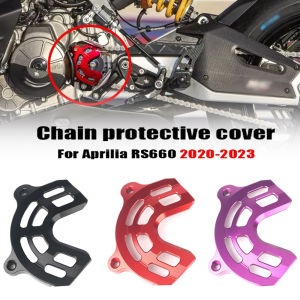
RS660 Front Sprocket Cover Chain Protector Guard For Aprilia RS660 2020 2021 2022 2023 RS 660 Motorcycle Sensor Protection Cover

2003-2007 COROLLA ALTIS HEAD LAMP UNIT DEPO-112-1111-LD

UNIVERSAL HYUNDAI DUMP TRUCK FRONT HUB BOLT WITH NUT WHEEL STUD NUT 104mm RH BN-115
![PISTON PIN 4095009/205200 [LOCAL STOCK.READY TO SHIP WITHIN 24HRS] for Cummins Engine Diesel Generator Spart Parts](https://img.lazcdn.com/g/ff/kf/S8298c66a0e4e40fcb567dfad7597eede4.png_300x300q80.png)
PISTON PIN 4095009/205200 [LOCAL STOCK.READY TO SHIP WITHIN 24HRS] for Cummins Engine Diesel Generator Spart Parts

120ml Car Perfume Air Freshener Deodorizer Long Lasting New Car Scent Car Fragrance Remove Odors Car Freshener
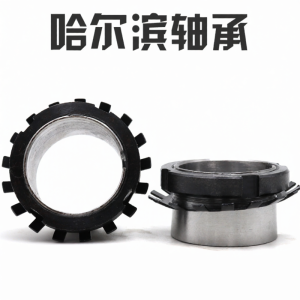
HRB | Bearing Locknut

Mitsubishi Mirage Radiator Reservoir Tank Cap - 1375A286

WW SOFT99 Glaco Mirror Coat 40ml (10309) Water Repellant Water Proof For Side Mirrors

Lightning McQueen Customized Car Wrap Film

Auto Anti-UV Heat Insulation Skylight Accessory Car Suede Fabric Electrostatic Adsorption Sunroof SunshadeFor MG HS ZS 2017-2024
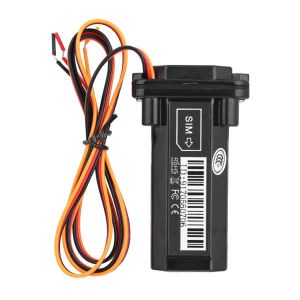
GPS Positioning Tracker Micro Locator Tracking Car Tracking GPS Locator



















