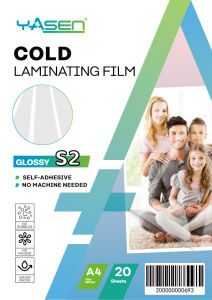
Cold Laminating Film A4 Yasen 80 Microns Glossy Satin Glitter Photo Top 20 Sheets
SPECIFICATIONSBrand: YASENProduct Name: Cold Laminating Film (Photo Top)Size: A4Thickness: 80 MicronsMaterial: Transparent PVC with Pressure-Sensitive AdhesiveFinishes Available: High Gloss, Matte / Satin, and Glitter FinishPack Quantity: 20 Sheets per PackOperation Type: Cold Lamination (Pressure-Sensitive / No Heat)✨ ADVANTAGES & FEATURESNo Warm-Up Time: Pressure-sensitive adhesive bonds instantly—no need to wait for a machine to heat up.Superior Finish & Transparency: High clarity across Glossy, Matte, and Glitter options to protect and elevate prints.Fading & Moisture Shield: Specially structured to protect photos and prints from moisture and color fading.Machine & Plotter Ready: High-quality self-adhesive film that can be processed with die cutters or cutter plotters.Easy Application: Works smoothly with cold laminating machines or can be applied manually without machinery. HOW & WHERE TO USE✅ Applications: Perfect for protecting and enhancing photos, stickers, cards, menus, labels, and promotional craft materials. Step-by-Step Guide:Option A: With Laminating Machine (Cold Mode)Select a compatible laminating machine and set it to COLD Mode.Peel back only a small portion of the protective backing paper.Stick the exposed adhesive edge firmly onto the top edge of your printed media.Feed the edge into the laminator feed until the machine grabs it.As the rollers pull the media through, slowly and continuously peel back the remaining backing paper. (Do not remove the entire backing paper at once before feeding).Let the machine press the film smoothly. Trim any excess film using scissors or a paper cutter.Option B: Manual Application (Without Machine)Carefully align and begin peeling the backing from the laminating film.Attach the adhesive side smoothly onto the surface of your printed paper.Tip: Use a sticker scraper or card to press and slide firmly across the surface to avoid air bubbles.Trim any excess film with a paper cutter or scissors.⚠️ REMINDERS & DISCLAIMER No Heat: Do NOT run this film through a HOT laminator or use heat settings. Adhesive Direction: Ensure the adhesive side of the film is applied directly onto the printed side of your paper. Surface Care: Avoid scratching or scraping the film surface with sharp, pointed, or rough objects. Proper Storage: Store in a dry, cool place away from direct heat and direct sunlight.

Crystal Image
Review
You May Also Like
12pcs Blind Needle Home Elderly Needle-side Hole Household Stainless Steel Tail Sewing Needles DIY Apparel Accessories

Color Clay Toy Burger & Baking Set 12 Colors Clays Plasticine Play House Toys For Children And Kids
Plaster Painting Kit
Outdoor Nature Camping Traveler Embroidered Patch Iron On Patches For Clothing Thermoadhesive Patches Hiking Patch For Backpack

Restoration DIY Decoration Stickers
5Pcs Rubber Thimble Protector Counting Cone Quilter for Sewing Finger Tip Craft
Kitchen Storage Box Office Desktop File Snack Organizer Storage Make Up Organizer
ZTOYL 10pcs 21mm Industrial Aluminum Bobbins For Singer Brother Sewing Machine Tools

BILIBILI | DIY Digital Oil Painting Paint By Numbers Flower Bouquet Pattern Canvas Hand Painted Artwork for Home Decoration Festival Gift
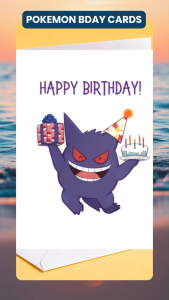
Gengar Pokemon Birthday Card Cute Funny Birthday Card Gift for Friend Partner Greeeting Card
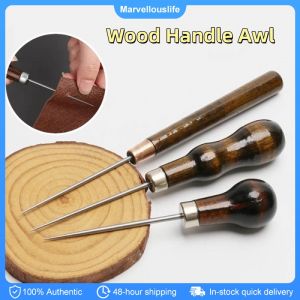
3PCS Leather Hole Puncher Wood Handle Awl Leather Punching Tools Hand Stitcher Leathercraft Needle