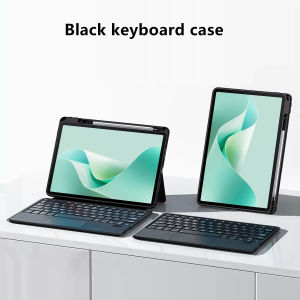
AJIUYU | TouchPad Keyboard For Huawei MatePad 11.5 S 2026 SLG-W50 SLG-W10 Case With Pen Holder for Matepad 11.5 S 11.5S 11.5" Cover Funda
This is an detachable keyboard case, TPU soft shell protective case, which can effectively protect your tablet. The keyboard and protective case can be separated .Keyboard with Backlight and TouchPad.Bluetooth connection, with touch pad, with backlight.,Horizontal and vertical supportNote 1:You need to upgrade your tablet to version 15.0 or higher to use the touchpad.Note 2:After Open the Power, Please Long press F12 for 2-4 seconds Button Together to Open the Keyboard's Bluetooth. It is Very Important.How To Verify Your Tablet Model1.Turn tablet to the back find your specific model,Par exemple: SLG-/TGR-/DMG-***2.Find the "Settings"--Click the "About"--Find the "Model"3.Please select the correct model number for your tablet purchase after viewing it.Applicable Models:For Huawei MatePad 11.5 S 2024 (Model: TGR-W09 TGR-W10 DMG-W00)For Huawei MatePad 11.5 S 2026/2025 (Model: SLG-W50 SLG-W10)Note: The above models of keyboard covers are universal.Attention PleaseEnglish versionkeyboard : There are English letters on the keyboard only.Multi-language versionkeyboard : English letters and carved language letters together .【For example, if you choose French, the keyboard will display English and French letters. Please note that the same letters will not be engraved repeatedly】(Due to the difference in the number of keyboard keys compared to a normal office keyboard, some special character engraving positions are the same, which is a normal phenomenon)The keyboard Core defaults to English, and the characters engraved on the keyboard are only a Surface display.so in some countries, even if the input method is switched, the special symbols do not necessarily match the keyboard function layout.If you mind, please do not purchase)【Note】Bluetooth connection method: Turn on the keyboard switch, Please Long press F12 for 2-4 seconds seconds to start Bluetooth, then turn on your tablet Bluetooth device, search for"Wireless keyboard",and click connect to connect 。【1】Switch language: Open Settings - Language and Input Method - Physical Keyboard - Add Language Layout【1-1】Input method switching: Ctrl+spacebar【2】Type-C charging interface, with switch button, 【3】For detailed instructions, please read the user manual. If you have any questions, you can contact "Online Services" for consultation .The resolution of the machine is different, and there may be color differences in the images, which is a normal phenomenon. The actual product received shall prevailProduct features:1,Magnetic suction separation, which can be supported horizontally and vertically2,Keyboard Support 7 colors backlight, you can adjust brightnessanimation Scene graph is only for reference!!

Prime Supply_Play Life
Review

You May Also Like
UGP | Translucent Frosted Nacre Texture Drop-proof Phone Case
RJ45 ethernet cable adapter connector Extender Female to Female Black Coupler cat6 cat5e cat5
Buck Power Buck Module Mobile Phone Fast Charging 12V24V To 5V Qc3.0 Single Usb Charging Conversion Board
1PC Computer Motherboard USB Extension Cable 9 Pin 1 Female To 2 Male Y Splitter
FLOVEME 1PC UV Screen Protector For Samsung Galaxy S23 S22 S21 Ultra Privacy Anti Spy Tempered Glass Screen Film Full Screen Glue For Galaxy S23 S22 S21 Ultra Full Cover UV Glass
BBONI TA : Original SuperCharge 120W Type-C Charging Set – Universal Fast Charging Cable & Adapter
Case for VIVO Y19S 4G 2024 V40 LITE 4G phone casing Softcase Silicone shockproof Cover new design aesthetic clear With 9D Soft Film SJMBSWX02
Blackmagic Design DaVinci Resolve Studio 20 Full Version Lifetime Use Unlimited Installation
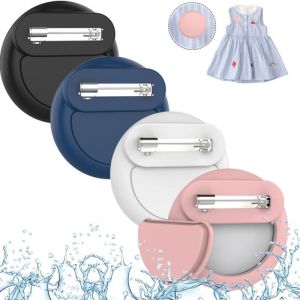
MARBLEX Silicone Tracker Case Waterproof Anti-scratch Hidden Brooch Pin Fashion Sleeve Keychain Protective Shell for AirTag Kids

T26 Selfie Stick Mini Extendable Phone Grip Tripod With Bluetooth Remote Shooting Vlog Video
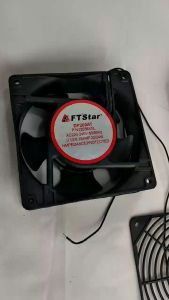
FT STAR BLOWER FAN COVER ONLY