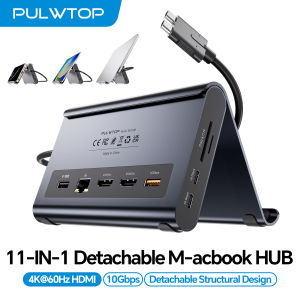
PULWTOP Docking Station Dual Monitor with 2×HDMI 4K 60Hz PD 10Gbps USB-C/A Ethernet Audio SD/TF for MacBook Pro/Air M4/M5
2-in-1 Macbook Dock & Vertical StandThis macbook docking station stand combines a macbook air dock with a sturdy laptop stand. Hold your MacBook in the stand, also works as a holder for tablets and phones. The macbook pro dock features 2x 4K@60Hz HDMI, 2x USB-C 10Gbps, 1x USB-A 10Gbps, 1x USB-A 2.0, SD/TF, 3.5mm Audio, and Gigabit Ethernet (RJ45) & 100W PD input (PD adapter not included).Dual 4K@60Hz for MacBook Pro/AirThis macbook docking station dual monitor delivers stunning 4K@60Hz video output via dual HDMI ports — ideal for video editing, creative workflows. Transform your MacBook into a powerful dual‑monitor workstation for mirroring or extending, enjoy ultra‑smooth visuals and seamless multitasking for your laptop dock.Precision Compatibility - MacBook OnlyThis macbook pro docking station dual monitor is precision-engineered for MacBook Pro/Air 2016–2026 (Intel chips,M1 Pro/Max, M2 Pro/Max,M3 Pro/Max, M4 Base Chip,M4 Pro/Max,m5 Base Chip,M5 Pro/Max). ★NOT compatible with M1, M2, or M3 Base chips. Also incompatible with Windows laptops, MacBook Neo, Please verify your model before purchase.10Gbps Ultra-Fast Data TransferThis macbook air docking station delivers 2×10Gbps USB-C and 1×10Gbps USB-A (Data Only – no video & charging). Move massive 4K videos, photo libraries, or backups in seconds. Perfect for video editors, designers.usb c docking station dual monitor companion for your MacBook workflows. A dedicated USB-A 2.0 port keeps your mouse and keyboard lag‑free‑smooth precision.100W PD + Gigabit EthernetThis macbook pro m5 docking station support Max 100W PD input and 95W output to charge MacBook Pro or Air at full speed – even under Final Cut Pro or dual monitors. Built‑in Gigabit Ethernet ensures lag‑free Zoom calls. No battery anxiety, no Wi‑Fi drops. A true docking station for macbook pro that keeps you productive all day.Steps of Clamshell Mode① Go to Applications → Utilities and open Terminal. ② Enter the following command and press Enter : sudo pmset -a disablesleep 1 ③ Insert administrator password and press Enter again. Once these steps are completed, you can use dual displays while your MacBook is in clamshell mode (lid closed).✳️ Important Notes: ① If the external display still doesn't show any output after running the command, restart your MacBook. ② To revert to the default sleep behavior (which will disable clamshell mode), run the following command instead: sudo pmset -a disablesleep 0

Prime Supply_Play Life
Review

You May Also Like

♥Ready Stock Limit Free Shipping♥Transparent Case For OPPO A54 A74 A94 5G A16 A16S Find X3 Neo Lite 360 Overall Full Body Cover Cases

BILIBILI | Neon Grin Smiley Luxury Fashion Full Lens Protective Case for Samsung Galaxy S26 S25 S24 A56 A36 Plus Ultra

Premium FULL GlueTempered Glass 9H Screen Protector REALME GT 7 / GT 7T

Ulanzi | Neck-Mounted Magnetic Smartphone Stand 1st Person View Outdoor Photography Fishing Chest Fixation

【E-WOITD】 Photo Flash Diffuser Dome Bounce For V1 TT600 V850II V860III TT600 520 685 850 860 Flash Speedlight Soft Box Case Replacement
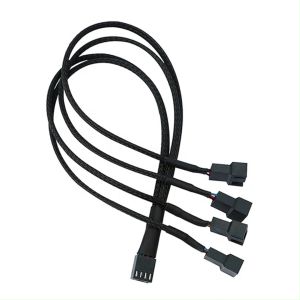
upHere 12V 4PIN splitter cable PWM Fan Power Extension 1 to 4 Converter for Computer Cooling fan

Retractable Air Conditioner Wind Deflector Central Air Conditioner Windboard Hanging Type Air Conditioning Wind Guide Household Air Anti Direct Blowing Wind Deflector Multi Function Easy to Clean

ZoeRax Cat8 Ethernet Cable 40Gbps 2000MHz RJ45 LAN Network Cable Flat Braided Nylon Cable for PS5 PS4 Router PC Laptop 0.3M–30M
![[COD] Universal 2.4G Wireless Air Mouse Keyboard Remote Control with USB Receiver for Android TV Box Smart TV Windows PC](https://img.lazcdn.com/g/p/f873db7d4bd7b4e1d8342613fd0840d4.jpg_300x300q80.jpg)
[COD] Universal 2.4G Wireless Air Mouse Keyboard Remote Control with USB Receiver for Android TV Box Smart TV Windows PC

Bandai | One Piece XXL Gaming Mouse Pad Rubber Keyboard Mat With 2MM Lock Edge For Computer Laptop
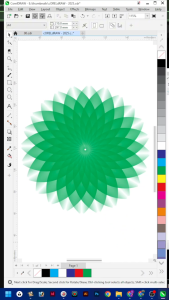
Corel DRAW Graphics Suite 2025 PRO Edition Professional Version No Watermark Full Version Unlimited Installation