


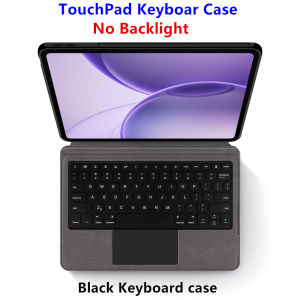
AJIUYU | Touchpad Keyboard for OPPO Pad 5 Case 12.1 inch 2026 OPPO Pad 6 Pad5 12.1" Tablet Protective Cover Case Backlight Keyboard Folio
This is an "all-in-one" keyboard case, TPU soft shell protective case, which can effectively protect your tablet. The keyboard and protective case cannot be separated .Bluetooth connection, with touch pad, with backlight ,Note: The keyboard comes with and without backlight, and you will get what you choose.How To Verify Your Tablet Model1.Find the "Settings"--Click the "About"--Find the "Model"2.Please select the correct model number for your tablet purchase after viewing it.Applicable Models:For OPPO Pad 5 12.1 inch 2026 TabletFor OPPO Pad 6 12.1 inch 2026 TabletThese two models of keyboard covers are universal.Please confirm your machine model before purchasing~Attention PleaseEnglish versionkeyboard : There are English letters on the keyboard only.Multi-language versionkeyboard : English letters and carved language letters together .【For example, if you choose French, the keyboard will display English and French letters. Please note that the same letters will not be engraved repeatedly】(Due to the keyboard material, the language characters carved out are dark gray.)(Due to the difference in the number of keyboard keys compared to a normal office keyboard, some special character engraving positions are the same, which is a normal phenomenon)(The keyboard Core defaults to English, and the characters engraved on the keyboard are only a Surface display.so in some countries, even if the input method is switched, the special symbols do not necessarily match the keyboard function layout.(You can hold down the Shift or AI combination)If you mind, please do not purchase)[1]Bluetooth connection method: Turn on the keyboard switch, then press and hold Fn+Z for about 2-3 seconds to start Bluetooth. The indicator light turns blue, and then turn on your tablet Bluetooth. Search for "Bluetooth Keyboard" and click connect to pair. After receiving the keyboard, fully charge it (about 4 hours).【2】Switch language: Open Settings - Language and Input Method - Physical Keyboard - Add Language Layout..【3】Input method switching: control+spacebar.(Choose the language you need)【4】For detailed instructions, please read the user manual. If you have any questions, you can contact "Online Services" for consultation .The resolution of the machine is different, and there may be color differences in the images, which is a normal phenomenon. The actual product received shall prevailNote: Tablet and Pencil are not included in the packaging!!The back bracket needs to be manually opened~~

Prime Supply_Play Life
Review

You May Also Like
Itel LCD Itel P37 Pro P37 Spark 7 P651W LCD Touch Screen Display Frame Assembly for Replacement
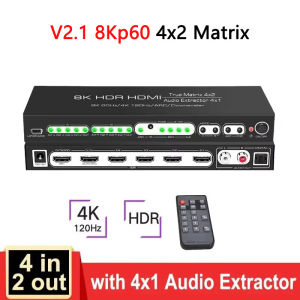
8K 4x2 HDMI Matrix 3D ARC HDR10 Video Switch Screen Splitter Converter with 4x1 Audio Extractor 4 in 2 Out Dual Display
6.78AMOLED LCD For Honor Magic7 Lite BRP-NX1 Display Screen Touch Digitizer For Huawei Honor X9c X60 Pro LCD With Frame

PC Tech Laptop Keyboard X202E Compatible with Asus VivoBook X201 X201E X202 x202e S200 S200E Q200 Q200E

OATSBASF Cute Cell Phone Stand Adjustable Bunny Phone Stand for Desk Thick Case Friendly Holder Compatible with iPhone Kindle iPad Switch All Phones
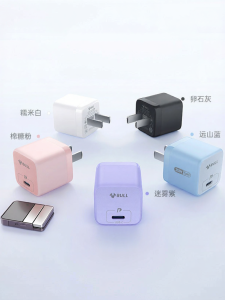
Bull | USB-C GaN PD Fast Charging Charger Set

Phone Case For Xiaomi Redmi Note 13 12 11 10 9 8 Pro Max 4G / Note 13 12 10 5G / Note 12S 11S 10S 9S Retro Leather Wallet with Stand Card Slots Flip Cover Casing

GJ56 3/8 1/4 Inch Tripod Rubber Foot M8 Screws Anti-slip Tripod Feet Mat Universal Feet Mount Monopod Foot Pad Andoer/Benro/Gitzo/Manfrotto
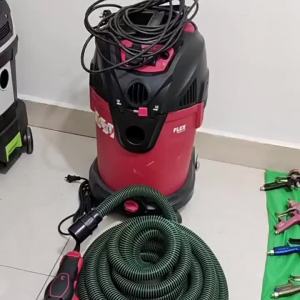
10 Meter Long Electric Sweep-up Suitable for Festo Dust Collecting Barrel Mocha Vacuum Cleaner FLEX Grinding Head Dry Grinding Machine
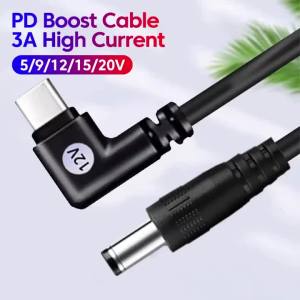
Type-C to DC Power Cable 20v/15v/12v/9v/5v DC5.5mm Bend Boost Line For Laptop Router Speaker DC Interface Power Supply Equipment
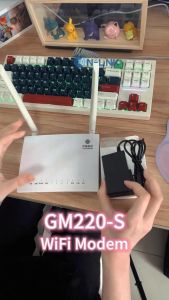
Used Modem GM220-S WIFI XPON ONU – Supports EPON & GPON with Adapter Included