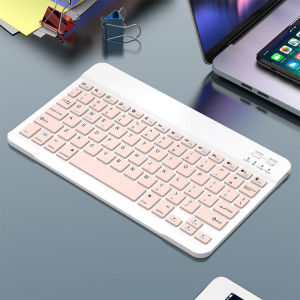
JITE Ultra-Slim Bluetooth Keyboard Mini Wireless Keyboard MOUSE for iPad iPhone Tablet Phone Smartphone iOS Android Windows
Compact SizeIts compact size makes it easy to carry around, ideal for on-the-go typing or gaming sessions.Wireless ConnectivityEnjoy the freedom of wireless connectivity with this mini keyboard, perfect for use with iOS, Android, and Windows devices.78-Key LayoutFeaturing a standard 78-key layout, this keyboard offers all the essential keys for efficient typing.USB InterfaceEquipped with a USB interface, this keyboard ensures stable and quick data transmission.Ultra-Slim DesignThe JITE Ultra-Slim Bluetooth Keyboard boasts a sleek, minimalist design that seamlessly integrates with your tablet or smartphone.Product features:1.BROAD COMPAYIBILITY :Use with all four major operating systems supporting Bluetooth (iOS, Android, Mac OS and Windows) ,Compatible with iPads, iPhones and Bluetooth-enabled Tablets, Laptops, and Mobile Phones, such as iPad air , iPad mini, iPad Pro, iPhone Xs Max etc.(Devices without Bluetooth need to buy a Bluetooth receiver by themselves)2.ULTRA-SLIM,LIGHTWEIGHT & PORTABLE:This lightweight Bluetooth keyboard is designed for anyone who needs a portable capable keyboard for work or play and especially suitable for business travel.3.RECHARGEABLE AND AUTO SLEEP MODE:The universal wireless bluetooth keyboard uses built-in lithium battery, can be easily recharged through USB cable, no need to change the battery. The Built-in Rechargeable battery is incredibly long-lasting, standby time is about 6 months between charges. The bluetooth wireless keyboard can automatically enter into sleep mode in order to save energy.4.STABLE CONNECTION:Advanced Bluetooth technology provides a cable-free connection with an operating range of 10 meters. But for Desktop PC Laptop without bluetooth function, you need to insert a third-party bluetooth adapter (not included) to install bluetooth driver before use.5.COMFORTABLE and QUIET TYPING:The whisper-quiet, low-profile keys bring a whole new level of comfort to your fingertips. Besides, keep all your most-used functions and media controls closer than ever Windows-dedicated hot keys.6.Attention!!! The mouse requires two AAA batteries. You need to purchase them separately or bring them along yourself.How to connect?Bluetooth keyboard connection method:7''/10'' keyboard connection :1.Turn on the "on" button in the keyboard2.Press and hold the "connection" key on the keyboard for 2 seconds3. Turn on the Bluetooth device you need to connect to4.Find "Bluetooth keyboard" in "my device" and click "connected"Mouse connection modes:Bluetooth connection mode: open the 'on' button in the mouse, then open the Bluetooth device to be connected, find 'BT mouse' in 'my device', and then click 'connected'.

GlobalLifestyle
Review

You May Also Like
Tempered Glass ALL CLEAR Screen Protector FOR REALME P4 LITE / P4X
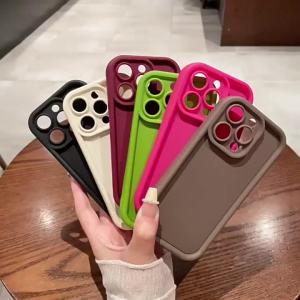
Joyful Simple Words Phone Case for iPhone 18 17 Air 16 15 14 11 Pro Max Plus 13 12 Mini 8 7 X Xs Protective Soft TPU Color Cover

Aircon bracket Thickened 1-1.5 horsepower 2Hp 3Hp stainless steel 304 air conditioning bracket。Thickened high quality
New OLED Screen For Samsung Galaxy A36 LCD Display Touch Screen Digitizer Assembly For Samsung A36 5G A366E Screen Replacement

MADEWITH 1 Pair Protein Leather Headphone Foam Replacement Headband Ear Pads Cushion Cover

BILIBILI | Mauve Mint Vertical Stripes Luxury Fashion Full Lens Protective Case for Samsung Galaxy S26 S25 S24 A56 A36 Plus Ultra

Screen for Xiaomi Redmi Note 13 Pro 4G 23117RA68G 2312FPCA6G Lcd Display Digital Touch Screen for Redmi Note 13 Pro 4G Assembly

ADDO with Lens Cover Protective Case Built-in Cold Shoe Aluminum Alloy Metal Frame High Quality Quick Release Camera Cage for Insta360 X5 Action Camera Accessories

BILIBILI | Green Dot Gecko Tribal Phone Case for iPhone 18 17 16 15 14 13 12 11 Air Pro Max Plus Double-layer Cover
3FT/6FT Air Conditioner Drain Hose Kit Adjustable Portable AC Hose Connector
Case for Samsung Galaxy Tab S9 FE 10.9inch Detachable Bluetooth Keyboard Case For Samsung Tab S9 FE 10.9inch SM-X510/X516B/X518U