



AM32 Brushless ESC 40A 65A 80A 32-bit Speed Controller Support PWM/DSHOT/Sine USB Link for RC 1/8 1/10 1/18 Car Crawler Drone
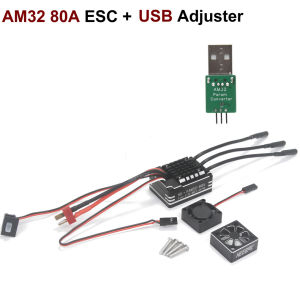
AM32 Brushless ESC 40A 65A 80A 32-bit Speed Controller Support PWM/DSHOT/Sine USB Link for RC 1/8 1/10 1/18 Car Crawler DroneAttention: The parameters of our product are default for cars when it leaves the factory, and it needs to be used with a tuner for airplane models. Description:A new 32-bit ESC product, with a super mini size, very suitable for compact installation, it is a driving tool for various small model airplane brushless motors.Selected low-power MOS tube with layout placed on the same side for convenient heat dissipation and strong power.Mini size and high power, it is the preferred power for small aircraft, crawler, climbing vehicles.Integrates the BEC module (5V2A), adds overcurrent copper bars, adds thermal conductive silicone sheets, and takes all performance to a higher level.Supports mainstream control signals such as DSHOT and PWM, with linear at low speeds, violent at high speeds, and smooth speed regulation. It uses AM32 open-source firmware, which can be freely adjusted. It supports bidirectional operation, adjustable drag braking, sine start, and other functions, and fast forward and reverse switching is very smooth.With a 470uF 35V capacitor to improve its working condition.Add low voltage protection function, improve low-speed linear performance.40A 65A ESC Specification:Item name: 32-bit ESCFirmware: AM32Master control: AT32Working voltage: 2-4S LipoMax current: 40ABEC: 5V2ASupport signal: PWM/DSHOT/Sine, etc.Applicable motor:Below the 22 seriesBoard size: 30x12mmWeight: about 4.6gDescription:This AM32 ESC PRO version integrates the BEC module on board based on the original AM32 ESC, and is controlled by an adjustable switch. It provides three voltage levels of 5V/6V/7.4V and a maximum current of 5A, which can meet the additional needs of high-power peripherals.The PRO version has LED status indicator, reserved telemetry backhaul interface, reserved external switch pad, and on-board overcurrent copper bars. It has significant upgrades in both functionality and performance.The use of AM32 ESC requires the use of a matching parameter adjuster. Supports mainstream control signals such as DSHOT and PWM, with linear at low speeds, violent at high speeds, and smooth speed regulation. It uses AM32 open-source firmware, which can be freely adjusted. It supports bidirectional operation, adjustable drag braking, sine start, and other functions, and fast forward and reverse switching is very smooth. It is the preferred power for small aircraft, crawler, climbing vehicles. It is a driving tool for various small model airplane brushless motors.Specification:Item name: AM32 ESC PROType: AM32 ESCFirmware: V2.16Master control: AT32Working voltage: 2-6SMaximum current: 65ASupport signal: PWM/DSHOT/Sine, etcBEC: onboard integrationBEC parameters: 5V/6V/7.4V adjustable, 5ALED status light: supportTelemetry backhaul: supportExternal switch: supportApplicable motor:Below the 3532 MotorModule size: 52x25x7mmWeight: about 14.9g80A ESC Features:AM32 custom firmwareSine wave start allows the motor to operate smoothly at ultra-low speedsVariable driving frequencyLow voltage, runaway, and rotor lock protectionHigh-performance 32-bit MCUE-switch, durable and waterproofName: AM32 80A ESC Battery: 2~6S LipoCurrent: 80A (Continuous)BEC: Max 10A, Output 5.2/6.0/7.4/8.2V, adjustable via DIP switchElectronic switch supportedFan: Included, with reserved power plugMotor power connector: Not includedWires: Power wire 14AWGx150mm, motor end 14AWGx100mm, signal wire 200mm, electronic switch 125mmDimensions:1/10 1/8Weight:0.052kgAM32 80A ESC T Plug Featureslow-speed torque.Simulated FOC,Extremely excellent low-speed linearity and powerful various types of motorsParameter adjusters and software can be used to adjust and adapt to Low voltage protectionMetal caseHigh speed cooling fan, metal heat sink, powerful heat dissipation capabilitySpecificationsProduct Name: FAM32-80ABattery: 2~3S LipoContinuous/Peak Current: 80A/560ABEC: 7.4V/5ACompatible Vehicles:1:10/1:8 Climbing/Off Road VehicleDimensions: 46.234.235.9 mmWeight: 81.3gColor: Black Usage:Connect the power supply, motor, and receiver correctly according to the instructions in the diagram.Connect the motor and the three wires of the electric controller in any order. If the throttle is reversed, switch the two wires for connection.Adjust the throttle center position by adjusting the throttle fine adjustment knob and making a few long beeps to the motor. This is the throttle center position.When the throttle adjustment is not in the neutral position, there is no response to the throttle during operationThe transmitter throttle adjustment 0 value is only a reference center, sometimes it may deviate to the left or right.USB LinkFor AM32/BL32, connects the ESC to a computer for configuration or firmware upgrade.Portable and easy to use, simply connect the ESC signal plug, connect the USB cable to a computer, and install the VCP driver.AM32 firmware is specifically designed for AT32 ARM processors, for controlling brushless motors (BLDC). The firmware is designed to be safe, fast, with a smooth and rapid start, and linear throttle. It is suitable for various vehicle types and flight controllers.BEC Output Voltage AdjustmentFirmware UpgradeConfiguration Tool Download:https://drive.google.com/file/d/1qw2f7nM6OZftIE5GTgMPWB5zXCELxYG9/viewCH340 Driver Download:https://www.wch-ic.com/1.Connect the ESC to the tuner, as shown in the diagram.Open the ESC Configuration Tool.2.Check Direct Connect when using Arduino PC Link (do notcheck when using the flight controller interface).3.Select your Arduino port.4.Click the "Connect" button.5.Read the ESC settings using the M1 button.Now, you can adjust settings, change tabs, upload new firmware, or load the defaulteeprom settings.6.After making adjustments, save your settings.To carefully check if your settings have been applied, close the connection, then reconnect and press M1 again.7.8.First,check the appropriate box. Second, select the serial port number where the tuner is located. Third, connect the motor to the ESC.9.Choose and download the firmware needed for the direct upgrade.ParameterPay special attention to a few points here:1.If using a 6S lithium battery, do not set the sine power value to 10, as this will cause both the motor and the ESC to become very hot.2.When using 3-4S lithium batteries, set the sine power value based on the direct weight of the vehicle, usually around 6-8 is appropriate.Recommended Setting ParametersFor 3S-4S batteries, the recommended parameters are(set the motor KV value and the number of poles according to your motor's specifications)For 6S batteries, the recommended parameters are (set the motor KV value and the number of poles according to your motor's specifications)Warning:1.If using a 6S lithium battery,do not set the sine power value to 10, as this will cause both the motor and the ESC to become very hot.2.When using 3-4S lithium batteries, set the sine power value based on the direct weight of the vehicle, usually around 6-8 is appropriate.Parameter adjustment instructions1. The 3P plug of the ESC, the white signal line corresponds to S, and the black BEC negative line corresponds to G, plug into the S and G of the parameter adjuster.2. Plug the parameter adjuster into the USB port of the computer (win10 is recommended), and plug in the battery of the ESC.3. In the FreelyRC product manual and tool library, download the parameter adjuster driver (win10 does not require installation), and the parameter adjustment software package Esc_Config_Tool_1.82 (unzip it without installation).4. After ensuring that the parameter adjuster driver is normal (the CH340 serial port device is recognized in the device manager), open the unzipped parameter adjustment software folder and run "SerialPortConnector.exe"5. Operate the software in the order shown belowIn step 2, select the COM number corresponding to the adjuster in the drop-down box.Note: This COM number is different for each computer. You need to select the COM port corresponding to the tuner device on your computer.6. Click the "Connect" button, and an "M1" button will appear in the software interface. Click "M1".7. Start parameter adjustment (example: bidirectional car, turn on FOC)8. Press Save Settings to save the settings and then unplug the ESC.

Prime Supply_ChicEdit
Review

You May Also Like

Kayou | Adult Jigsaw Puzzle 1000 Pieces Puzzle Moon Night Wildflower Sunflower Paper Puzzle Decorative Painting Exercise Brain Thinking

Bouncing Doll Cute Press Jump Toys for Kids Cute Emojis Doll Toys Spring Jump Toy

GONOVO STUDIO Action Figure Simulated Motorcycle Rider Doll Deformation Helmet Movable Limbs Transform Motorcycle Toy Cute Flexible Movable Figurine Model Ornament

Bandai | Demon Slayer Kamado Nezuko Sports Jersey Mens shirt Women t-shirt Summer Short Sleeve Anime Casual Pink Football Tee Tops
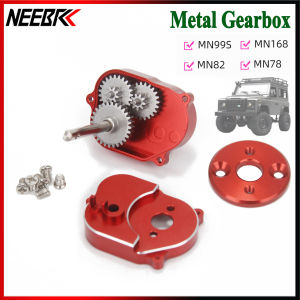
Full Metal Transmission Gearbox for 1/12 RC Car Crawler MN Model 370 Motor MN82 MN78 MN99S MN168 MN98 Upgrade Accessories Parts

Creative Reverse Double Sided Water Blaster Prank Toy Summer Beach Water Fight Toy for Kids
Kayou | 500/1000/1200/2000PCS White Dog Starry Night Animal Puzzle Creative Puzzle Jigsaw Birthday Gifts Home Decor Educational Toys

Bandai | 2026 Death Note Comic Handmade 15-19cm Death God Liukrem Standing Character Handmade PVC Model Anime Toy Ornament

LABAICAI Exquisite Birthdays Kids Party Supplies Magic Toy Multi-purpose Children Gifts Holiday Favors Plastic Magical Wand Props Christmas Tree Glow Stick Xmas Home Decor Light-Up Wand

GLOBECART Craft Dollhouse Furniture Mini Ornament Wood Painting Easel Small Blackboard Dollhouse Accessories Miniature Chalkboard Model

MAOMEI 24 Types Hand Puppets For Animal Cartoon Animal Plush Toy Adorable Hand Puppets Plaything Toys Educational Animals Hand Finger Puppet Teaching