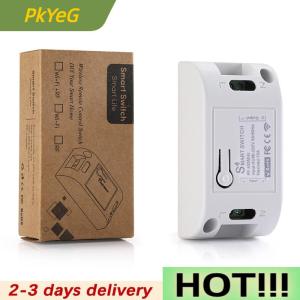
PkYeG New Smart Switch DIY Wireless Switch Control Smart Home Automation
New Smart Switch DIY Wireless Switch Control Smart Home AutomationDescription:Working voltage: 90—250VWorking frequency: 50-60HzWorking temperature: -20—60℃Total load power: 2000wSpecifications:1. Turn ordinary non-smart appliances or equipment into smart;2. Group control. The lights can be grouped to achieve unified control (simultaneous switching, timing, etc.)InstructionsSelf-locking mode pair code description(The same button, press one-time to turn on, then press--down to turn off. This mode is suitable for 1 remote control to control 1 receiver)Setting method: Press the pairing button on the receiver twice, the LED flashes once and then lights up; press the button on the remote control that needs to be paired, when the LEDThe indicator light will flash 3 times and then turn off, the self-locking mode is successfully set.Interlock Mode Pairing Instructions(settings - one button can only be turned on, another - - a button can only be turned off. Requires a remote control with at least two buttons. This mode is suitable for - -The remote controls multiple receivers. )Setting method: Press the code pairing button on the receiver 3 times, then the LED flashes once and then lights up; press the button that needs to be set as the open function on the remote controlIf button A) after the receiver indicator flashes, continue to press the button on the remote control that needs to be set to be off (eg button B) the receiver indicatorBlinking, the interlock mode is set successfully.Jog mode code matching instructions(Same key, hold to open, release to close.)Setting method: Press the pairing button on the receiver once, the LED flashes once and then lights up; press the button on the remote control that needs to be paired, when the LED flashes onceThe indicator light will flash 3 times and then turn off, the self-locking mode is successfully set.reset settingsAfter pressing the receiver's learn button 8 times, the receiver clears all remote control data in its memory. When the receiver's LED blinks 8 times in a rowafter the reset is completed. If it has been set to the power-on state, it will also be reset to the power-on and power-off state.Power-on setting method (applicable to control lights with manual switch): Factory default power-on and power-off. Press 6 times to learn on the receiverPress the button, the indicator light flashes 3 times. The power-on and power-on settings are successful.Package Included:Switch Modulex1

PkYeG Tool Store
Review

You May Also Like

BroadLink | Original Broadlink RM4 Pro IR RF WIFI Universal Remote Control RM4Pro HTS2 Sensor Smart Home Work With Alexa Google Home

Aolon GT6 Pro Smartwatch Compass Heart Rate Monitor Bluetooth Call Water-Resistant 1.51" AMOLED Sports Smartwatch for Men and Women

S16 Ultra 2.29inch Amoled 5G LTE Full Netcom Android 13.0 Smartwatch Smart Watch With 190° Rotary Camera Touch ID function

Smartwatch Mens Watch Business Watch Sporty Casual Watch 1.52 Inch Screen Features Multiple Sports ModesMusic Control Perfect
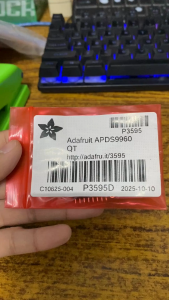
Adafruit APDS9960 Proximity Light RGB and Gesture Sensor - STEMMA QT / Qwiic

2026New Ultra-Slim SmartWatch Women Men High Precision Health Monitoring Sport Mode Bluetooth Call Curved Design Smart Watch

YHE | High Precision Blood Pressure Watch with Blood Oxygen Detection and Health Monitoring for Elderly
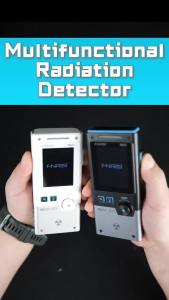
Fnirsi | FNIRSI GC-03 NR+EF+MF Detection Tool 3-in-1 Environment Detector RF Power Temperature Monitor

2026 NEW Smart Power Electricity Energy Saving Box Household Electric Saver Device High Efficiency Stable Voltage Energy Saving Box for Home and Office

GUHUAVMI | WiFi Camera Smart Glasses 1080P Video Photo AI Voice Control HD Calling Music Playback Wear Detection TR90 Frame IP65 Outdoor

Mini Tuya SmartLife Wifi LED Controller DC12V-24V COB 5050 Single Color LED Strip Dimmer Switch Work with Alexa Google Assistant