



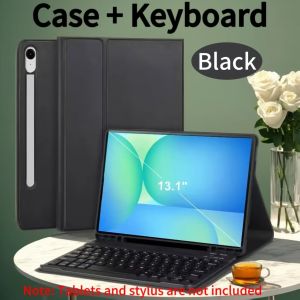
Case for Samsung Galaxy Tab S10 FE Plus 13.1 Inch SM-X620/626B for Samsung Tab S10 FE+ 13.1 Detachable Bluetooth Keyboard Cover
Please confirm your machine model before purchasing~For Samsung Galaxy Tab S10 FE Plus 13.1 Inch (SM-X620/X626B) Tablet.Please notePlease confirm each combination of the product before purchasing. Note the first basic image of each color version, which will most accurately reflect the color combination of the product. Please confirm the keyboard language before purchasing, we will deliver the goods to you according to the color combination you have selectedPlease noteEnglish keyboard:There are only English letters on the keyboard.Multilingual version keyboard:English letters and engraved language letters together.Note:The digital tablet and stylus are not included in the package. The detailed description is for reference only. Please refer to the actual product for the color of the product.Office learning business fashionComfortable solution to your office, study and entertainment needs.Honeycomb back design, great heat dissipation effectMagnetdesignMagnetdesign -Verhindern Sie, dass die Tastatur herunterfalltAbnehmbare Bluetooth-Tastatur - kann die Tastatur leicht entfernenAutomatischer Schlaf-/Wake-Energy-ErhaltungTriangular stable design Stable support, anti-slip protectionHigh-quality materialDirty resistant and anti-fingerprintBacklit keyboardSwitch cool lights at willHow to connect keyboard & Mouse?1,Connect the mouse first, then connect the keyboard.2,Mouse:Push the switch to the "Bluetooth" icon, find the Bluetooth connection with "Mouse" in the device Bluetooth list.3,Normal Keyboard:Push the switch in the upper right corner to "ON", press "Connect", and find the Bluetooth connection with "Keyboard" in the device Bluetooth list.4,Touchpad Keyboard:turn on keyboard ,press Fn+C to,then find the Bluetooth connection with "Keyboard" in the device Bluetooth list.Non-touch keyboard Bluetooth connection stepsTouch keyboard Bluetooth connection stepsFAQQ:What should I pay attention to when connecting the mouse for the first time?A:When the mouse is connected for the first time, you need to press the left button, the right button and the scroll wheel at the same time for about 3-5 seconds.Q: Is the scroll direction of the mouse USB connector and Bluetooth connection the same?A: No, they are different. When using the USB connector, the scroll wheel slides in the same direction as the computer mouse. Bluetooth connection is the opposite.Q: How to switch between different systems?A: Fn+Q=Android, Fn+W=Windows, Fn+E=IOS.Please note that please switch the system before connecting the tablet.Q:The bluetooth keyboard letters are messy?A: Please check the settings according to the prompts,a. Check whether the keyboard language set on the device is English.b. Disconnect the keyboard Bluetooth, click Ignore the connected device, reopen the Bluetooth keyboard, select system, Fn+E (IOS system).Note: Fn+Q=Android, Fn+W=Windows, Fn+E=IOSc. Press the L S Z buttons at the same time to reset the keyboardQ:How to configure the input method for different languages keyboard?A:Take the samsung tablet as example,open "Settings--"ystem"--"Language & input"--"Add New Keyboard". (For other systems, please set them in the system settings according to the tips of the iPad example.)Q:How does the mouse change teh scroll wheel sliding direction on the device?A: The mouse is connected, open "General" - "Trackpad & Mouse" - close "Natural Scrolling".

GlobalLifestyle
You May Also Like

Xundd [ORIGINAL] Beatle Clear Hybrid Shock Proof Armor Case for Oppo Find X9 Ultra

PBZZ Case for OPPO A52 A92 4G A74 A73 A93S A54 5G phone casing Softcase Silicone shockproof Cover new design aesthetic cute Burgundy with holder for women KNXCDZJ2
PRO CAM SILICON CASE IPHONE 11 14 PRO 13 12 XR XS MAX
Professional Diving Phone Case For iPhone 17 16 15 14 Pro Max Underwater Taking Waterproof Cases Cover For SamsungS22 S23 Huawei
New For Macbook Pro Retina 13" A1989 821-01699-A Keyboard Flex Cable 2018 2019 Year
ASUS A Bean 14 X403F I403FAC ADOL14FA S403F X403JA Notebook Keyboard

MDK Original Gas Oven Ignition Controller For DKL-01 AC220 12KV Oven Accessories 12V
Head Band for Marshall Major 1 2 3 Headband Cover Wired Wireless Headphone Cushion Pad Repair Replacement Cover Replacement Headband Cushion Pad Cover Head Band Protector for Marshall Major I/ Major III
MAJESTICX Plastic Watch Charging Stand Desktop Placement Cable Storage Desktop Holder Stable Anti Slip Pad Smart Watch Dock Universal

10-30Pcs NFC/Ntag 215 Card White NFC Tags PVC Compatible with Amiibo and Tagmo

FLORI Multifunction Three Tap Faucet Dual Control Double Outlet Diverter Tap Flushing Spray Angle Valve Bathroom