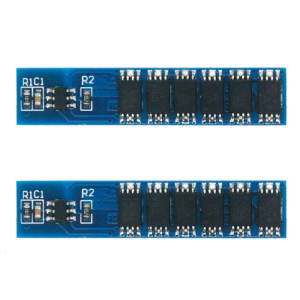
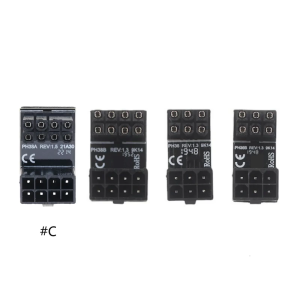
[COD] Bsuimki 1Set CA-901 LCD TV Switching Power Supply DC Sampling Power Module Chip

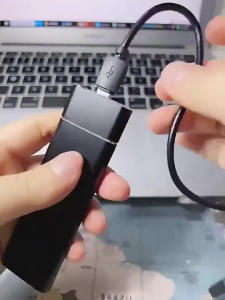
New and high quality. Cabe length: about11cm. Input: 12V24V optional output. High performance, low power consumption, small size and easy installation. Package Included: 1Set. Note: 1. Due to manual measurement, please allow an error of 1-3mm. 2. As different computers display different colors, thank you for your understanding, the actual product color may be slightly different from the image. New and high quality. Cabe length: about11cm. Input: 12V24V optional output. High performance, low power consumption, small size and easy installation. Package Included: 1Set. Note: 1. Due to manual measurement, please allow an error of 1-3mm. 2. As different computers display different colors, thank you for your understanding, the actual product color may be slightly different from the image

Bsuimki

Bsuimki

Seller ratings 94%

Review

Oops
This video has no reviews.

You May Also Like

Laptop Security Anchor Mount Hole Locking Plate Base For Computer Anti Theft Device
00:26

Laptop Security Anchor Mount Hole Locking Plate Base For Computer Anti Theft Device

JEYI M.2 NVMe to PCIe 4.0 x16 Adapter: High-Speed Storage Solution
00:56

JEYI M.2 NVMe to PCIe 4.0 x16 Adapter: High-Speed Storage Solution

MultiDevice Hdmis to Mini/Micros Hdmis Adapter Gold Plate Port No Driver Required for Digital Frame Gaming Consoles
00:12

MultiDevice Hdmis to Mini/Micros Hdmis Adapter Gold Plate Port No Driver Required for Digital Frame Gaming Consoles

DC12V Access Control Power Supply Ture 5A 3A Output AC110V-240V Input Power Source Supplier Adapter for Video Intercom System
00:07

DC12V Access Control Power Supply Ture 5A 3A Output AC110V-240V Input Power Source Supplier Adapter for Video Intercom System

AHXJKA 15.6 inch Portable Touch Monitor Gaming Laptop Extension Display aluminum alloy Mini HDMI For PS/Steam/Deck/Switch/PC/Mac
01:02

AHXJKA 15.6 inch Portable Touch Monitor Gaming Laptop Extension Display aluminum alloy Mini HDMI For PS/Steam/Deck/Switch/PC/Mac

AM1011A Analog Temperature Humidity Sensors Module Capacitive Measurement With Signal Output for Microcontrollers
00:14

AM1011A Analog Temperature Humidity Sensors Module Capacitive Measurement With Signal Output for Microcontrollers

16CH 5 IN 1 Modbus Rtu Digital IO Module RS485 NPN DI-DO Pin Cores Board Switching Output Remote IO Board
00:20

16CH 5 IN 1 Modbus Rtu Digital IO Module RS485 NPN DI-DO Pin Cores Board Switching Output Remote IO Board

【Brand New】Western Digital SATA III Internal Solid State Drive 120GB/240GB/480GB/960GB SSD For Notebook and Desktop
00:37

【Brand New】Western Digital SATA III Internal Solid State Drive 120GB/240GB/480GB/960GB SSD For Notebook and Desktop

High Fidelitys 90° Type C to 3.5mm Female Sound Adapter Cable for Smartphones
00:18

High Fidelitys 90° Type C to 3.5mm Female Sound Adapter Cable for Smartphones

PG Card - MCTC-PG-E 02010102 VER:C 1229
00:15

PG Card - MCTC-PG-E 02010102 VER:C 1229

KAMPEON Gaming Monitor for PC: 24 Inch Curved & 27 Inch Laptop Monitor Review\\n\\n What is the KAMPEON Gaming Monitor?\\n\\nThe KAMPEON Gaming Monitor is a high-performance computer monitor designed specifically for gaming enthusiasts. It comes in two sizes: a 24-inch curved gaming monitor and a 27-inch laptop monitor, both offering impressive features and specifications.\\n\\n Key Features & Specifications\\n\\nBoth models feature stunning 4K resolution and fast refresh rates, with the 24-inch model offering 144Hz and the 27-inch model providing 165Hz. This ensures smooth gameplay and seamless visuals for any gamer. Additionally, the curved design of the 24-inch model enhances immersion and reduces eye strain during extended gaming sessions.\\n\\n How Does It Compare to Other Monitors?\\n\\nCompared to other monitors on the market, the KAMPEON Gaming Monitor stands out due to its combination of high resolution, fast refresh rates, and curved design. It offers superior performance and visual quality, making it an excellent choice for serious gamers.\\n\\n How to Choose the Right KAMPEON Gaming Monitor\\n\\nWhen selecting the right KAMPEON Gaming Monitor, consider the following factors:\\n\\n Curved vs. Flat Display\\n\\nThe 24-inch model features a curved display, which provides a more immersive gaming experience and reduces eye strain. On the other hand, the 27-inch model has a flat display, offering a larger screen area for multitasking and productivity tasks alongside gaming.\\n\\n 24 Inch & 27 Inch Options\\n\\nBoth models come in two sizes, catering to different preferences and needs. The 24-inch monitor is ideal for those who prioritize immersion and eye comfort, while the 27-inch model offers a larger screen area for multitasking and productivity tasks alongside gaming.\\n\\n 144Hz & 165Hz Refresh Rates\\n\\nThe refresh rate determines how many frames per second the monitor can display. The 24-inch model features a 144Hz refresh rate, while the 27-inch model boasts a 165Hz refresh rate. Higher refresh rates result in smoother gameplay and more responsive visuals, enhancing the overall gaming experience.\\n\\n Setting Up Your KAMPEON Gaming Monitor\\n\\nSetting up your KAMPEON Gaming Monitor is straightforward and easy. Follow these steps:\\n\\n Connecting Your Monitor\\n\\nConnect your monitor to your PC using the included HDMI or DisplayPort cables. Make sure to select the correct input source on your monitor and adjust the resolution and refresh rate settings in your PC's display settings.\\n\\n Adjusting Display Settings\\n\\nOnce connected, adjust the display settings on your monitor to optimize its performance. You can customize brightness, contrast, color temperature, and other settings to suit your preferences and gaming needs.\\n\\n Optimizing Performance for Gaming\\n\\nTo get the most out of your KAMPEON Gaming Monitor, ensure that your PC meets the minimum system requirements for the selected refresh rate. This includes having a powerful graphics card and sufficient RAM. Additionally, consider enabling adaptive sync technologies like FreeSync or G-Sync to eliminate screen tearing and stuttering.\\n\\n Enhancing Your Gaming Experience with KAMPEON\\n\\nMaximize your gaming experience by taking advantage of the KAMPEON Gaming Monitor's advanced features:\\n\\n Customizing Visual Settings\\n\\nCustomize your monitor's visual settings to enhance your gaming experience. Experiment with different color profiles, contrast ratios, and sharpness levels to achieve the perfect balance of detail and clarity.\\n\\n Using Advanced Features\\n\\nTake advantage of the KAMPEON Gaming Monitor's advanced features, such as game modes, crosshair overlays, and black stabilizer. These features can help you stay focused, improve accuracy, and enjoy a more immersive gaming experience.\\n\\n Maintaining Optimal Performance\\n\\nTo maintain optimal performance, keep your monitor clean and free from dust. Regularly update your graphics drivers and firmware to ensure compatibility and access to the latest features. Additionally, avoid placing heavy objects on top of your monitor to prevent damage and maintain its longevity.\\n\\nIn conclusion, the KAMPEON Gaming Monitor is an excellent choice for PC gamers looking for high-resolution visuals, fast refresh rates, and advanced features. Whether you prefer a curved or flat display, the 24-inch or 27-inch size, or the 144Hz or 165Hz refresh rate, there's a KAMPEON Gaming Monitor that's perfect for you. So why wait? Upgrade your gaming setup today and experience the ultimate gaming experience with KAMPEON!\"
00:56

KAMPEON Gaming Monitor for PC: 24 Inch Curved & 27 Inch Laptop Monitor Review\\n\\n What is the KAMPEON Gaming Monitor?\\n\\nThe KAMPEON Gaming Monitor is a high-performance computer monitor designed specifically for gaming enthusiasts. It comes in two sizes: a 24-inch curved gaming monitor and a 27-inch laptop monitor, both offering impressive features and specifications.\\n\\n Key Features & Specifications\\n\\nBoth models feature stunning 4K resolution and fast refresh rates, with the 24-inch model offering 144Hz and the 27-inch model providing 165Hz. This ensures smooth gameplay and seamless visuals for any gamer. Additionally, the curved design of the 24-inch model enhances immersion and reduces eye strain during extended gaming sessions.\\n\\n How Does It Compare to Other Monitors?\\n\\nCompared to other monitors on the market, the KAMPEON Gaming Monitor stands out due to its combination of high resolution, fast refresh rates, and curved design. It offers superior performance and visual quality, making it an excellent choice for serious gamers.\\n\\n How to Choose the Right KAMPEON Gaming Monitor\\n\\nWhen selecting the right KAMPEON Gaming Monitor, consider the following factors:\\n\\n Curved vs. Flat Display\\n\\nThe 24-inch model features a curved display, which provides a more immersive gaming experience and reduces eye strain. On the other hand, the 27-inch model has a flat display, offering a larger screen area for multitasking and productivity tasks alongside gaming.\\n\\n 24 Inch & 27 Inch Options\\n\\nBoth models come in two sizes, catering to different preferences and needs. The 24-inch monitor is ideal for those who prioritize immersion and eye comfort, while the 27-inch model offers a larger screen area for multitasking and productivity tasks alongside gaming.\\n\\n 144Hz & 165Hz Refresh Rates\\n\\nThe refresh rate determines how many frames per second the monitor can display. The 24-inch model features a 144Hz refresh rate, while the 27-inch model boasts a 165Hz refresh rate. Higher refresh rates result in smoother gameplay and more responsive visuals, enhancing the overall gaming experience.\\n\\n Setting Up Your KAMPEON Gaming Monitor\\n\\nSetting up your KAMPEON Gaming Monitor is straightforward and easy. Follow these steps:\\n\\n Connecting Your Monitor\\n\\nConnect your monitor to your PC using the included HDMI or DisplayPort cables. Make sure to select the correct input source on your monitor and adjust the resolution and refresh rate settings in your PC's display settings.\\n\\n Adjusting Display Settings\\n\\nOnce connected, adjust the display settings on your monitor to optimize its performance. You can customize brightness, contrast, color temperature, and other settings to suit your preferences and gaming needs.\\n\\n Optimizing Performance for Gaming\\n\\nTo get the most out of your KAMPEON Gaming Monitor, ensure that your PC meets the minimum system requirements for the selected refresh rate. This includes having a powerful graphics card and sufficient RAM. Additionally, consider enabling adaptive sync technologies like FreeSync or G-Sync to eliminate screen tearing and stuttering.\\n\\n Enhancing Your Gaming Experience with KAMPEON\\n\\nMaximize your gaming experience by taking advantage of the KAMPEON Gaming Monitor's advanced features:\\n\\n Customizing Visual Settings\\n\\nCustomize your monitor's visual settings to enhance your gaming experience. Experiment with different color profiles, contrast ratios, and sharpness levels to achieve the perfect balance of detail and clarity.\\n\\n Using Advanced Features\\n\\nTake advantage of the KAMPEON Gaming Monitor's advanced features, such as game modes, crosshair overlays, and black stabilizer. These features can help you stay focused, improve accuracy, and enjoy a more immersive gaming experience.\\n\\n Maintaining Optimal Performance\\n\\nTo maintain optimal performance, keep your monitor clean and free from dust. Regularly update your graphics drivers and firmware to ensure compatibility and access to the latest features. Additionally, avoid placing heavy objects on top of your monitor to prevent damage and maintain its longevity.\\n\\nIn conclusion, the KAMPEON Gaming Monitor is an excellent choice for PC gamers looking for high-resolution visuals, fast refresh rates, and advanced features. Whether you prefer a curved or flat display, the 24-inch or 27-inch size, or the 144Hz or 165Hz refresh rate, there's a KAMPEON Gaming Monitor that's perfect for you. So why wait? Upgrade your gaming setup today and experience the ultimate gaming experience with KAMPEON!\"

14 Inch Laptop LCD Screen For Lenovo ThinkPad X1 Carbon 8th Gen Display Matrix Panel Replacement 1920x1080 2560x1440 3840x2160
00:24

14 Inch Laptop LCD Screen For Lenovo ThinkPad X1 Carbon 8th Gen Display Matrix Panel Replacement 1920x1080 2560x1440 3840x2160