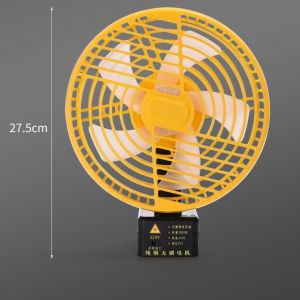
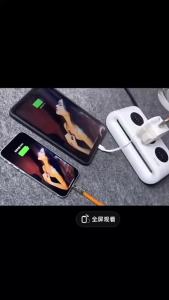
Wireless Portable Battery Fan High Wind Power for Outdoor Camping Fishing Stall Charging Brushless Fan Digital Accessories

Wireless Portable Battery Fan High Wind Power for Outdoor Camping Fishing Stall Charging Brushless Fan Digital Accessories

TB EL SHOP

TB EL SHOP

Seller ratings 95%

Review

Oops
This video has no reviews.

You May Also Like
For Xiaomi Pad 7 Case 11.2 inch Tri-Folding Flip Stand Case Funda For Xiaomi Pad 7 Pro Mi Pad 7 2024 with Auto Sleep Cover
00:39

For Xiaomi Pad 7 Case 11.2 inch Tri-Folding Flip Stand Case Funda For Xiaomi Pad 7 Pro Mi Pad 7 2024 with Auto Sleep Cover

Realme V60 pro Full Screen Tempered Glass Film Protection for Realme Series Phones Anti-Glare Anti-Fingerprint Blue Light Filter
00:10

Realme V60 pro Full Screen Tempered Glass Film Protection for Realme Series Phones Anti-Glare Anti-Fingerprint Blue Light Filter

Vivo S15e Silicone Phone Case Full Cover Anti-Fall Protection for Men And Women Environmentally Friendly And Supports 5G
00:55

Vivo S15e Silicone Phone Case Full Cover Anti-Fall Protection for Men And Women Environmentally Friendly And Supports 5G

4K 200M HDMI KVM Extender Over IP HDMI Ethernet Extender Via Cat6 Cable Support One To One  Many To Many TX RX Via Network Switch for Laptop PC Mouse Keyboard To TV Monitor
00:31

4K 200M HDMI KVM Extender Over IP HDMI Ethernet Extender Via Cat6 Cable Support One To One Many To Many TX RX Via Network Switch for Laptop PC Mouse Keyboard To TV Monitor

Vivo X27 X80 X20Plus X9S X70pro+ X6DL X23 X21iA X100S X21S Wallet Style Flip Cover Phone Case Full Protection Business Retro
00:39

Vivo X27 X80 X20Plus X9S X70pro+ X6DL X23 X21iA X100S X21S Wallet Style Flip Cover Phone Case Full Protection Business Retro

USB Games PC Vibration Handle Wired USB 2.0 Gaming controller Gamepad Joypad Joystick for Computer Laptop Console Gaming Controllers PC Controller
00:24

USB Games PC Vibration Handle Wired USB 2.0 Gaming controller Gamepad Joypad Joystick for Computer Laptop Console Gaming Controllers PC Controller

Mini Power Bank 80000mAh: A Compact & Fast-Charging Portable Charger
00:13

Mini Power Bank 80000mAh: A Compact & Fast-Charging Portable Charger

Matte Silver Iqoo9 Phone Case Anti-fall Silicone Protective Cover for Men And Women New Model Vivo Iqoo9 pro 5G Compatible
00:08

Matte Silver Iqoo9 Phone Case Anti-fall Silicone Protective Cover for Men And Women New Model Vivo Iqoo9 pro 5G Compatible

3-1Pcs Universal Phone Screen Touch Pens for Tablet Cell Phone PC Capacitive Pen for Capacitive Screen Phones Tablets Universal
00:19

3-1Pcs Universal Phone Screen Touch Pens for Tablet Cell Phone PC Capacitive Pen for Capacitive Screen Phones Tablets Universal

[COD] KOQZM KITCHEN 34.4mm 44.4mm 51.4mm 51.5mm Audio Driver Speaker Titanium Film Treble Voice Reel Tweeter
00:20

[COD] KOQZM KITCHEN 34.4mm 44.4mm 51.4mm 51.5mm Audio Driver Speaker Titanium Film Treble Voice Reel Tweeter

Mushroom Patterned Acrylic Phone Case for Apple 17 iPhone 16 pro Max Laser Engraved Matte Anti-Fall Design for Men New Model
00:13

Mushroom Patterned Acrylic Phone Case for Apple 17 iPhone 16 pro Max Laser Engraved Matte Anti-Fall Design for Men New Model

Network Splitter for Ethernet: A Comprehensive Guide\\n\\n Introduction to Network Splitters\\n\\n What is a Network Splitter?\\n\\nA network splitter is a device that allows you to distribute a single Ethernet connection to multiple devices. This is particularly useful if you have limited ports available on your router or switch and want to extend your network coverage. In this comprehensive guide, we will explore the different types of network splitters, how they work, and how to choose the right one for your needs.\\n\\n How Does a Network Splitter Work?\\n\\nNetwork splitters function by taking a single Ethernet connection and splitting it into multiple outputs. This allows you to connect several devices to a single network port, effectively extending your network coverage. There are two main types of network splitters: passive and active. Passive splitters rely solely on the signal strength of the incoming connection, while active splitters amplify the signal to maintain optimal performance across all connected devices.\\n\\n Types of Network Splitters\\n\\nThere are several types of network splitters available, including:\\n\\n- **RJ45 Splitter 1 in 4:** This type of splitter takes a single Ethernet connection and splits it into four outputs, allowing you to connect up to four devices to a single network port.\\n- **Gigabit Ethernet Splitter:** These splitters support speeds up to 1 Gbps, making them ideal for high-speed internet connections and demanding applications such as gaming or video streaming.\\n- **100M 1000M Splitter:** This type of splitter supports both 100 Mbps and 1 Gbps connections, providing flexibility for various network environments.\\n\\n Choosing the Right Network Splitter\\n\\n Key Features to Consider\\n\\nWhen selecting a network splitter, consider the following key features:\\n\\n- **Number of Outputs:** Determine how many devices you want to connect to a single network port.\\n- **Speed:** Choose a splitter that supports the desired speed of your internet connection.\\n- **Compatibility:** Ensure the splitter is compatible with your existing network setup and devices.\\n\\n Differences Between 100M & 1000M Splitter\\n\\nThe main difference between a 100M and a 1000M splitter lies in their supported speeds. A 100M splitter supports connections up to 100 Mbps, while a 1000M splitter supports connections up to 1 Gbps. If you have a high-speed internet connection, a 1000M splitter would be the better choice to ensure optimal performance.\\n\\n Gigabit Ethernet Splitter vs. RJ45 Splitter 1 in 4\\n\\nA Gigabit Ethernet splitter and an RJ45 splitter 1 in 4 differ primarily in their supported speeds and number of outputs. A Gigabit Ethernet splitter supports connections up to 1 Gbps and can have varying numbers of outputs depending on the model. An RJ45 splitter 1 in 4, on the other hand, splits a single Ethernet connection into four outputs and typically supports speeds up to 100 Mbps or 1 Gbps, depending on the model.\\n\\n How to Use a Network Splitter\\n\\n Connecting a Network Splitter to Your PC or Laptop\\n\\nTo connect a network splitter to your PC or laptop, follow these steps:\\n\\n1. Connect one end of an Ethernet cable to the input port of the network splitter.\\n2. Connect the other end of the Ethernet cable to a network port on your router or switch.\\n3. Connect the output ports of the network splitter to your desired devices using Ethernet cables.\\n\\n Setting Up a Network Splitter for Multiple Devices\\n\\nTo set up a network splitter for multiple devices, follow these steps:\\n\\n1. Connect one end of an Ethernet cable to the input port of the network splitter.\\n2. Connect the other end of the Ethernet cable to a network port on your router or switch.\\n3. Connect the output ports of the network splitter to your desired devices using Ethernet cables.\\n\\n Troubleshooting Common Issues with Network Splitters\\n\\nIf you encounter issues with your network splitter, try the following troubleshooting steps:\\n\\n- **Check Connections:** Ensure all Ethernet cables are securely connected to the network splitter and devices.\\n- **Restart Devices:** Restart your router, switch, and connected devices to refresh their network connections.\\n- **Check Network Settings:** Verify that the network settings on your devices are configured correctly.\\n\\n Conclusion\\n\\n Recap of Key Points\\n\\nIn this comprehensive guide, we explored the different types of network splitters, how they work, and how to choose the right one for your needs. We discussed key features to consider when selecting a network splitter, differences between 100M and 1000M splitters, and the distinctions between Gigabit Ethernet splitters and RJ45 splitters 1 in 4. We also provided step-by-step instructions for connecting a network splitter to your PC or laptop, setting up a network splitter for multiple devices, and troubleshooting common issues.\\n\\n Final Thoughts on Network Splitters\\n\\nNetwork splitters are a valuable tool for extending your network coverage and connecting multiple devices to a single network port. By understanding the different types of network splitters and their capabilities, you can choose the right one for your needs and enjoy a seamless networking experience.\n}
00:43

Network Splitter for Ethernet: A Comprehensive Guide\\n\\n Introduction to Network Splitters\\n\\n What is a Network Splitter?\\n\\nA network splitter is a device that allows you to distribute a single Ethernet connection to multiple devices. This is particularly useful if you have limited ports available on your router or switch and want to extend your network coverage. In this comprehensive guide, we will explore the different types of network splitters, how they work, and how to choose the right one for your needs.\\n\\n How Does a Network Splitter Work?\\n\\nNetwork splitters function by taking a single Ethernet connection and splitting it into multiple outputs. This allows you to connect several devices to a single network port, effectively extending your network coverage. There are two main types of network splitters: passive and active. Passive splitters rely solely on the signal strength of the incoming connection, while active splitters amplify the signal to maintain optimal performance across all connected devices.\\n\\n Types of Network Splitters\\n\\nThere are several types of network splitters available, including:\\n\\n- **RJ45 Splitter 1 in 4:** This type of splitter takes a single Ethernet connection and splits it into four outputs, allowing you to connect up to four devices to a single network port.\\n- **Gigabit Ethernet Splitter:** These splitters support speeds up to 1 Gbps, making them ideal for high-speed internet connections and demanding applications such as gaming or video streaming.\\n- **100M 1000M Splitter:** This type of splitter supports both 100 Mbps and 1 Gbps connections, providing flexibility for various network environments.\\n\\n Choosing the Right Network Splitter\\n\\n Key Features to Consider\\n\\nWhen selecting a network splitter, consider the following key features:\\n\\n- **Number of Outputs:** Determine how many devices you want to connect to a single network port.\\n- **Speed:** Choose a splitter that supports the desired speed of your internet connection.\\n- **Compatibility:** Ensure the splitter is compatible with your existing network setup and devices.\\n\\n Differences Between 100M & 1000M Splitter\\n\\nThe main difference between a 100M and a 1000M splitter lies in their supported speeds. A 100M splitter supports connections up to 100 Mbps, while a 1000M splitter supports connections up to 1 Gbps. If you have a high-speed internet connection, a 1000M splitter would be the better choice to ensure optimal performance.\\n\\n Gigabit Ethernet Splitter vs. RJ45 Splitter 1 in 4\\n\\nA Gigabit Ethernet splitter and an RJ45 splitter 1 in 4 differ primarily in their supported speeds and number of outputs. A Gigabit Ethernet splitter supports connections up to 1 Gbps and can have varying numbers of outputs depending on the model. An RJ45 splitter 1 in 4, on the other hand, splits a single Ethernet connection into four outputs and typically supports speeds up to 100 Mbps or 1 Gbps, depending on the model.\\n\\n How to Use a Network Splitter\\n\\n Connecting a Network Splitter to Your PC or Laptop\\n\\nTo connect a network splitter to your PC or laptop, follow these steps:\\n\\n1. Connect one end of an Ethernet cable to the input port of the network splitter.\\n2. Connect the other end of the Ethernet cable to a network port on your router or switch.\\n3. Connect the output ports of the network splitter to your desired devices using Ethernet cables.\\n\\n Setting Up a Network Splitter for Multiple Devices\\n\\nTo set up a network splitter for multiple devices, follow these steps:\\n\\n1. Connect one end of an Ethernet cable to the input port of the network splitter.\\n2. Connect the other end of the Ethernet cable to a network port on your router or switch.\\n3. Connect the output ports of the network splitter to your desired devices using Ethernet cables.\\n\\n Troubleshooting Common Issues with Network Splitters\\n\\nIf you encounter issues with your network splitter, try the following troubleshooting steps:\\n\\n- **Check Connections:** Ensure all Ethernet cables are securely connected to the network splitter and devices.\\n- **Restart Devices:** Restart your router, switch, and connected devices to refresh their network connections.\\n- **Check Network Settings:** Verify that the network settings on your devices are configured correctly.\\n\\n Conclusion\\n\\n Recap of Key Points\\n\\nIn this comprehensive guide, we explored the different types of network splitters, how they work, and how to choose the right one for your needs. We discussed key features to consider when selecting a network splitter, differences between 100M and 1000M splitters, and the distinctions between Gigabit Ethernet splitters and RJ45 splitters 1 in 4. We also provided step-by-step instructions for connecting a network splitter to your PC or laptop, setting up a network splitter for multiple devices, and troubleshooting common issues.\\n\\n Final Thoughts on Network Splitters\\n\\nNetwork splitters are a valuable tool for extending your network coverage and connecting multiple devices to a single network port. By understanding the different types of network splitters and their capabilities, you can choose the right one for your needs and enjoy a seamless networking experience.\n}