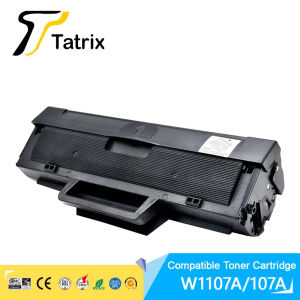
W1107A toner 107a W1107A Premium Compatible Black Toner Cartridge for HP 107a 107w MFP 135a 135w 137fnw

High-concerned chemical None. Compatible Brand HP Laserjet. Model Number W1107A. Bulk Packaging Yes. Cartridge's Status Full. Type Toner Cartridge. Product name: W1107A/107A. Compatible Yes. Color Black. Page Yield: 1500 pages. Package Package. For Canon Yes. Type: Toner Cartridge. Chip: With chip 100 compatible. W1107A toner 107a W1107A Premium Compatible Laser Black Toner Cartridge for HP Laser 107a107w MFP 135a135w137fnw. Advantage: 1. Toner powder: High quality toner powder, good to save your files. 2. Drum: Permanentopc drum. 3. Chip: 100%compatible. 4. Yield page: Sufficienttoner volume make surethe yield page is the same as the original. 5. Easy to operate: Our toner cartridges areincluded instructionsand isvery easy to install. 6. Premium Quality Guaranteed: 100 Guarantee, 1:1 replacement or refund for any defective goods

InkMall
InkMall

Seller ratings 97%

Review

Oops
This video has no reviews.

You May Also Like

AOS Compatible Drum Unit MK4105 MK-4105 MK 4105 Maintenance Kit for Kyocera
00:12

AOS Compatible Drum Unit MK4105 MK-4105 MK 4105 Maintenance Kit for Kyocera

HP Original Ink GT53/51 Black GT52 CMY Set Of 4units Ink Bottle For GT5810 / GT5820 Tank 315 / 415  / 515
01:00

HP Original Ink GT53/51 Black GT52 CMY Set Of 4units Ink Bottle For GT5810 / GT5820 Tank 315 / 415 / 515

Magic photo 1 Liter CUYI Cleaning Solution for Eco-Solvent Ink
00:52

Magic photo 1 Liter CUYI Cleaning Solution for Eco-Solvent Ink

Metal Textured Bed Plate Cold Plate Strong Adhesion Double Sided Epoxy Coated For H2D 3D Printer Accessories
00:12

Metal Textured Bed Plate Cold Plate Strong Adhesion Double Sided Epoxy Coated For H2D 3D Printer Accessories

Original and sealed Brother Ink Cartridge LC563 For MFC-J2310 / MFC-J2510 / MFC-J3520 / MFC-J3720
00:55

Original and sealed Brother Ink Cartridge LC563 For MFC-J2310 / MFC-J2510 / MFC-J3520 / MFC-J3720

EPSON 664 INK GENUINE 100% ORIGINAL (L360 L3110 L200 L565 L220 L130)\\n\\n Understanding EPSON 664 INK GENUINE\\n\\n What is EPSON 664 INK GENUINE?\\n\\nEPSON 664 INK GENUINE is a high-quality ink cartridge specifically designed for EPSON printers such as L360, L3110, L200, L565, L220, and L130. This ink cartridge guarantees optimal performance and print quality, ensuring your documents and photos look their best.\\n\\n Benefits of using 100% ORIGINAL EPSON INK\\n\\nUsing 100% original EPSON ink provides numerous benefits, including:\\n\\n- **Superior Print Quality**: Original EPSON ink cartridges produce vibrant colors and sharp text, making your prints stand out.\\n- **Reliability**: Genuine EPSON ink cartridges are tested and optimized for EPSON printers, reducing the risk of print errors and ensuring consistent performance.\\n- **Durability**: Original EPSON ink cartridges have a longer lifespan compared to compatible alternatives, providing cost savings over time.\\n\\n Compatible Ink for EPSON Printers\\n\\n Advantages of using compatible ink cartridges\\n\\nWhile original EPSON ink cartridges offer superior print quality and reliability, compatible ink cartridges can be a cost-effective alternative. Some advantages of using compatible ink cartridges include:\\n\\n- **Cost Savings**: Compatible ink cartridges often come at a lower price point, allowing you to save money on printing costs.\\n- **Wide Availability**: Compatible ink cartridges are readily available from various manufacturers, providing more options for consumers.\\n\\n How to choose the right compatible ink for your printer\\n\\nWhen selecting a compatible ink cartridge for your EPSON printer, consider the following factors:\\n\\n- **Compatibility**: Ensure the compatible ink cartridge is specifically designed for your printer model.\\n- **Quality**: Look for reputable manufacturers that prioritize quality and reliability.\\n- **Price**: Compare prices from different manufacturers to find the best value for your budget.\\n\\n Installing EPSON 664 INK GENUINE\\n\\n Step-by-step guide to installing genuine EPSON ink cartridges\\n\\nFollow these steps to install EPSON 664 INK GENUINE in your printer:\\n\\n1. Turn off your printer and open the ink cartridge access door.\\n2. Remove the old ink cartridge by gently pulling it out of its slot.\\n3. Carefully remove the new EPSON 664 INK GENUINE from its packaging.\\n4. Insert the new ink cartridge into its designated slot and close the ink cartridge access door.\\n5. Turn on your printer and allow it to initialize.\\n\\n Troubleshooting common ink installation issues\\n\\nIf you encounter any issues during the ink cartridge installation process, refer to the following troubleshooting tips:\\n\\n- **Print Quality Issues**: If your prints appear faded or blurry, try cleaning the print head or replacing the ink cartridge.\\n- **Ink Cartridge Not Detected**: Ensure the ink cartridge is properly inserted and the ink cartridge access door is closed.\\n\\n Maximizing Printer Performance\\n\\n Best practices for maintaining optimal printer performance\\n\\nTo keep your EPSON printer running smoothly, follow these best practices:\\n\\n- **Regular Maintenance**: Clean the print head and replace the ink cartridges regularly to maintain optimal print quality.\\n- **Proper Storage**: Store ink cartridges in a cool, dry place away from direct sunlight to prevent drying out.\\n- **Software Updates**: Keep your printer software up-to-date to ensure compatibility with the latest ink cartridges and features.\\n\\n Tips for extending the lifespan of your ink cartridges\\n\\nTo extend the lifespan of your EPSON 664 INK GENUINE, consider the following tips:\\n\\n- **Use the Right Paper**: Using high-quality paper can help prevent ink smudging and bleeding, reducing the amount of ink used.\\n- **Print in Draft Mode**: Printing in draft mode can reduce ink usage, extending the lifespan of your ink cartridges.\\n- **Store Ink Cartridges Properly**: Storing ink cartridges in a cool, dry place can help prevent drying out and extend their lifespan.\"
00:28

EPSON 664 INK GENUINE 100% ORIGINAL (L360 L3110 L200 L565 L220 L130)\\n\\n Understanding EPSON 664 INK GENUINE\\n\\n What is EPSON 664 INK GENUINE?\\n\\nEPSON 664 INK GENUINE is a high-quality ink cartridge specifically designed for EPSON printers such as L360, L3110, L200, L565, L220, and L130. This ink cartridge guarantees optimal performance and print quality, ensuring your documents and photos look their best.\\n\\n Benefits of using 100% ORIGINAL EPSON INK\\n\\nUsing 100% original EPSON ink provides numerous benefits, including:\\n\\n- **Superior Print Quality**: Original EPSON ink cartridges produce vibrant colors and sharp text, making your prints stand out.\\n- **Reliability**: Genuine EPSON ink cartridges are tested and optimized for EPSON printers, reducing the risk of print errors and ensuring consistent performance.\\n- **Durability**: Original EPSON ink cartridges have a longer lifespan compared to compatible alternatives, providing cost savings over time.\\n\\n Compatible Ink for EPSON Printers\\n\\n Advantages of using compatible ink cartridges\\n\\nWhile original EPSON ink cartridges offer superior print quality and reliability, compatible ink cartridges can be a cost-effective alternative. Some advantages of using compatible ink cartridges include:\\n\\n- **Cost Savings**: Compatible ink cartridges often come at a lower price point, allowing you to save money on printing costs.\\n- **Wide Availability**: Compatible ink cartridges are readily available from various manufacturers, providing more options for consumers.\\n\\n How to choose the right compatible ink for your printer\\n\\nWhen selecting a compatible ink cartridge for your EPSON printer, consider the following factors:\\n\\n- **Compatibility**: Ensure the compatible ink cartridge is specifically designed for your printer model.\\n- **Quality**: Look for reputable manufacturers that prioritize quality and reliability.\\n- **Price**: Compare prices from different manufacturers to find the best value for your budget.\\n\\n Installing EPSON 664 INK GENUINE\\n\\n Step-by-step guide to installing genuine EPSON ink cartridges\\n\\nFollow these steps to install EPSON 664 INK GENUINE in your printer:\\n\\n1. Turn off your printer and open the ink cartridge access door.\\n2. Remove the old ink cartridge by gently pulling it out of its slot.\\n3. Carefully remove the new EPSON 664 INK GENUINE from its packaging.\\n4. Insert the new ink cartridge into its designated slot and close the ink cartridge access door.\\n5. Turn on your printer and allow it to initialize.\\n\\n Troubleshooting common ink installation issues\\n\\nIf you encounter any issues during the ink cartridge installation process, refer to the following troubleshooting tips:\\n\\n- **Print Quality Issues**: If your prints appear faded or blurry, try cleaning the print head or replacing the ink cartridge.\\n- **Ink Cartridge Not Detected**: Ensure the ink cartridge is properly inserted and the ink cartridge access door is closed.\\n\\n Maximizing Printer Performance\\n\\n Best practices for maintaining optimal printer performance\\n\\nTo keep your EPSON printer running smoothly, follow these best practices:\\n\\n- **Regular Maintenance**: Clean the print head and replace the ink cartridges regularly to maintain optimal print quality.\\n- **Proper Storage**: Store ink cartridges in a cool, dry place away from direct sunlight to prevent drying out.\\n- **Software Updates**: Keep your printer software up-to-date to ensure compatibility with the latest ink cartridges and features.\\n\\n Tips for extending the lifespan of your ink cartridges\\n\\nTo extend the lifespan of your EPSON 664 INK GENUINE, consider the following tips:\\n\\n- **Use the Right Paper**: Using high-quality paper can help prevent ink smudging and bleeding, reducing the amount of ink used.\\n- **Print in Draft Mode**: Printing in draft mode can reduce ink usage, extending the lifespan of your ink cartridges.\\n- **Store Ink Cartridges Properly**: Storing ink cartridges in a cool, dry place can help prevent drying out and extend their lifespan.\"

Genuine Original Ink 673 Black Colored for L805/L850
00:14

Genuine Original Ink 673 Black Colored for L805/L850

Mini Label Printer Marklife P50 Portable Thermal Printer Self Adheisve Sticker Machine Bluetooth Wireless Label Maker No Ink
00:11

Mini Label Printer Marklife P50 Portable Thermal Printer Self Adheisve Sticker Machine Bluetooth Wireless Label Maker No Ink

PVC White Card Card Printer Fudan ICID Access Control Card Adhesive Nano SIM Magnetic Stripe UID Smart Card Printing Customization
00:28

PVC White Card Card Printer Fudan ICID Access Control Card Adhesive Nano SIM Magnetic Stripe UID Smart Card Printing Customization

Bluetooth Auto-Cutter USB Ethernet Receipt POS Printer: A Comprehensive Guide
00:56

Bluetooth Auto-Cutter USB Ethernet Receipt POS Printer: A Comprehensive Guide

Eyoyo 1D Back Clip Bluetooth Barcode Scanner Work with Phone Portable Barcode Reader with Bluetooth Function Compatible with Android IOS System 1D Barcode Scanning
03:43

Eyoyo 1D Back Clip Bluetooth Barcode Scanner Work with Phone Portable Barcode Reader with Bluetooth Function Compatible with Android IOS System 1D Barcode Scanning

TN221 Toner Cartridge Compatible with Develop Ineo ineo+ 227 287 281 Konica Bizhub C287 C287e C227e
00:35

TN221 Toner Cartridge Compatible with Develop Ineo ineo+ 227 287 281 Konica Bizhub C287 C287e C227e