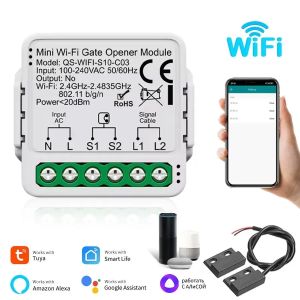
Tuya WiFi ZigBee Smart Garage Door Opener Switch Alexa Google Assistant Alice Smart Life APP Remote Control Gate Opener Module

Tuya WiFi ZigBee Smart Garage Door Opener Switch Alexa Google Assistant Alice Smart Life APP Remote Control Gate Opener Module

GlobalTechMart
Seller ratings 97%
Review

Oops
This video has no reviews.
You May Also Like
00:12
Protector Shell Screen Protector with Tempered Glass for Solar Lite Wristwatch Cover Smartwatch Housing Hard PC Case

00:45
COOSPO H9Z Chest Heart Rate Monitor Strap Bluetooth 4.0 ANT+ HRM Sensor Waterproof For Garmin Wahoo Bike Computer

00:29
Men Smart Watch AMOLED Screen Wireless Call All-day Heart Rate Monitoring Smartwatch 100+ Sports Modes Waterproof Fitness Clock

00:45
New Outdoor Military Smart Watch Men Bluetooth Call HD Screen Heart Rate Blood OXygen Health Monitor Sports Fitness Smartwatches

00:55
Love Care S5 Elderly Positioning Watch Phone Dementia Elderly Anti-Loss Alarm Device GPS Watch Mobile Phone Smart Bracelet SOS

00:32
GRV Smartwatch compatible with iOS and Android Mobile Phone ( Answer / Make a Phone Call ) Womens watch IP68 Waterproof Smart Watch Fitness Tracker Watch with / Sleep Monitor Step Counter Calorie Counter ( Pink )

01:03
Tuya WiFi Smart Touch Switch EU Two Wiring Methods LED 1/2/3Gang Wall Light Switches Smart Life Home Via Alexa Google Home

00:18
New Bluetooth Call Smart Watches 1.39” Inch Custom Dials Sport Watch 6 Heart Rate Health Monitor Smartwatch For Men Woman 2025

00:49
High-Survival Waterproof Dog GPS Locator with Leash Anti-Lost Tag Customizable Text Tracking No Charging Required

00:28
JBMBHC & KEBETEME 433Mhz Electric Cloning Remote Control: A Comprehensive Guide

01:33
32GB+256GB H19 Smart Watch 4G LTE Full Netcom Android Smartwatch 900W Rotating Camera GPS WIFI Google Play Store Download Apps\\n\\nThe 32GB+256GB H19 Smart Watch is a revolutionary piece of wearable technology, offering users a powerful combination of features that cater to both their personal and professional needs. With its robust 4G LTE connectivity, Full Netcom & GPS functionality, and 900W rotating camera, this smartwatch is a must-have for those looking to stay connected and capture life's moments on-the-go.\\n\\n Key Features & Benefits\\n\\n 4G LTE Connectivity\\n\\nOne of the standout features of the H19 Smart Watch is its 4G LTE connectivity, allowing users to make calls, send messages, and access the internet without the need for a smartphone. This feature is perfect for individuals who want to stay connected while on the go, whether they're commuting, traveling, or working remotely.\\n\\n Full Netcom & GPS Functionality\\n\\nThe H19 Smart Watch comes equipped with Full Netcom & GPS functionality, providing users with accurate location tracking and seamless voice communication. This feature is ideal for fitness enthusiasts, outdoor adventurers, and anyone who wants to stay connected and track their movements during physical activities.\\n\\n 900W Rotating Camera\\n\\nAnother impressive feature of the H19 Smart Watch is its 900W rotating camera, which allows users to capture stunning photos and videos from various angles. This feature is perfect for photographers, vloggers, and anyone who wants to document their experiences in a unique way.\\n\\n How to Set Up Your New Smartwatch\\n\\n Connecting to Wi-Fi & Google Play Store\\n\\nTo get started with your new H19 Smart Watch, you'll first need to connect it to Wi-Fi and download the necessary apps from the Google Play Store. Follow these steps:\\n\\n1. Power on your smartwatch and navigate to the Wi-Fi settings.\\n2. Select your Wi-Fi network and enter the password.\\n3. Once connected, open the Google Play Store app and download the desired apps.\\n\\n Setting Up 4G LTE & Downloading Apps\\n\\nIf you plan to use your H19 Smart Watch for 4G LTE connectivity, you'll need to set up a SIM card and download the necessary apps. Follow these steps:\\n\\n1. Insert a compatible SIM card into the smartwatch.\\n2. Open the Google Play Store app and download the desired apps.\\n\\n Configuring GPS & Camera Settings\\n\\nTo get the most out of your H19 Smart Watch's GPS and camera features, it's important to configure the settings properly. Follow these steps:\\n\\n1. Navigate to the GPS settings and enable location tracking.\\n2. Adjust the camera settings according to your preferences, such as resolution, frame rate, and exposure.\\n\\n Tips for Optimal Performance\\n\\n Battery Life & Charging\\n\\nTo ensure optimal battery life and performance, it's essential to charge your H19 Smart Watch regularly. Follow these tips:\\n\\n* Charge your smartwatch overnight to ensure a full battery before using it the next day.\\n* Disable unnecessary features and apps to conserve battery life.\\n* Keep your smartwatch software updated to improve battery efficiency.\\n\\n Syncing Data & Backups\\n\\nTo keep your H19 Smart Watch data safe and up-to-date, it's important to sync and back up your data regularly. Follow these steps:\\n\\n* Connect your smartwatch to Wi-Fi and sync your data with your smartphone or computer.\\n* Set up automatic backups to ensure your data is always safe and secure.\\n\\n Troubleshooting Common Issues\\n\\nIf you experience any issues with your H19 Smart Watch, here are some troubleshooting tips:\\n\\n* Restart your smartwatch by holding down the power button.\\n* Check for software updates and install them if available.\\n* Contact customer support for further assistance.\"

00:19
GTX5030 Easy Installation Underground Metal Detector High Sensitivity Jewelry Treasure Gold Metal Detecting Metal Finder
Hot Search
Ebernon Low Shoes Whitemap of manilaElectric Grinder Philippineslaptop backpack for 13 inchMen Bags with Side Pocketelegant cocktail dress womensoft shell luggagehiersoen tshirtcrptopcommon rail pressure sensor 6uz1skirt beach outfitnew balance running shorts menmulti rice cockersmarthwatch original