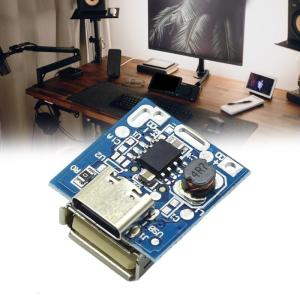
Pack of 10pcs 5V Step Up Board for Lithium Charging Protections with Build-in Intelligent Temperature Control

It is a single-chip solution designing specifically for mobile power adapter, integrating charging management module, discharging management module, power detection and LED indicator module, and protections module. Build in charging and discharging power MOS, can set charging current, charging current and discharging current is both 1Amp. It integrates almost all safety protections functions such as constant temperature charging modes, over temperature protections, over charge and over discharge protections, output overvoltage protections, output over load protections, and output shortcircuit protections. Pack of 10pcs 5V Step Up Board for Lithium Charging Protections with Build-in Intelligent Temperature Control Features: It is a single-chip solution designing specifically for mobile power adapter, integrating charging management module, discharging management module, power detection and LED indicator module, and protections module. Build in charging and discharging power MOS, can set

Top Trendz1
Top Trendz1

Seller ratings 95%

Review

Oops
This video has no reviews.

You May Also Like

AJVXI computer monitor 24 inch pc monitor 165hz gaming computer monitor curved full screen borderless LED IPS 1MS HDMI/DP/VGA warranty 3 years
00:45

AJVXI computer monitor 24 inch pc monitor 165hz gaming computer monitor curved full screen borderless LED IPS 1MS HDMI/DP/VGA warranty 3 years

EXP GDC OCuLink GPU Dock GPU Dock EXP GDC PCIe External Independent Video Dock External Discrete Graphics Base
00:14

EXP GDC OCuLink GPU Dock GPU Dock EXP GDC PCIe External Independent Video Dock External Discrete Graphics Base

UPSIREN PF-14 V2 140mm pc fan ARGB CD texture Hydraulic Bearing 9 blades high performance fan PWM 4PIN 600-1600RPM ventilador
00:41

UPSIREN PF-14 V2 140mm pc fan ARGB CD texture Hydraulic Bearing 9 blades high performance fan PWM 4PIN 600-1600RPM ventilador

Secure UPS: 650VA to 3000VA Uninterruptible Power Supply for PC & Laptop\\n\\n Understanding Secure UPS\\n\\n What is an Uninterruptible Power Supply?\\n\\nAn Uninterruptible Power Supply (UPS) is a backup power source designed to provide continuous electricity during unexpected power outages. Secure UPS models offer reliable protection for your computer systems, including PCs and laptops, by maintaining a consistent power supply. This ensures your work remains uninterrupted and helps prevent data loss.\\n\\n How Does Secure UPS Work?\\n\\nSecure UPS works by continuously monitoring the incoming electrical supply. If it detects a drop or surge in voltage, it switches to battery power almost instantaneously. This transition is seamless, allowing your devices to continue operating without interruption. Once the primary power source is restored, the UPS automatically reverts back to normal operation.\\n\\n Choosing the Right Secure UPS\\n\\n Selecting the Right Capacity: 650VA to 3000VA\\n\\nWhen choosing a Secure UPS, consider the total power requirements of your devices. Secure UPS offers various models with capacities ranging from 650VA to 3000VA. This range caters to different needs, whether you're protecting a single laptop or a larger desktop setup.\\n\\n* 650VA: Ideal for laptops and small devices\n* 1000VA: Suitable for desktop computers and moderate-sized systems\n* 1500VA: Offers extended runtime for power-hungry applications\n* 2000VA: Provides robust protection for gaming PCs and larger setups\n* 3000VA: Perfect for server rooms and high-power configurations\\n\\n Comparing Secure UPS Models for Desktop & Laptop\\n\\nWhen selecting a Secure UPS model, consider the specific needs of your desktop or laptop setup. For laptops, a smaller capacity UPS may suffice, while desktop users might require more substantial power reserves. Additionally, some Secure UPS models offer advanced features like WiFi connectivity and remote management capabilities, which can be beneficial for home office environments.\\n\\n Setting Up Your Secure UPS\\n\\n Installing a Secure UPS for Home Office\\n\\nInstalling a Secure UPS in your home office is a straightforward process. First, ensure you've chosen the appropriate capacity for your devices. Next, connect your UPS to a power outlet and plug your devices into the UPS's output ports. Finally, configure any necessary settings, such as battery runtime or surge protection levels.\\n\\n Configuring WiFi Connectivity for Secure UPS\\n\\nMany Secure UPS models come equipped with built-in WiFi capabilities, allowing you to monitor and manage your UPS remotely. To set up WiFi connectivity, simply connect your Secure UPS to your home network using the provided instructions. Once connected, you can access real-time data, receive notifications, and perform maintenance tasks from anywhere.\\n\\n Maximizing Your Secure UPS Performance\\n\\n Maintaining Your Secure UPS\\n\\nRegular maintenance is essential to ensure your Secure UPS operates at peak performance. Follow these tips:\\n\\n* Check battery levels regularly\\n* Keep the unit clean and free from dust\\n* Replace batteries every 3-5 years\\n* Update firmware if necessary\\n\\n Troubleshooting Common Issues\\n\\nIf you encounter problems with your Secure UPS, refer to the troubleshooting guide provided by Secure UPS. Common issues may include:\\n\\n* Incorrect power settings\\n* Battery issues\\n* Connectivity problems\\n\\nBy addressing these concerns promptly, you can maintain a reliable power supply for your PC and laptop.\"\n}
00:48

Secure UPS: 650VA to 3000VA Uninterruptible Power Supply for PC & Laptop\\n\\n Understanding Secure UPS\\n\\n What is an Uninterruptible Power Supply?\\n\\nAn Uninterruptible Power Supply (UPS) is a backup power source designed to provide continuous electricity during unexpected power outages. Secure UPS models offer reliable protection for your computer systems, including PCs and laptops, by maintaining a consistent power supply. This ensures your work remains uninterrupted and helps prevent data loss.\\n\\n How Does Secure UPS Work?\\n\\nSecure UPS works by continuously monitoring the incoming electrical supply. If it detects a drop or surge in voltage, it switches to battery power almost instantaneously. This transition is seamless, allowing your devices to continue operating without interruption. Once the primary power source is restored, the UPS automatically reverts back to normal operation.\\n\\n Choosing the Right Secure UPS\\n\\n Selecting the Right Capacity: 650VA to 3000VA\\n\\nWhen choosing a Secure UPS, consider the total power requirements of your devices. Secure UPS offers various models with capacities ranging from 650VA to 3000VA. This range caters to different needs, whether you're protecting a single laptop or a larger desktop setup.\\n\\n* 650VA: Ideal for laptops and small devices\n* 1000VA: Suitable for desktop computers and moderate-sized systems\n* 1500VA: Offers extended runtime for power-hungry applications\n* 2000VA: Provides robust protection for gaming PCs and larger setups\n* 3000VA: Perfect for server rooms and high-power configurations\\n\\n Comparing Secure UPS Models for Desktop & Laptop\\n\\nWhen selecting a Secure UPS model, consider the specific needs of your desktop or laptop setup. For laptops, a smaller capacity UPS may suffice, while desktop users might require more substantial power reserves. Additionally, some Secure UPS models offer advanced features like WiFi connectivity and remote management capabilities, which can be beneficial for home office environments.\\n\\n Setting Up Your Secure UPS\\n\\n Installing a Secure UPS for Home Office\\n\\nInstalling a Secure UPS in your home office is a straightforward process. First, ensure you've chosen the appropriate capacity for your devices. Next, connect your UPS to a power outlet and plug your devices into the UPS's output ports. Finally, configure any necessary settings, such as battery runtime or surge protection levels.\\n\\n Configuring WiFi Connectivity for Secure UPS\\n\\nMany Secure UPS models come equipped with built-in WiFi capabilities, allowing you to monitor and manage your UPS remotely. To set up WiFi connectivity, simply connect your Secure UPS to your home network using the provided instructions. Once connected, you can access real-time data, receive notifications, and perform maintenance tasks from anywhere.\\n\\n Maximizing Your Secure UPS Performance\\n\\n Maintaining Your Secure UPS\\n\\nRegular maintenance is essential to ensure your Secure UPS operates at peak performance. Follow these tips:\\n\\n* Check battery levels regularly\\n* Keep the unit clean and free from dust\\n* Replace batteries every 3-5 years\\n* Update firmware if necessary\\n\\n Troubleshooting Common Issues\\n\\nIf you encounter problems with your Secure UPS, refer to the troubleshooting guide provided by Secure UPS. Common issues may include:\\n\\n* Incorrect power settings\\n* Battery issues\\n* Connectivity problems\\n\\nBy addressing these concerns promptly, you can maintain a reliable power supply for your PC and laptop.\"\n}

PC Games 1 Terabyte SATA Hard Drive (3.5) Desktop HDD
00:59

PC Games 1 Terabyte SATA Hard Drive (3.5) Desktop HDD

RGB Controller CablePC 5V 12V ARGB CPU for Case Fan LED Light Strip Lamp Bar Water Cooling AURA Control Molex Powe
00:10

RGB Controller CablePC 5V 12V ARGB CPU for Case Fan LED Light Strip Lamp Bar Water Cooling AURA Control Molex Powe

Concealed Power Strips With 2 Outlets USB C PD20W QC18W Fast Charging Suitable For Seamlessly Desk Cabinet Installation
00:12

Concealed Power Strips With 2 Outlets USB C PD20W QC18W Fast Charging Suitable For Seamlessly Desk Cabinet Installation

Universal MMCX Female Adapters For IE300/600/900 Headphones HassleFree Installation Maintains Original Sound Quality
00:14

Universal MMCX Female Adapters For IE300/600/900 Headphones HassleFree Installation Maintains Original Sound Quality

for Tesla Model Y Model 3 Display Screen Dashboard 8.8in IPS Touchscreen Linux System Support AMD Ryzen CPU with Wire Carplay
04:35

for Tesla Model Y Model 3 Display Screen Dashboard 8.8in IPS Touchscreen Linux System Support AMD Ryzen CPU with Wire Carplay

12.3 inch portable monitor 1280P 400cd/m² 60hz gaming monitor Built-in speakers for ps3/4/5 Swtich Xbox laptop iphone PC
00:28

12.3 inch portable monitor 1280P 400cd/m² 60hz gaming monitor Built-in speakers for ps3/4/5 Swtich Xbox laptop iphone PC

Engine Water Cooling Hose 7L0121156A 7L0-121-156-A for 2003-2010 Coolant Pipe Auto Accessories Easy Installation
00:14

Engine Water Cooling Hose 7L0121156A 7L0-121-156-A for 2003-2010 Coolant Pipe Auto Accessories Easy Installation

Power Controller for Router And Optical Catridge Transparent Timer Restart Reset Line Automatic Power off after 72 Hours
00:11

Power Controller for Router And Optical Catridge Transparent Timer Restart Reset Line Automatic Power off after 72 Hours