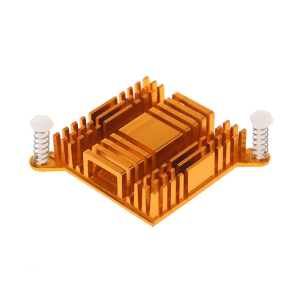
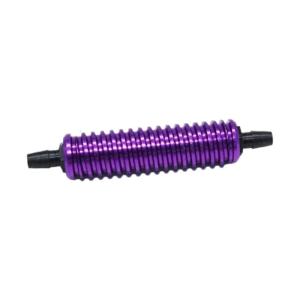
High Performances Metal Air Coolers for 1/10 1/8 Remote Control Model Vehicle Engines Fuel Saving Cooling Solution
Efficient air coolers for 1/101/8 scale remote control cars enhances fuel efficiency and engine longevity through optimized airflows design, suitable for HSP model and major gas powered vehicle. With metal construction, this cooling system features advanced heat dissipation technology to maintain optimal engine temperatures during high performances runs. Great for remote control enthusiasts seeking upgraded component for HSP vehicle or competitive 1/8 scale nitro powered model cars requiring great thermal management. High Performances Metal Air Coolers for 1/101/8 Remote Control Model Vehicle Engines Fuel Saving Cooling Solution. Features: Efficient air coolers for 1/101/8 scale remote control cars enhances fuel efficiency and engine longevity through optimized airflows design, suitable for HSP model and major gas powered vehicle. With metal construction, this cooling system features advanced heat dissipation technology to maintain optimal engine temperatures during high performances r

GlobalGather1
Review

You May Also Like
CORSAIR iCUE LINK LX140 RGB 140mm PWM Dual Fans Starter Kit - White CO-9051032-WW

Customs Fit Laptop Rubber Strips Pad Slip Resistant Silicone Feet for Latitude7310 Laptop for Stability and Durability

14 Inch Laptop LCD Screen MNE007JA1-2 NE140WUM-N6G B140UAN02.1 Display Matrix Panel Replacement 1920x1200 eDP 30 Pins Non-Touch

Reliable Cooling Fan For VXL3S Motors Offers Superior Heat Management And Longevity In Racing Or Off Road Scenarios

YGT Liquid cooler ARGB lighting AIO Deep Frost AURA SYNC Water Cooling CPU Cooler 120mm 240mm 360mm Liquid Heatsink

Adjustable DC Power Supply: A Comprehensive Guide

80-140MM Dust Filter For Computer Cooler Fan Magnetic Frame PC Fan Dust Mesh PC Cooler Filter Dustproof Mesh Cover Net Guard

PCIE Type C PCIE X1 to 2 Port USB C Adapter HUB PCIE USB 3.2 Gen1 5Gbps Expansion ASM1042 Chip for Desktop

Power Train PRISM 7 PRO Computer Chassis Fan 120mm 4PIN PWM ARGB Quiet CPU Cooling Fan 12V Air Volume 56.8CFM/600-1500RPM

Crucial 8GB & 4GB DDR3 1866Mhz RAM: A Comprehensive Guide\\n\\n What is Crucial DDR3 Laptop RAM?\\n\\nCrucial DDR3 Laptop RAM is a type of Random Access Memory (RAM) designed specifically for laptops and notebooks. This particular RAM module is available in two capacities - 8GB and 4GB - and operates at various speeds including 1866MHz, 1600MHz, 1333MHz, and 1066MHz. It supports PC3-14900, PC3-12800, PC3-10600, and PC3-8500 speed ratings, making it compatible with a wide range of notebook models.\\n\\n Key Features of Crucial DDR3 RAM\\n\\n- **Capacity**: Available in 8GB and 4GB configurations\\n- **Speed**: Supports 1866MHz, 1600MHz, 1333MHz, and 1066MHz speeds\\n- **Voltage**: 1.5V 204pin SO-DIMM memory\\n- **Compatibility**: PC3-14900, PC3-12800, PC3-10600, and PC3-8500 speed ratings\\n\\n Compatibility with Various Notebooks\\n\\nCrucial DDR3 Laptop RAM is compatible with a wide range of notebook models, including those from popular manufacturers like Dell, HP, Lenovo, and Acer. To ensure compatibility with your specific laptop model, refer to the manufacturer's specifications or consult Crucial's compatibility checker.\\n\\n How to Choose the Right Crucial RAM for Your Notebook\\n\\nChoosing the right Crucial DDR3 Laptop RAM for your notebook involves understanding your laptop's RAM requirements and identifying the appropriate speed rating.\\n\\n Understanding PC3-14900 & Other Speed Ratings\\n\\nThe speed ratings of Crucial DDR3 Laptop RAM include PC3-14900, PC3-12800, PC3-10600, and PC3-8500. These ratings represent the theoretical peak transfer rate of the memory module, measured in megabytes per second (MB/s).\\n\\n- **PC3-14900**: 1866MHz speed, 14,900 MB/s transfer rate\\n- **PC3-12800**: 1600MHz speed, 12,800 MB/s transfer rate\\n- **PC3-10600**: 1333MHz speed, 10,600 MB/s transfer rate\\n- **PC3-8500**: 1066MHz speed, 8,500 MB/s transfer rate\\n\\n Identifying Your Laptop's RAM Requirements\\n\\nTo determine the appropriate Crucial DDR3 Laptop RAM for your notebook, consult the manufacturer's specifications or use Crucial's compatibility checker. Consider factors such as the maximum supported capacity, voltage, and speed rating when selecting the right RAM module for your laptop.\\n\\n Installing Crucial DDR3 RAM: A Step-by-Step Guide\\n\\nInstalling Crucial DDR3 Laptop RAM is a straightforward process that involves preparing for installation, inserting the RAM module into your notebook, and verifying installation success.\\n\\n Preparing for Installation\\n\\nBefore installing Crucial DDR3 Laptop RAM, ensure that your laptop is powered off and unplugged from any power sources. Gather necessary tools, such as a screwdriver, and prepare a clean, static-free workspace.\\n\\n Inserting the RAM Module into Your Notebook\\n\\n1. Open your laptop's RAM compartment by removing the screws securing the panel.\\n2. Align the notches on the Crucial DDR3 Laptop RAM module with the slots on your notebook's motherboard.\\n3. Gently press the RAM module into place until it clicks.\\n4. Replace the screws securing the RAM compartment panel.\\n\\n Verifying Installation Success\\n\\nAfter installing Crucial DDR3 Laptop RAM, power on your laptop and enter the BIOS/UEFI settings to verify that the new RAM module is recognized. Check your operating system's system information to confirm that the correct amount of RAM is installed.\\n\\n Maximizing Performance with Crucial DDR3 RAM\\n\\nTo maximize performance with Crucial DDR3 Laptop RAM, optimize your laptop's settings and enhance system stability and speed.\\n\\n Optimizing Your Laptop's Settings\\n\\nAdjust your laptop's power settings, disable unnecessary startup programs, and configure the operating system's virtual memory settings to improve overall performance.\\n\\n Enhancing System Stability & Speed\\n\\nRegularly update your operating system and drivers, defragment your hard drive, and run system maintenance tasks to maintain optimal system stability and speed.\\n\\n Conclusion: Upgrade Your Notebook with Crucial DDR3 RAM\\n\\nUpgrading your notebook with Crucial DDR3 Laptop RAM can significantly enhance performance and stability. By understanding your laptop's RAM requirements, choosing the right Crucial DDR3 Laptop RAM, and following the installation process, you can enjoy faster system speeds and improved overall performance.\"
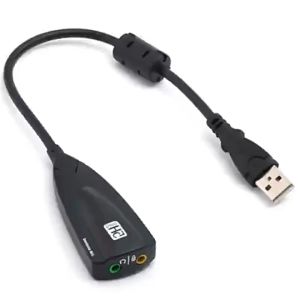
![[COD] shiou USB 2.0 To Jack External USB Sound Card 3D Audio Headset Microphone Earphone 7.1 Channel 5HV2 Adapter For Laptop](https://img.lazcdn.com/g/p/891eb48a4566e61a202397c81f07a02d.jpg_300x300q80.jpg)
[COD] shiou USB 2.0 To Jack External USB Sound Card 3D Audio Headset Microphone Earphone 7.1 Channel 5HV2 Adapter For Laptop