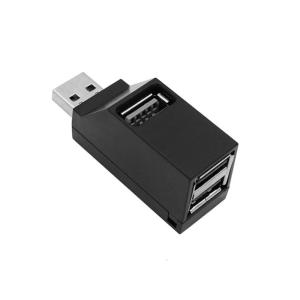
Multiple Port USB2.0 Hubs 3 Port Splitter Adapter for Laptop Car Tablet Air and Additional Devices
Experience connectivitys with 3 Port USB2.0 Hubs, offering Fast Speed data transfer up to 5Gbps for efficient multitasking on your laptop, Tablet. This portable USB expander features not setups or driver needed, ensuring use and compatibility with multiple devices. for enthusiasts, professional, and students who require additional USB Port for their laptops, tablets, and other USB enableds devices. Multiple Port USB2.0 Hubs 3 Port Splitter Adapter for Laptop Car Tablet Air and Additional Devices. Features: Experience connectivitys with 3 Port USB2.0 Hubs, offering Fast Speed data transfer up to 5Gbps for efficient multitasking on your laptop, Tablet. This portable USB expander features not setups or driver needed, ensuring use and compatibility with multiple devices. for enthusiasts, professional, and students who require additional USB Port for their laptops, tablets, and other USB enableds devices. Perfect for use in such as home offices, classrooms, or even in your car, providing co

Home Essentials1
Review

You May Also Like
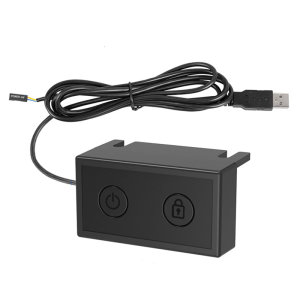
External Power Button for PC External PC Power Button Desktop Computer Case Lock Screen Switches Button with USB Cable

CrashStar Simple Slim Transparent Hard Shockproof Phone Case With Electroplated Camera Protective Ring For iPhone 15 14 Pro Max Plus 13 12 11 Pro Max X XR XS Max Clear Phone Casing Cover Shell Hot Sale

MOSBO Tempered Glass Film for Xiaomi Redmi Note11 Pro: Full Screen Protection No Border Shell Fall Proof Anti Glare

Doodle Hand Drawn Keycaps for Cherry MX Switch Compatible Mechanical Keyboard

TV Wall Mount Bracket 32-75 inche Swivel Tilt Swivel Monitor LCD Metal Stand Holder Tv Rack Stand Load Capacity 500KG Can be Tilt15°Wall Bracket Swivel Metal stand Bracket for Hanging wall Minimalist modern Tv Rack stand Tv rack
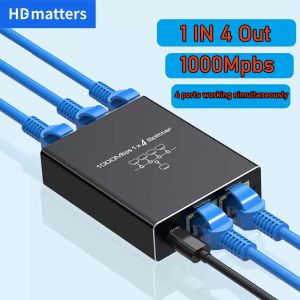
Network Splitter for Ethernet: A Comprehensive Guide\\n\\n Introduction to Network Splitters\\n\\n What is a Network Splitter?\\n\\nA network splitter is a device that allows you to distribute a single Ethernet connection to multiple devices. This is particularly useful if you have limited ports available on your router or switch and want to extend your network coverage. In this comprehensive guide, we will explore the different types of network splitters, how they work, and how to choose the right one for your needs.\\n\\n How Does a Network Splitter Work?\\n\\nNetwork splitters function by taking a single Ethernet connection and splitting it into multiple outputs. This allows you to connect several devices to a single network port, effectively extending your network coverage. There are two main types of network splitters: passive and active. Passive splitters rely solely on the signal strength of the incoming connection, while active splitters amplify the signal to maintain optimal performance across all connected devices.\\n\\n Types of Network Splitters\\n\\nThere are several types of network splitters available, including:\\n\\n- **RJ45 Splitter 1 in 4:** This type of splitter takes a single Ethernet connection and splits it into four outputs, allowing you to connect up to four devices to a single network port.\\n- **Gigabit Ethernet Splitter:** These splitters support speeds up to 1 Gbps, making them ideal for high-speed internet connections and demanding applications such as gaming or video streaming.\\n- **100M 1000M Splitter:** This type of splitter supports both 100 Mbps and 1 Gbps connections, providing flexibility for various network environments.\\n\\n Choosing the Right Network Splitter\\n\\n Key Features to Consider\\n\\nWhen selecting a network splitter, consider the following key features:\\n\\n- **Number of Outputs:** Determine how many devices you want to connect to a single network port.\\n- **Speed:** Choose a splitter that supports the desired speed of your internet connection.\\n- **Compatibility:** Ensure the splitter is compatible with your existing network setup and devices.\\n\\n Differences Between 100M & 1000M Splitter\\n\\nThe main difference between a 100M and a 1000M splitter lies in their supported speeds. A 100M splitter supports connections up to 100 Mbps, while a 1000M splitter supports connections up to 1 Gbps. If you have a high-speed internet connection, a 1000M splitter would be the better choice to ensure optimal performance.\\n\\n Gigabit Ethernet Splitter vs. RJ45 Splitter 1 in 4\\n\\nA Gigabit Ethernet splitter and an RJ45 splitter 1 in 4 differ primarily in their supported speeds and number of outputs. A Gigabit Ethernet splitter supports connections up to 1 Gbps and can have varying numbers of outputs depending on the model. An RJ45 splitter 1 in 4, on the other hand, splits a single Ethernet connection into four outputs and typically supports speeds up to 100 Mbps or 1 Gbps, depending on the model.\\n\\n How to Use a Network Splitter\\n\\n Connecting a Network Splitter to Your PC or Laptop\\n\\nTo connect a network splitter to your PC or laptop, follow these steps:\\n\\n1. Connect one end of an Ethernet cable to the input port of the network splitter.\\n2. Connect the other end of the Ethernet cable to a network port on your router or switch.\\n3. Connect the output ports of the network splitter to your desired devices using Ethernet cables.\\n\\n Setting Up a Network Splitter for Multiple Devices\\n\\nTo set up a network splitter for multiple devices, follow these steps:\\n\\n1. Connect one end of an Ethernet cable to the input port of the network splitter.\\n2. Connect the other end of the Ethernet cable to a network port on your router or switch.\\n3. Connect the output ports of the network splitter to your desired devices using Ethernet cables.\\n\\n Troubleshooting Common Issues with Network Splitters\\n\\nIf you encounter issues with your network splitter, try the following troubleshooting steps:\\n\\n- **Check Connections:** Ensure all Ethernet cables are securely connected to the network splitter and devices.\\n- **Restart Devices:** Restart your router, switch, and connected devices to refresh their network connections.\\n- **Check Network Settings:** Verify that the network settings on your devices are configured correctly.\\n\\n Conclusion\\n\\n Recap of Key Points\\n\\nIn this comprehensive guide, we explored the different types of network splitters, how they work, and how to choose the right one for your needs. We discussed key features to consider when selecting a network splitter, differences between 100M and 1000M splitters, and the distinctions between Gigabit Ethernet splitters and RJ45 splitters 1 in 4. We also provided step-by-step instructions for connecting a network splitter to your PC or laptop, setting up a network splitter for multiple devices, and troubleshooting common issues.\\n\\n Final Thoughts on Network Splitters\\n\\nNetwork splitters are a valuable tool for extending your network coverage and connecting multiple devices to a single network port. By understanding the different types of network splitters and their capabilities, you can choose the right one for your needs and enjoy a seamless networking experience.\n}

Liquid Silicone Shockproof Case For iPhone 17 16 15 14 13 12 11 Pro Max Plus Phone Magnetic Wireless Charger For Magsafe Cover

Case for OPPO RENO 5 5g oppo RENO 4 4g reno5 5g phone casing Softcase shockproof Cover new design aesthetic Rabbit makeup mirror with holder Lanyard SJSFTUZJ02
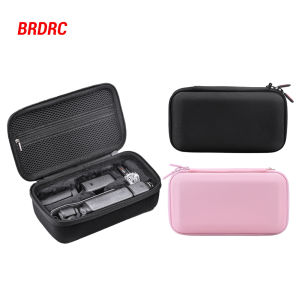
BRDRC Carrying Case/Handbag For DJI Osmo Pocket 3 Camera Portable Storage Bag Pocket 3 Gimbal Camera Travel Storage Accessories
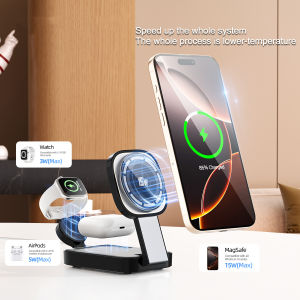
ZUZG Qi2 3-IN-1 Foldable Wireless Charger: A Comprehensive Guide
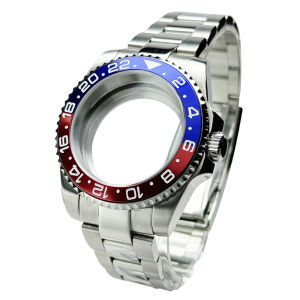
Diver Watch Case Fit for Sub Polish Oyster Band Mod NH34 NH35 NH36 NH70 NH72 20bar red blue bezel 120 Clicks Sliding Buckle