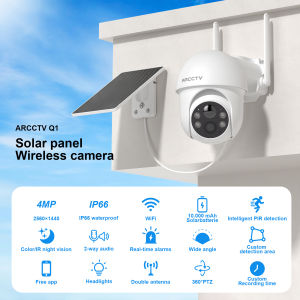
ANRAN Security Camera Wireless Outdoor Solar Camera Connect Cellphone 5G WIFI Remote Monitoring With Human Detection Full Color Night Vision Waterproof Q01

ANRAN Security Camera Wireless Outdoor Solar Camera Connect Cellphone 5G WIFI Remote Monitoring With Human Detection Full Color Night Vision Waterproof Q01

Anran-CCTV Swin

Anran-CCTV Swin

Seller ratings 99%

You May Also Like

🔥COD🔥Hidden Camera Spy Camera A9 cctv camera 1080P HD cctv camera connect cellphone no need internet mini camera spy connect phone mini cctv connect to phone hidden camera spy wireless
00:21

🔥COD🔥Hidden Camera Spy Camera A9 cctv camera 1080P HD cctv camera connect cellphone no need internet mini camera spy connect phone mini cctv connect to phone hidden camera spy wireless

Viewfinder EB Rubber Eye Cup Eyepiece For 30D 40D 50D 60D 70D 5D
00:14

Viewfinder EB Rubber Eye Cup Eyepiece For 30D 40D 50D 60D 70D 5D

【Ready Stock】A9 Camera 1080P HD Mini Hidden Portable Camera Night Vision Wireless Surveillance CCTV Camera Connect To Cellphone
00:21

【Ready Stock】A9 Camera 1080P HD Mini Hidden Portable Camera Night Vision Wireless Surveillance CCTV Camera Connect To Cellphone

Suke A9 WiFi Mini Camera: A Comprehensive Guide
00:35

Suke A9 WiFi Mini Camera: A Comprehensive Guide

ALLAN 8MP HD Video Balun Video Balanced Connector Video Balanced Transceiver Cable for BNC Male Cable Male Twisted HD CVI AHD TVI CVBS BNC
00:12

ALLAN 8MP HD Video Balun Video Balanced Connector Video Balanced Transceiver Cable for BNC Male Cable Male Twisted HD CVI AHD TVI CVBS BNC

5MP 2K Window Camera 5GHz WiFi Indoor Cameras For Home Security Color Night Vision Motion Detection 24/7 Recording Quick Install
00:34

5MP 2K Window Camera 5GHz WiFi Indoor Cameras For Home Security Color Night Vision Motion Detection 24/7 Recording Quick Install

60x60 Zoom High Power Ultra-long Distance 15000M Waterproof Night Vision Binoculars Telescopes Telescopio
00:47

60x60 Zoom High Power Ultra-long Distance 15000M Waterproof Night Vision Binoculars Telescopes Telescopio

1080P HD Glasses Camera Hidden Wearable Mini Video Recorder 5MP Loop Recording 1.5H Life Time No Light While Recording Support 128G Storage Hidden Camera
00:46

1080P HD Glasses Camera Hidden Wearable Mini Video Recorder 5MP Loop Recording 1.5H Life Time No Light While Recording Support 128G Storage Hidden Camera

BOKEWU E27 2MP HD 1080P IP Camera Wireless Panoramic Home Security WiFi CCTV Smart Bulb Camera Two Audio Night Vision Camera\\n\\n What is BOKEWU E27 2MP HD IP Camera?\\n\\nThe BOKEWU E27 2MP HD IP Camera is a cutting-edge surveillance device designed to provide high-quality video monitoring for homes and small businesses. With its advanced features and sleek design, this camera is perfect for anyone looking to enhance their home security system.\\n\\n Key Features & Specifications\\n\\n- **Resolution**: 2MP HD (1080P)\\n- **Camera Type**: IP Camera\\n- **Connection**: WiFi\\n- **Storage**: Cloud Storage/Micro SD Card Storage\\n- **Night Vision**: Smart IR\\n- **Motion Detection**: Yes\\n- **Audio**: Two-Way Audio\\n- **Pan and Tilt**: Yes\\n- **Smart Features**: AI Human Auto Tracking, Panoramic Surveillance Camera\\n\\n Comparison with Other Models\\n\\nCompared to other models in the market, the BOKEWU E27 2MP HD IP Camera stands out due to its advanced features such as AI Human Auto Tracking, Smart IR, and Panoramic Surveillance. Additionally, the camera offers a smooth two-way audio experience, making it ideal for both home and business security needs.\\n\\n How to Install BOKEWU E27 2MP HD IP Camera?\\n\\nInstalling the BOKEWU E27 2MP HD IP Camera is a straightforward process that can be completed in just a few simple steps.\\n\\n Step-by-Step Installation Process\\n\\n1. Unpack the camera and its accessories.\\n2. Connect the camera to power.\\n3. Download the BOKEWU app from the App Store or Google Play.\\n4. Follow the on-screen instructions to connect the camera to your WiFi network.\\n5. Set up your account and configure the camera settings.\\n\\n Troubleshooting Common Issues\\n\\nIf you encounter any issues during installation, refer to the troubleshooting guide provided in the BOKEWU app or visit their support website for further assistance.\\n\\n How to Optimize BOKEWU E27 2MP HD IP Camera Performance?\\n\\nTo get the most out of your BOKEWU E27 2MP HD IP Camera, it's essential to optimize its performance by enhancing night vision, maximizing motion detection, and customizing audio settings.\\n\\n Enhancing Night Vision\\n\\nThe BOKEWU E27 2MP HD IP Camera features Smart IR technology, which automatically adjusts the camera's night vision based on the surrounding light conditions. To further enhance night vision, adjust the camera's sensitivity settings within the BOKEWU app.\\n\\n Maximizing Motion Detection\\n\\nTo maximize motion detection, configure the camera's motion detection settings within the BOKEWU app. This includes adjusting the sensitivity, setting up custom zones, and enabling or disabling specific features such as sound detection.\\n\\n Customizing Audio Settings\\n\\nThe BOKEWU E27 2MP HD IP Camera offers a smooth two-way audio experience, allowing you to communicate with individuals within the camera's range. To customize audio settings, adjust the volume levels and enable or disable specific features such as sound detection within the BOKEWU app.\\n\\n BOKEWU E27 2MP HD IP Camera Security & Privacy Considerations\\n\\nWhen using the BOKEWU E27 2MP HD IP Camera, it's essential to consider security and privacy concerns.\\n\\n Ensuring Data Encryption\\n\\nThe BOKEWU E27 2MP HD IP Camera uses advanced encryption technology to protect your data and ensure that your videos and images remain secure. To further enhance security, enable two-factor authentication within the BOKEWU app.\\n\\n Setting Up User Access Controls\\n\\nTo control who has access to your camera, set up user access controls within the BOKEWU app. This includes creating unique usernames and passwords, assigning roles and permissions, and monitoring user activity.\\n\\n Regular Software Updates\\n\\nTo ensure your BOKEWU E27 2MP HD IP Camera remains up-to-date and secure, regularly check for software updates within the BOKEWU app. These updates often include bug fixes, performance improvements, and new features.\n}
01:04

BOKEWU E27 2MP HD 1080P IP Camera Wireless Panoramic Home Security WiFi CCTV Smart Bulb Camera Two Audio Night Vision Camera\\n\\n What is BOKEWU E27 2MP HD IP Camera?\\n\\nThe BOKEWU E27 2MP HD IP Camera is a cutting-edge surveillance device designed to provide high-quality video monitoring for homes and small businesses. With its advanced features and sleek design, this camera is perfect for anyone looking to enhance their home security system.\\n\\n Key Features & Specifications\\n\\n- **Resolution**: 2MP HD (1080P)\\n- **Camera Type**: IP Camera\\n- **Connection**: WiFi\\n- **Storage**: Cloud Storage/Micro SD Card Storage\\n- **Night Vision**: Smart IR\\n- **Motion Detection**: Yes\\n- **Audio**: Two-Way Audio\\n- **Pan and Tilt**: Yes\\n- **Smart Features**: AI Human Auto Tracking, Panoramic Surveillance Camera\\n\\n Comparison with Other Models\\n\\nCompared to other models in the market, the BOKEWU E27 2MP HD IP Camera stands out due to its advanced features such as AI Human Auto Tracking, Smart IR, and Panoramic Surveillance. Additionally, the camera offers a smooth two-way audio experience, making it ideal for both home and business security needs.\\n\\n How to Install BOKEWU E27 2MP HD IP Camera?\\n\\nInstalling the BOKEWU E27 2MP HD IP Camera is a straightforward process that can be completed in just a few simple steps.\\n\\n Step-by-Step Installation Process\\n\\n1. Unpack the camera and its accessories.\\n2. Connect the camera to power.\\n3. Download the BOKEWU app from the App Store or Google Play.\\n4. Follow the on-screen instructions to connect the camera to your WiFi network.\\n5. Set up your account and configure the camera settings.\\n\\n Troubleshooting Common Issues\\n\\nIf you encounter any issues during installation, refer to the troubleshooting guide provided in the BOKEWU app or visit their support website for further assistance.\\n\\n How to Optimize BOKEWU E27 2MP HD IP Camera Performance?\\n\\nTo get the most out of your BOKEWU E27 2MP HD IP Camera, it's essential to optimize its performance by enhancing night vision, maximizing motion detection, and customizing audio settings.\\n\\n Enhancing Night Vision\\n\\nThe BOKEWU E27 2MP HD IP Camera features Smart IR technology, which automatically adjusts the camera's night vision based on the surrounding light conditions. To further enhance night vision, adjust the camera's sensitivity settings within the BOKEWU app.\\n\\n Maximizing Motion Detection\\n\\nTo maximize motion detection, configure the camera's motion detection settings within the BOKEWU app. This includes adjusting the sensitivity, setting up custom zones, and enabling or disabling specific features such as sound detection.\\n\\n Customizing Audio Settings\\n\\nThe BOKEWU E27 2MP HD IP Camera offers a smooth two-way audio experience, allowing you to communicate with individuals within the camera's range. To customize audio settings, adjust the volume levels and enable or disable specific features such as sound detection within the BOKEWU app.\\n\\n BOKEWU E27 2MP HD IP Camera Security & Privacy Considerations\\n\\nWhen using the BOKEWU E27 2MP HD IP Camera, it's essential to consider security and privacy concerns.\\n\\n Ensuring Data Encryption\\n\\nThe BOKEWU E27 2MP HD IP Camera uses advanced encryption technology to protect your data and ensure that your videos and images remain secure. To further enhance security, enable two-factor authentication within the BOKEWU app.\\n\\n Setting Up User Access Controls\\n\\nTo control who has access to your camera, set up user access controls within the BOKEWU app. This includes creating unique usernames and passwords, assigning roles and permissions, and monitoring user activity.\\n\\n Regular Software Updates\\n\\nTo ensure your BOKEWU E27 2MP HD IP Camera remains up-to-date and secure, regularly check for software updates within the BOKEWU app. These updates often include bug fixes, performance improvements, and new features.\n}

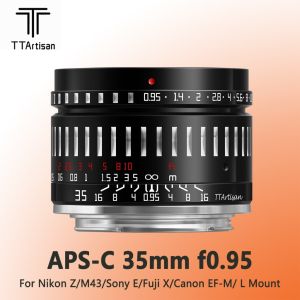
TTArtisan 35mm F0.95 APS-C Large Aperture Prime Manual Focus Lens for Mirrorless Camera

00:51

TTArtisan 35mm F0.95 APS-C Large Aperture Prime Manual Focus Lens for Mirrorless Camera

Dahua Kit 8CH 8 Cameras FULL COLOR 2MP HD 1080P 24/7 CCTV SET PACKAGE KIT AUDIO Built in Mic Pickup Record Wizsense Kit
01:00

Dahua Kit 8CH 8 Cameras FULL COLOR 2MP HD 1080P 24/7 CCTV SET PACKAGE KIT AUDIO Built in Mic Pickup Record Wizsense Kit

Neye S2 8MP 4K WiFi Intelligent Security Camera Home Indoor Baby/Elderly Monitor Automatic Tracking CCTV Security Camera
00:27

Neye S2 8MP 4K WiFi Intelligent Security Camera Home Indoor Baby/Elderly Monitor Automatic Tracking CCTV Security Camera