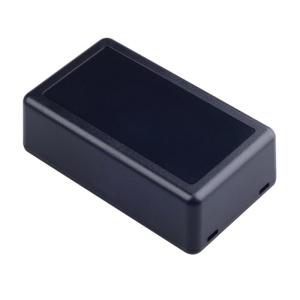
Heat Resistant Instrument Housing Box Enclosure Case for Electronic Projects Various Applications with Waterproof Design
Hard Case. The DIY housing instrument storage case offers a robusts and waterproof enclosure, ensuring the safety and longevity of your electronic projects. Crafted from abs plastic, this enclosure box is heat resistant, featuring a user friendly design for easy installation and maintenance. For electronic engineers, automation industry professionals, and DIY enthusiasts seek reliable wiring solution. Heat Resistant Instrument Housing Box Enclosure Case for Electronic Projects Various Applications with Waterproof Design Features: The DIY housing instrument storage case offers a robusts and waterproof enclosure, ensuring the safety and longevity of your electronic projects. Crafted from abs plastic, this enclosure box is heat resistant, featuring a user friendly design for easy installation and maintenance. For electronic engineers, automation industry professionals, and DIY enthusiasts seek reliable wiring solution. Perfect for use in laboratories, industrial production lines, and home

Charm Central
Review

You May Also Like
BenQ GW2791 | 27" 1080p FHD 100Hz Eye-Care Monitor

JGINYUE B650M Snow Dream AM5 DDR5 ARGB M-ATX Motherboard For Gaming PCIe 4.0×4 M.2 For CPU 9700X/9900X/7800X3D gaming pc DIY

GD-3 Thermal Grease Processor Thermal Paste 7g 7.5W/M-k For CPU GPU PS5 Printer Heat Sink Cooling Cooler Compound Silicone

15.6" Laptop LCD Touch Screen B156HAK02.4 NV156FHM-T0J LP156WFD-SPP1 For Lenovo ThinkPad L15 Gen 3 Gen 4 Display Matrix Panel

KingSpec NVMe 2280 SSD M2 ssd m.2 NVMe pcie SSD capacity 512gb 128gb 256GB For Laptop Desktop MSI Ssd Nvme M 2 - Lazada

Metal Graphics Card Brace GPU Stand Holder Prevents Drooping With Multiple Height Setting Stable Magnetic Base

Efficient 12V 100RPM High Torque Motor Slow Speed for Engineering Experiments and Robotic Systems

KAMPEON Gaming Monitor for PC: 24 Inch Curved & 27 Inch Laptop Monitor Review\\n\\n What is the KAMPEON Gaming Monitor?\\n\\nThe KAMPEON Gaming Monitor is a high-performance computer monitor designed specifically for gaming enthusiasts. It comes in two sizes: a 24-inch curved gaming monitor and a 27-inch laptop monitor, both offering impressive features and specifications.\\n\\n Key Features & Specifications\\n\\nBoth models feature stunning 4K resolution and fast refresh rates, with the 24-inch model offering 144Hz and the 27-inch model providing 165Hz. This ensures smooth gameplay and seamless visuals for any gamer. Additionally, the curved design of the 24-inch model enhances immersion and reduces eye strain during extended gaming sessions.\\n\\n How Does It Compare to Other Monitors?\\n\\nCompared to other monitors on the market, the KAMPEON Gaming Monitor stands out due to its combination of high resolution, fast refresh rates, and curved design. It offers superior performance and visual quality, making it an excellent choice for serious gamers.\\n\\n How to Choose the Right KAMPEON Gaming Monitor\\n\\nWhen selecting the right KAMPEON Gaming Monitor, consider the following factors:\\n\\n Curved vs. Flat Display\\n\\nThe 24-inch model features a curved display, which provides a more immersive gaming experience and reduces eye strain. On the other hand, the 27-inch model has a flat display, offering a larger screen area for multitasking and productivity tasks alongside gaming.\\n\\n 24 Inch & 27 Inch Options\\n\\nBoth models come in two sizes, catering to different preferences and needs. The 24-inch monitor is ideal for those who prioritize immersion and eye comfort, while the 27-inch model offers a larger screen area for multitasking and productivity tasks alongside gaming.\\n\\n 144Hz & 165Hz Refresh Rates\\n\\nThe refresh rate determines how many frames per second the monitor can display. The 24-inch model features a 144Hz refresh rate, while the 27-inch model boasts a 165Hz refresh rate. Higher refresh rates result in smoother gameplay and more responsive visuals, enhancing the overall gaming experience.\\n\\n Setting Up Your KAMPEON Gaming Monitor\\n\\nSetting up your KAMPEON Gaming Monitor is straightforward and easy. Follow these steps:\\n\\n Connecting Your Monitor\\n\\nConnect your monitor to your PC using the included HDMI or DisplayPort cables. Make sure to select the correct input source on your monitor and adjust the resolution and refresh rate settings in your PC's display settings.\\n\\n Adjusting Display Settings\\n\\nOnce connected, adjust the display settings on your monitor to optimize its performance. You can customize brightness, contrast, color temperature, and other settings to suit your preferences and gaming needs.\\n\\n Optimizing Performance for Gaming\\n\\nTo get the most out of your KAMPEON Gaming Monitor, ensure that your PC meets the minimum system requirements for the selected refresh rate. This includes having a powerful graphics card and sufficient RAM. Additionally, consider enabling adaptive sync technologies like FreeSync or G-Sync to eliminate screen tearing and stuttering.\\n\\n Enhancing Your Gaming Experience with KAMPEON\\n\\nMaximize your gaming experience by taking advantage of the KAMPEON Gaming Monitor's advanced features:\\n\\n Customizing Visual Settings\\n\\nCustomize your monitor's visual settings to enhance your gaming experience. Experiment with different color profiles, contrast ratios, and sharpness levels to achieve the perfect balance of detail and clarity.\\n\\n Using Advanced Features\\n\\nTake advantage of the KAMPEON Gaming Monitor's advanced features, such as game modes, crosshair overlays, and black stabilizer. These features can help you stay focused, improve accuracy, and enjoy a more immersive gaming experience.\\n\\n Maintaining Optimal Performance\\n\\nTo maintain optimal performance, keep your monitor clean and free from dust. Regularly update your graphics drivers and firmware to ensure compatibility and access to the latest features. Additionally, avoid placing heavy objects on top of your monitor to prevent damage and maintain its longevity.\\n\\nIn conclusion, the KAMPEON Gaming Monitor is an excellent choice for PC gamers looking for high-resolution visuals, fast refresh rates, and advanced features. Whether you prefer a curved or flat display, the 24-inch or 27-inch size, or the 144Hz or 165Hz refresh rate, there's a KAMPEON Gaming Monitor that's perfect for you. So why wait? Upgrade your gaming setup today and experience the ultimate gaming experience with KAMPEON!\"

9V 12V 5V 15V 24 Hours Timing Automatic Power Off Reset Restart Control Line for Router Speaker LED Lamp and more

ZEUSLAP 14-16inch 2.5K 144Hz Portable Monitor 2560*1600 16:10 100%sRGB 500Cd/m² Travel Gaming Display for Laptop Switch Xbox PS5 Mini PC

5V/2A 12V/2A Step Down Module Replacement None isolated Bucking Converter Power Supply Converter Easy to Installation