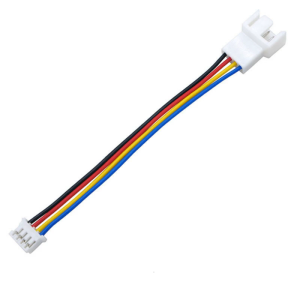
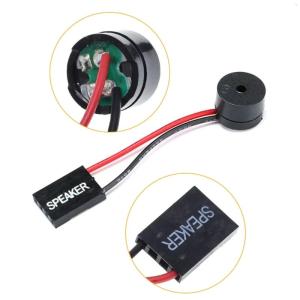
5Pcs Computer Motherboard Beep Code Internal Speaker Buzzer Computer Case Buzzer
Plugs right into your motherboard where the speaker. Keep your computer case internal cable clean. The speaker used to obtain beep codes from motherboards, alarm system and other electronics. 5Pcs Computer Motherboard Beep Code Internal Speaker Buzzer Computer Case Buzzer. Features: Plugs right into your motherboard where the speaker. Keep your computer case internal cable clean. The speaker used to obtain beep codes from motherboards, alarm system and other electronics. This speaker is ensuring you get quality performances everytimes. Perfect for use in computer repair shops, offices, homes, and any other place where computers is used. Specifications: Component: PVC. Cable Length: Approx. 4cm/1.57inches. Package Includes: 5Pcs Computer Buzzer. note: 1. Please allow 1-2cm errors due to manual measurement, making sure that you not mind before order. 2. Due to the differences between different monitors, the picture may not reflect the actual of the item

GlobalNest1
Review

You May Also Like

17.3" LCD Screen B173HAN04.3 NV173FHM-N4K B173HAN04.4 N173HCE-G33 For Lenovo Legion 5-17ACH6 5-17ITH6 Display Matrix Panel FHD

42-34 3D Printer Stepping Motor for Ender-3 Ender-3 Pro CR10 Ender-5 3D Printer with 40 Teeth Brass Extrusion Gear

1PC B450M-TI ARGB Motherboard M.2 NVME ARGB PC Motherboard AMD Processor Dual-Channel 4*DDR4 Memory AM4 USB Mainboard

Thermalright Assassin Spirit 120 Vision ARGB Air Cooler: A Comprehensive Guide\\n\\n Introduction & Overview\\n\\nThe Thermalright Assassin Spirit 120 Vision ARGB Air Cooler is a top-tier cooling solution designed for PC enthusiasts who prioritize performance and aesthetics. This 120mm CPU cooler combines cutting-edge thermal technology with customizable RGB lighting, making it a must-have for gamers and overclockers alike.\\n\\n What is the Thermalright Assassin Spirit 120 Vision ARGB Air Cooler?\\n\\nThe Thermalright Assassin Spirit 120 Vision ARGB Air Cooler is a high-performance CPU cooler that utilizes advanced thermal design and ARGB lighting technology. This 120mm cooler offers exceptional thermal performance and customizable RGB lighting, making it a popular choice among PC enthusiasts.\\n\\n Key Features & Benefits\\n\\n- **Advanced Thermal Design**: The Assassin Spirit 120 Vision ARGB Air Cooler features a highly efficient heat sink and optimized fan design, ensuring superior thermal performance and quiet operation.\\n- **Customizable RGB Lighting**: With support for popular RGB lighting controllers, users can customize the lighting effects to match their system aesthetics.\\n- **Compatibility**: Designed to fit a wide range of CPU sockets, this cooler is compatible with most modern motherboards.\\n- **Ease of Installation**: The Assassin Spirit 120 Vision ARGB Air Cooler comes with all necessary mounting hardware and is easy to install, even for beginners.\\n\\n Why Choose the Thermalright Assassin Spirit 120 Vision ARGB Air Cooler?\\n\\nIf you're looking for a top-tier cooling solution that combines exceptional thermal performance with customizable RGB lighting, the Thermalright Assassin Spirit 120 Vision ARGB Air Cooler is the perfect choice. Its advanced thermal design, ease of installation, and compatibility make it a popular choice among PC enthusiasts.\\n\\n Performance & Efficiency\\n\\nThe Thermalright Assassin Spirit 120 Vision ARGB Air Cooler offers outstanding performance and efficiency, thanks to its advanced thermal design and ARGB lighting technology.\\n\\n How to Optimize Thermal Performance\\n\\nTo get the most out of your Thermalright Assassin Spirit 120 Vision ARGB Air Cooler, follow these tips:\\n\\n- **Ensure Proper Installation**: Follow the manufacturer's instructions carefully to ensure proper installation and optimal thermal contact.\\n- **Use High-Quality Thermal Paste**: Apply a thin layer of high-quality thermal paste to maximize heat transfer between the CPU and the cooler.\\n- **Monitor Temperatures**: Regularly monitor your CPU temperatures using software tools like HWMonitor or MSI Afterburner to ensure optimal performance.\\n\\n Understanding ARGB Air Cooler Technology\\n\\nARGB air coolers combine advanced thermal technology with customizable RGB lighting, allowing users to create a visually stunning PC build. The Assassin Spirit 120 Vision ARGB Air Cooler supports popular RGB lighting controllers, making it easy to customize the lighting effects to match your system aesthetics.\\n\\n Maximizing RGB Lighting Effects\\n\\nTo get the most out of your Thermalright Assassin Spirit 120 Vision ARGB Air Cooler's RGB lighting, consider the following tips:\\n\\n- **Choose a Compatible RGB Controller**: Ensure your motherboard or graphics card supports popular RGB lighting controllers like ASUS Aura Sync, MSI Mystic Light, or Corsair iCUE.\\n- **Experiment with Lighting Effects**: Try different lighting effects and colors to find the perfect match for your system aesthetics.\\n- **Synchronize with Other RGB Devices**: Sync your cooler's RGB lighting with other RGB devices in your build for a cohesive look.\\n\\n Installation & Setup\\n\\nInstalling the Thermalright Assassin Spirit 120 Vision ARGB Air Cooler is straightforward, even for beginners. Follow these steps to get started:\\n\\n How to Install the Thermalright Assassin Spirit 120 Vision ARGB Air Cooler\\n\\n1. **Prepare Your Workspace**: Ensure your workspace is clean and well-lit before beginning the installation process.\\n2. **Remove Old Cooler**: Carefully remove any existing CPU cooler before installing the Assassin Spirit 120 Vision ARGB Air Cooler.\\n3. **Apply Thermal Paste**: Apply a small amount of high-quality thermal paste to the CPU surface.\\n4. **Install the Cooler**: Mount the cooler onto the CPU socket, ensuring proper alignment and secure installation.\\n5. **Connect Power & RGB Cables**: Connect the power and RGB cables to the appropriate motherboard headers.\\n\\n Connecting the ARGB Lighting\\n\\nTo connect the ARGB lighting, follow these steps:\\n\\n1. **Identify ARGB Headers**: Locate the ARGB headers on your motherboard or graphics card.\\n2. **Connect ARGB Cable**: Connect the ARGB cable from the cooler to the appropriate header.\\n3. **Configure RGB Settings**: Use your motherboard or graphics card's software to configure the RGB settings.\\n\\n Configuring the RGB Lighting Settings\\n\\nTo configure the RGB lighting settings, follow these steps:\\n\\n1. **Launch RGB Software**: Open the RGB software provided by your motherboard or graphics card manufacturer.\\n2. **Select Cooler**: Locate the cooler in the software and select it for configuration.\\n3. **Choose Lighting Effects**: Select the desired lighting effects and colors.\\n4. **Save Settings**: Save your settings and exit the software.\\n\\n Maintenance & Troubleshooting\\n\\nRegular maintenance and troubleshooting can help ensure optimal performance and longevity of your Thermalright Assassin Spirit 120 Vision ARGB Air Cooler.\\n\\n How to Clean & Maintain the Thermalright Assassin Spirit 120 Vision ARGB Air Cooler\\n\\nTo clean and maintain your cooler, follow these steps:\\n\\n- **Power Off System**: Ensure your system is powered off before cleaning the cooler.\\n- **Remove Dust**: Use compressed air to remove dust from the cooler's fins and fan blades.\\n- **Check for Obstructions**: Inspect the cooler for any obstructions that may impede airflow.\\n- **Reapply Thermal Paste**: Reapply thermal paste every 6-12 months to maintain optimal heat transfer.\\n\\n Common Issues & Solutions\\n\\nIf you're experiencing issues with your Thermalright Assassin Spirit 120 Vision ARGB Air Cooler, consider the following solutions:\\n\\n- **High Temperatures**: Check for proper installation, thermal paste application, and dust buildup.\\n- **No RGB Lighting**: Ensure the ARGB cable is connected correctly and the RGB settings are configured properly.\\n- **Fan Noise**: Adjust fan speed settings or clean the cooler to reduce noise.\\n\\n FAQs & Additional Resources\\n\\nFor more information on the Thermalright Assassin Spirit 120 Vision ARGB Air Cooler, consult the following resources:\\n\\n- **User Manual**: Refer to the user manual for detailed installation and usage instructions.\\n- **Thermalright Website**: Visit the Thermalright website for product information, support, and warranty details.\\n- **Online Forums**: Join online forums like Tom's Hardware or Reddit to connect with other users and share experiences.\n}

Western Digital WD Green 2.5 SATA III SSD: The Ultimate Laptop & Desktop Storage Solution

KingSpec mSATA SSD 512GGB 256GB 128GB Internal Solid State Drive SATAIII 6GB/s 1TB SSD Mini SATA3 Hard Disk for Laptop Desktop

🔥🔥🔥qnljgv 100W DC-DC Boost Step Up Converter Power Supply Module

Nice Power Adjustable power supply dc 30V 10A LED Digital Lab Bench Power Source Stabilized Power Supply 24V 48V 60V 72V 100V Voltage Regulator Switch

Variable Duty Cycle Squares Waves Generator Board for Motor Driver Control and Electronic Prototyping

Compatible Printer Head QY6 0086 For QY60086 MX928 MX728 IX6780 IX6880 Printer for Ensuring Smooth Printing Performances

10PCS Mounting Clip Coolers Fan Mount Pin Plastic Push Screw Fastener for Socket LGA 775/1150/1155/1156/1366 CPU