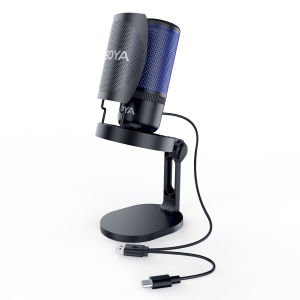
BOYA K3 Condenser Microphone USB Microphone Gaming Mic Desktop Microphone for PC Android Phone Live Streaming

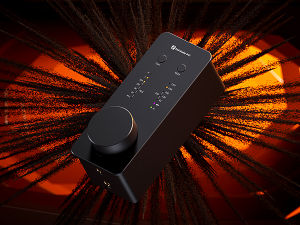
Boya. Hi-Fi quality sound, 48 kHz 24-bit, 20 Hz 20 kHz. Innovative one-tap noise cancellation filters out ambient noise. Lights Up, Vibes Up: offers a dynamic lighting effect that changes among 9 colors. Real-time monitoring via 3.5 mm TRS. Plug and play with no driver needed. BOYA K3 Vibrant Lighting Condenser USB Microphone. The K3 is a desktop microphone equipped with RGB lighting and dynamic effects, creating a fashion style and ambiance for your gaming or live show. lt boasts a shock mount at the bottom to minimize handling noise, and includes a built-in foam to reduce sound spikes. The microphone's LED indicator allows you to easily monitor its status while recording. Additionally, you can mute the microphone with one tap which helps avoid embarrassing mishaps during a live show. K3 microphone adopts a gain control dial for quick adjustment of input sensitivity. The provided adapter is compatible with 3/8 and 5/8 threads for most stands. The K3 microphone delivers high-quality so

BOYA & Saramonic
BOYA & Saramonic

Seller ratings 98%

You May Also Like

[COD] PkYeG Tool Single Wire Earpiece Headset Kit MIC PTT Mic D Shaped 2 Pin Radio Earphone Walkie Talkie for KENWOOD BAOFENG TYT Ear Hook
00:38

[COD] PkYeG Tool Single Wire Earpiece Headset Kit MIC PTT Mic D Shaped 2 Pin Radio Earphone Walkie Talkie for KENWOOD BAOFENG TYT Ear Hook

Sports Earbuds Wired Running Headphones with Microphone Neckband in-Ear Stereo Workout Earphones Designed for Jogging Gym HeadsetsGreen
00:34

Sports Earbuds Wired Running Headphones with Microphone Neckband in-Ear Stereo Workout Earphones Designed for Jogging Gym HeadsetsGreen

Awei ES-160i 3.5mm Plug Ear-Hook Smart Sports Lightweight Stereo Earphone
01:00

Awei ES-160i 3.5mm Plug Ear-Hook Smart Sports Lightweight Stereo Earphone

BAVIN BH53 Wireless Comfort Headphones BT Hi-Fi Sounds & Strong Bass Built-In Mic w/ Silicon Band & Soft Earpads
01:00

BAVIN BH53 Wireless Comfort Headphones BT Hi-Fi Sounds & Strong Bass Built-In Mic w/ Silicon Band & Soft Earpads

Mezone Lenovo LP40 Pro Wireless Bluetooth Earphone TWS Headphones Gaming Headset Noise With Microphone Waterproof Earbuds Noise Reduction\\n\\n Introduction\\n\\nThe Mezone Lenovo LP40 Pro wireless Bluetooth earphones are a high-quality TWS gaming headset designed for both casual and professional gamers. These earbuds offer exceptional sound quality, noise reduction, and water resistance, making them ideal for gaming, streaming, and everyday use. This comprehensive guide will cover the key features and specifications, how to use the Mezone Lenovo LP40 Pro wireless Bluetooth earphones, and a comparison with competitors.\\n\\n Key Features & Specifications\\n\\n Wireless Connectivity & Sound Quality\\n\\nThe Mezone Lenovo LP40 Pro wireless Bluetooth earphones boast a robust wireless connectivity range of up to 33 feet, ensuring a seamless connection between devices. With support for Bluetooth 5.0, these earbuds provide stable and reliable audio transmission, even in crowded environments. The earphones feature a 10mm dynamic driver that delivers clear, balanced sound with deep bass, making them perfect for gaming, music, and video calls.\\n\\n Microphone & Voice Control\\n\\nEquipped with a built-in microphone, the Mezone Lenovo LP40 Pro wireless Bluetooth earphones offer crystal-clear voice quality during calls and voice commands. The noise-cancellation technology reduces background noise, ensuring that your voice is heard clearly by others. Additionally, these earbuds support voice control, allowing users to easily manage their audio playback and take hands-free calls.\\n\\n Durability & Water Resistance\\n\\nDesigned for durability, the Mezone Lenovo LP40 Pro wireless Bluetooth earphones feature a sturdy build and water-resistant design. With an IPX7 rating, these earbuds can withstand accidental splashes and even short submersion in water, making them perfect for use during workouts or outdoor activities.\\n\\n How to Use Mezone Lenovo LP40 Pro Wireless Bluetooth Earphones\\n\\n Pairing with Devices\\n\\nTo pair the Mezone Lenovo LP40 Pro wireless Bluetooth earphones with your device, simply press and hold the power button on either earbud until the LED light blinks blue, indicating that the earbuds are in pairing mode. Then, open your device's Bluetooth settings and select the Mezone Lenovo LP40 Pro from the list of available devices. Once connected, the LED light will turn solid blue.\\n\\n Charging & Battery Life\\n\\nThe Mezone Lenovo LP40 Pro wireless Bluetooth earphones come with a charging cable and a compact charging case. Each earbud has a battery life of up to 6 hours, while the charging case provides an additional 24 hours of playback time. To charge the earbuds, simply place them back in the charging case and connect the charging cable to a power source.\\n\\n Troubleshooting Common Issues\\n\\nIf you experience issues with the Mezone Lenovo LP40 Pro wireless Bluetooth earphones, such as poor sound quality or connectivity problems, try restarting both the earbuds and your device. If the issue persists, consult the user manual or contact customer support for further assistance.\\n\\n Comparing Mezone Lenovo LP40 Pro with Competitors\\n\\n Sound Quality & Comfort\\n\\nThe Mezone Lenovo LP40 Pro wireless Bluetooth earphones offer superior sound quality compared to many competitors, thanks to their 10mm dynamic driver and noise-cancellation technology. Additionally, these earbuds feature ergonomic designs that provide a comfortable fit, even during extended use.\\n\\n Price & Value\\n\\nPriced competitively, the Mezone Lenovo LP40 Pro wireless Bluetooth earphones offer excellent value for money, considering their high-quality audio performance, durability, and water resistance.\\n\\n Features & Customization\\n\\nWith support for Bluetooth 5.0, voice control, and a compact charging case, the Mezone Lenovo LP40 Pro wireless Bluetooth earphones offer a wide range of features and customization options. Users can easily adjust their audio settings, take hands-free calls, and enjoy seamless connectivity with various devices.\n}
00:48

Mezone Lenovo LP40 Pro Wireless Bluetooth Earphone TWS Headphones Gaming Headset Noise With Microphone Waterproof Earbuds Noise Reduction\\n\\n Introduction\\n\\nThe Mezone Lenovo LP40 Pro wireless Bluetooth earphones are a high-quality TWS gaming headset designed for both casual and professional gamers. These earbuds offer exceptional sound quality, noise reduction, and water resistance, making them ideal for gaming, streaming, and everyday use. This comprehensive guide will cover the key features and specifications, how to use the Mezone Lenovo LP40 Pro wireless Bluetooth earphones, and a comparison with competitors.\\n\\n Key Features & Specifications\\n\\n Wireless Connectivity & Sound Quality\\n\\nThe Mezone Lenovo LP40 Pro wireless Bluetooth earphones boast a robust wireless connectivity range of up to 33 feet, ensuring a seamless connection between devices. With support for Bluetooth 5.0, these earbuds provide stable and reliable audio transmission, even in crowded environments. The earphones feature a 10mm dynamic driver that delivers clear, balanced sound with deep bass, making them perfect for gaming, music, and video calls.\\n\\n Microphone & Voice Control\\n\\nEquipped with a built-in microphone, the Mezone Lenovo LP40 Pro wireless Bluetooth earphones offer crystal-clear voice quality during calls and voice commands. The noise-cancellation technology reduces background noise, ensuring that your voice is heard clearly by others. Additionally, these earbuds support voice control, allowing users to easily manage their audio playback and take hands-free calls.\\n\\n Durability & Water Resistance\\n\\nDesigned for durability, the Mezone Lenovo LP40 Pro wireless Bluetooth earphones feature a sturdy build and water-resistant design. With an IPX7 rating, these earbuds can withstand accidental splashes and even short submersion in water, making them perfect for use during workouts or outdoor activities.\\n\\n How to Use Mezone Lenovo LP40 Pro Wireless Bluetooth Earphones\\n\\n Pairing with Devices\\n\\nTo pair the Mezone Lenovo LP40 Pro wireless Bluetooth earphones with your device, simply press and hold the power button on either earbud until the LED light blinks blue, indicating that the earbuds are in pairing mode. Then, open your device's Bluetooth settings and select the Mezone Lenovo LP40 Pro from the list of available devices. Once connected, the LED light will turn solid blue.\\n\\n Charging & Battery Life\\n\\nThe Mezone Lenovo LP40 Pro wireless Bluetooth earphones come with a charging cable and a compact charging case. Each earbud has a battery life of up to 6 hours, while the charging case provides an additional 24 hours of playback time. To charge the earbuds, simply place them back in the charging case and connect the charging cable to a power source.\\n\\n Troubleshooting Common Issues\\n\\nIf you experience issues with the Mezone Lenovo LP40 Pro wireless Bluetooth earphones, such as poor sound quality or connectivity problems, try restarting both the earbuds and your device. If the issue persists, consult the user manual or contact customer support for further assistance.\\n\\n Comparing Mezone Lenovo LP40 Pro with Competitors\\n\\n Sound Quality & Comfort\\n\\nThe Mezone Lenovo LP40 Pro wireless Bluetooth earphones offer superior sound quality compared to many competitors, thanks to their 10mm dynamic driver and noise-cancellation technology. Additionally, these earbuds feature ergonomic designs that provide a comfortable fit, even during extended use.\\n\\n Price & Value\\n\\nPriced competitively, the Mezone Lenovo LP40 Pro wireless Bluetooth earphones offer excellent value for money, considering their high-quality audio performance, durability, and water resistance.\\n\\n Features & Customization\\n\\nWith support for Bluetooth 5.0, voice control, and a compact charging case, the Mezone Lenovo LP40 Pro wireless Bluetooth earphones offer a wide range of features and customization options. Users can easily adjust their audio settings, take hands-free calls, and enjoy seamless connectivity with various devices.\n}

VTUOGE TWS Wireless Headphones 9D Stereo Earbuds Sports Waterproof Bluetooth Wireless Earphones With Microphone Wireless Headsets for Xiaomi Redmi Huawei Airdots Android Mobile Phone
00:49

VTUOGE TWS Wireless Headphones 9D Stereo Earbuds Sports Waterproof Bluetooth Wireless Earphones With Microphone Wireless Headsets for Xiaomi Redmi Huawei Airdots Android Mobile Phone

Baofeng UV-17L Walkie Talkie Long Range 10-20KM Portable 5W Dual Band Two Way Radio Type-C Fast Charging Multimode Scan
00:15

Baofeng UV-17L Walkie Talkie Long Range 10-20KM Portable 5W Dual Band Two Way Radio Type-C Fast Charging Multimode Scan

1 Pair Replacement Ear Pads Cushion Cups Ear Cover Earpads For Skull Candy HESH 2.0 Headphones Earphone Repair Parts
00:10

1 Pair Replacement Ear Pads Cushion Cups Ear Cover Earpads For Skull Candy HESH 2.0 Headphones Earphone Repair Parts

Sennheiser e945 Microphone: A High-Performance Dynamic Microphone
01:00

Sennheiser e945 Microphone: A High-Performance Dynamic Microphone

Belkin SoundForm Mini Wireless On-Ear Headphones for Kids
00:35

Belkin SoundForm Mini Wireless On-Ear Headphones for Kids

Imix Professional Dynamic Microphone Trident TR-50B
00:30

Imix Professional Dynamic Microphone Trident TR-50B

FTstar AV-502B 5.1Channel Karaoke Amplifier ( AV 502 B ) NEW
00:52

FTstar AV-502B 5.1Channel Karaoke Amplifier ( AV 502 B ) NEW