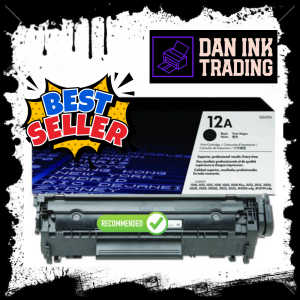
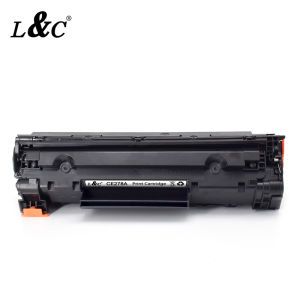
HPee 12A (Q2612A) Laser Jet Black Original Toner Cartridge

12A Black Original LaserJet Toner Cartridge Specifications. SELECTABILITY. 12A. CARTRIDGE COLORS. Black. PAGE YIELD BLACK AND WHITE). 2,000 pages. PAGE YIELD FOOTNOTE. Approximate average yield based on ISO/IEC 19752. Actual yield varies considerably based on content of printed pages and other factors. For details s. WHAT'S IN THE BOX. Toner cartridge, Recycling guide. PACKAGE DIMENSIONS W X D X H). 357 x 105 x 134 mm. OPERATING TEMPERATURE RANGE. 7.5 to 32.5C. STORAGE TEMPERATURE RANGE. 20 to 40C. NON-OPERATING HUMIDITY RANGE. 10 to 90 RH

Dan Ink Trading

Dan Ink Trading

Seller ratings 97%

You May Also Like
CANON Mobile Photo Printer SELPHY CP1500 1500 USB Type C Wi-Fi 300 x 300 DPI Resolution MVP CAMERA
00:59

CANON Mobile Photo Printer SELPHY CP1500 1500 USB Type C Wi-Fi 300 x 300 DPI Resolution MVP CAMERA

HP Printhead Kit 3JB06AA: A Comprehensive Guide
00:11

HP Printhead Kit 3JB06AA: A Comprehensive Guide

Instax Inspired Photo Prints Valentines Edition
00:25

Instax Inspired Photo Prints Valentines Edition

2 Inch Bluetooth USB Barcode Label Printer: A Compact & Efficient Solution
00:54

2 Inch Bluetooth USB Barcode Label Printer: A Compact & Efficient Solution

G2 Gel-Ink Refills for Retractable Gel Ink Pen 0.5mm/0.7mm Point Blue/Black for Student Teacher Office Worker 10 Pack
00:14

G2 Gel-Ink Refills for Retractable Gel Ink Pen 0.5mm/0.7mm Point Blue/Black for Student Teacher Office Worker 10 Pack

Ricoh Toner Compatible and For Use 1Kg MP2000 MP2014 MP2851 MP2501 MP2550 MP4000 and all Monochrome Machine
00:19

Ricoh Toner Compatible and For Use 1Kg MP2000 MP2014 MP2851 MP2501 MP2550 MP4000 and all Monochrome Machine

Modulars V Slot Rollers Assembly V Gantry Plate for 2020V slot Aluminum Profile in DIY 3D Printing Automation Projects
00:16

Modulars V Slot Rollers Assembly V Gantry Plate for 2020V slot Aluminum Profile in DIY 3D Printing Automation Projects

NIIMBOT B21 Thermal Label Printer Portable Bluetooth Inkless Label Maker Office Medical Cable Clothing Sticker Portable Label Machine for Android/IOS Phone Included Label Paper
00:42

NIIMBOT B21 Thermal Label Printer Portable Bluetooth Inkless Label Maker Office Medical Cable Clothing Sticker Portable Label Machine for Android/IOS Phone Included Label Paper

HPee 48A / CF248A Black Original Toner Cartridge
00:21

HPee 48A / CF248A Black Original Toner Cartridge

3D Pen Kids 3 Speed Adjustable 3D Printing Pen LCD Screen DIY Drawing Pens PLA Filament Children Toys Girls and Boys Gifts
00:08

3D Pen Kids 3 Speed Adjustable 3D Printing Pen LCD Screen DIY Drawing Pens PLA Filament Children Toys Girls and Boys Gifts

EPSON 664 INK GENUINE 100% ORIGINAL (L360 L3110 L200 L565 L220 L130)\\n\\n Understanding EPSON 664 INK GENUINE\\n\\n What is EPSON 664 INK GENUINE?\\n\\nEPSON 664 INK GENUINE is a high-quality ink cartridge specifically designed for EPSON printers such as L360, L3110, L200, L565, L220, and L130. This ink cartridge guarantees optimal performance and print quality, ensuring your documents and photos look their best.\\n\\n Benefits of using 100% ORIGINAL EPSON INK\\n\\nUsing 100% original EPSON ink provides numerous benefits, including:\\n\\n- **Superior Print Quality**: Original EPSON ink cartridges produce vibrant colors and sharp text, making your prints stand out.\\n- **Reliability**: Genuine EPSON ink cartridges are tested and optimized for EPSON printers, reducing the risk of print errors and ensuring consistent performance.\\n- **Durability**: Original EPSON ink cartridges have a longer lifespan compared to compatible alternatives, providing cost savings over time.\\n\\n Compatible Ink for EPSON Printers\\n\\n Advantages of using compatible ink cartridges\\n\\nWhile original EPSON ink cartridges offer superior print quality and reliability, compatible ink cartridges can be a cost-effective alternative. Some advantages of using compatible ink cartridges include:\\n\\n- **Cost Savings**: Compatible ink cartridges often come at a lower price point, allowing you to save money on printing costs.\\n- **Wide Availability**: Compatible ink cartridges are readily available from various manufacturers, providing more options for consumers.\\n\\n How to choose the right compatible ink for your printer\\n\\nWhen selecting a compatible ink cartridge for your EPSON printer, consider the following factors:\\n\\n- **Compatibility**: Ensure the compatible ink cartridge is specifically designed for your printer model.\\n- **Quality**: Look for reputable manufacturers that prioritize quality and reliability.\\n- **Price**: Compare prices from different manufacturers to find the best value for your budget.\\n\\n Installing EPSON 664 INK GENUINE\\n\\n Step-by-step guide to installing genuine EPSON ink cartridges\\n\\nFollow these steps to install EPSON 664 INK GENUINE in your printer:\\n\\n1. Turn off your printer and open the ink cartridge access door.\\n2. Remove the old ink cartridge by gently pulling it out of its slot.\\n3. Carefully remove the new EPSON 664 INK GENUINE from its packaging.\\n4. Insert the new ink cartridge into its designated slot and close the ink cartridge access door.\\n5. Turn on your printer and allow it to initialize.\\n\\n Troubleshooting common ink installation issues\\n\\nIf you encounter any issues during the ink cartridge installation process, refer to the following troubleshooting tips:\\n\\n- **Print Quality Issues**: If your prints appear faded or blurry, try cleaning the print head or replacing the ink cartridge.\\n- **Ink Cartridge Not Detected**: Ensure the ink cartridge is properly inserted and the ink cartridge access door is closed.\\n\\n Maximizing Printer Performance\\n\\n Best practices for maintaining optimal printer performance\\n\\nTo keep your EPSON printer running smoothly, follow these best practices:\\n\\n- **Regular Maintenance**: Clean the print head and replace the ink cartridges regularly to maintain optimal print quality.\\n- **Proper Storage**: Store ink cartridges in a cool, dry place away from direct sunlight to prevent drying out.\\n- **Software Updates**: Keep your printer software up-to-date to ensure compatibility with the latest ink cartridges and features.\\n\\n Tips for extending the lifespan of your ink cartridges\\n\\nTo extend the lifespan of your EPSON 664 INK GENUINE, consider the following tips:\\n\\n- **Use the Right Paper**: Using high-quality paper can help prevent ink smudging and bleeding, reducing the amount of ink used.\\n- **Print in Draft Mode**: Printing in draft mode can reduce ink usage, extending the lifespan of your ink cartridges.\\n- **Store Ink Cartridges Properly**: Storing ink cartridges in a cool, dry place can help prevent drying out and extend their lifespan.\"
00:28

EPSON 664 INK GENUINE 100% ORIGINAL (L360 L3110 L200 L565 L220 L130)\\n\\n Understanding EPSON 664 INK GENUINE\\n\\n What is EPSON 664 INK GENUINE?\\n\\nEPSON 664 INK GENUINE is a high-quality ink cartridge specifically designed for EPSON printers such as L360, L3110, L200, L565, L220, and L130. This ink cartridge guarantees optimal performance and print quality, ensuring your documents and photos look their best.\\n\\n Benefits of using 100% ORIGINAL EPSON INK\\n\\nUsing 100% original EPSON ink provides numerous benefits, including:\\n\\n- **Superior Print Quality**: Original EPSON ink cartridges produce vibrant colors and sharp text, making your prints stand out.\\n- **Reliability**: Genuine EPSON ink cartridges are tested and optimized for EPSON printers, reducing the risk of print errors and ensuring consistent performance.\\n- **Durability**: Original EPSON ink cartridges have a longer lifespan compared to compatible alternatives, providing cost savings over time.\\n\\n Compatible Ink for EPSON Printers\\n\\n Advantages of using compatible ink cartridges\\n\\nWhile original EPSON ink cartridges offer superior print quality and reliability, compatible ink cartridges can be a cost-effective alternative. Some advantages of using compatible ink cartridges include:\\n\\n- **Cost Savings**: Compatible ink cartridges often come at a lower price point, allowing you to save money on printing costs.\\n- **Wide Availability**: Compatible ink cartridges are readily available from various manufacturers, providing more options for consumers.\\n\\n How to choose the right compatible ink for your printer\\n\\nWhen selecting a compatible ink cartridge for your EPSON printer, consider the following factors:\\n\\n- **Compatibility**: Ensure the compatible ink cartridge is specifically designed for your printer model.\\n- **Quality**: Look for reputable manufacturers that prioritize quality and reliability.\\n- **Price**: Compare prices from different manufacturers to find the best value for your budget.\\n\\n Installing EPSON 664 INK GENUINE\\n\\n Step-by-step guide to installing genuine EPSON ink cartridges\\n\\nFollow these steps to install EPSON 664 INK GENUINE in your printer:\\n\\n1. Turn off your printer and open the ink cartridge access door.\\n2. Remove the old ink cartridge by gently pulling it out of its slot.\\n3. Carefully remove the new EPSON 664 INK GENUINE from its packaging.\\n4. Insert the new ink cartridge into its designated slot and close the ink cartridge access door.\\n5. Turn on your printer and allow it to initialize.\\n\\n Troubleshooting common ink installation issues\\n\\nIf you encounter any issues during the ink cartridge installation process, refer to the following troubleshooting tips:\\n\\n- **Print Quality Issues**: If your prints appear faded or blurry, try cleaning the print head or replacing the ink cartridge.\\n- **Ink Cartridge Not Detected**: Ensure the ink cartridge is properly inserted and the ink cartridge access door is closed.\\n\\n Maximizing Printer Performance\\n\\n Best practices for maintaining optimal printer performance\\n\\nTo keep your EPSON printer running smoothly, follow these best practices:\\n\\n- **Regular Maintenance**: Clean the print head and replace the ink cartridges regularly to maintain optimal print quality.\\n- **Proper Storage**: Store ink cartridges in a cool, dry place away from direct sunlight to prevent drying out.\\n- **Software Updates**: Keep your printer software up-to-date to ensure compatibility with the latest ink cartridges and features.\\n\\n Tips for extending the lifespan of your ink cartridges\\n\\nTo extend the lifespan of your EPSON 664 INK GENUINE, consider the following tips:\\n\\n- **Use the Right Paper**: Using high-quality paper can help prevent ink smudging and bleeding, reducing the amount of ink used.\\n- **Print in Draft Mode**: Printing in draft mode can reduce ink usage, extending the lifespan of your ink cartridges.\\n- **Store Ink Cartridges Properly**: Storing ink cartridges in a cool, dry place can help prevent drying out and extend their lifespan.\"

HP 305 305XL Ink Cartridge Compatible with HP Deskjet 2320 2710 2720/4110 2723 2724 2721 2722 6410 6412 4120 4130 6010 6020 Printers
00:27

HP 305 305XL Ink Cartridge Compatible with HP Deskjet 2320 2710 2720/4110 2723 2724 2721 2722 6410 6412 4120 4130 6010 6020 Printers