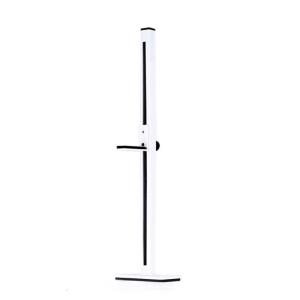
Metal Graphics Card Brace GPU Stand Holder Prevents Drooping With Multiple Height Setting Stable Magnetic Base
Effectively prevents GPU sagging ensuring long time stability and extending your graphics card service life with its durability aluminum construction. Featuring a glides adjustment and magnetic base designing. this 21cmGPU bracket offers customizable height adjustments to fit PC case while maintaining vibration resistant stability under heavy loads. Metal Graphics Card Brace GPU Stand Holder Prevents Drooping With Multiple Height Setting Stable Magnetic Base Features: Effectively prevents GPU sagging ensuring long time stability and extending your graphics card service life with its durability aluminum construction. Featuring a glides adjustment and magnetic base designing. this 21cmGPU bracket offers customizable height adjustments to fit PC case while maintaining vibration resistant stability under heavy loads. Ideal for PC builders and gamers this GPU support solves sagging issue in vertical or horizontal GPU installations. Perfect for gaming rigs, workstations, or builds requiring

SZ 3C Electronics
Review

You May Also Like
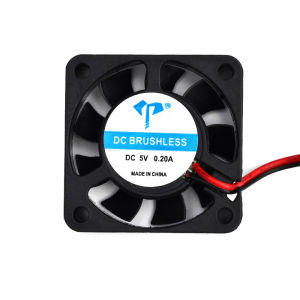
PANTHON DC4010 40mm Quiet Cooling Fan: A Simple & Long-lasting Solution
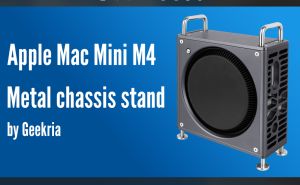
Geekria Computer Aluminum Chassis Stand Compatible with Apple 2024 Mac Mini M4 / Mac Mini M4 Pro Case - Accessories Optimized Heat Dissipation (Space Gray)

monitor dell 17 inches lcd monitor square black
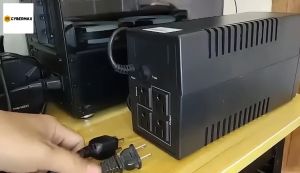
Secure UPS: 650VA to 3000VA Uninterruptible Power Supply for PC & Laptop\\n\\n Understanding Secure UPS\\n\\n What is an Uninterruptible Power Supply?\\n\\nAn Uninterruptible Power Supply (UPS) is a backup power source designed to provide continuous electricity during unexpected power outages. Secure UPS models offer reliable protection for your computer systems, including PCs and laptops, by maintaining a consistent power supply. This ensures your work remains uninterrupted and helps prevent data loss.\\n\\n How Does Secure UPS Work?\\n\\nSecure UPS works by continuously monitoring the incoming electrical supply. If it detects a drop or surge in voltage, it switches to battery power almost instantaneously. This transition is seamless, allowing your devices to continue operating without interruption. Once the primary power source is restored, the UPS automatically reverts back to normal operation.\\n\\n Choosing the Right Secure UPS\\n\\n Selecting the Right Capacity: 650VA to 3000VA\\n\\nWhen choosing a Secure UPS, consider the total power requirements of your devices. Secure UPS offers various models with capacities ranging from 650VA to 3000VA. This range caters to different needs, whether you're protecting a single laptop or a larger desktop setup.\\n\\n* 650VA: Ideal for laptops and small devices\n* 1000VA: Suitable for desktop computers and moderate-sized systems\n* 1500VA: Offers extended runtime for power-hungry applications\n* 2000VA: Provides robust protection for gaming PCs and larger setups\n* 3000VA: Perfect for server rooms and high-power configurations\\n\\n Comparing Secure UPS Models for Desktop & Laptop\\n\\nWhen selecting a Secure UPS model, consider the specific needs of your desktop or laptop setup. For laptops, a smaller capacity UPS may suffice, while desktop users might require more substantial power reserves. Additionally, some Secure UPS models offer advanced features like WiFi connectivity and remote management capabilities, which can be beneficial for home office environments.\\n\\n Setting Up Your Secure UPS\\n\\n Installing a Secure UPS for Home Office\\n\\nInstalling a Secure UPS in your home office is a straightforward process. First, ensure you've chosen the appropriate capacity for your devices. Next, connect your UPS to a power outlet and plug your devices into the UPS's output ports. Finally, configure any necessary settings, such as battery runtime or surge protection levels.\\n\\n Configuring WiFi Connectivity for Secure UPS\\n\\nMany Secure UPS models come equipped with built-in WiFi capabilities, allowing you to monitor and manage your UPS remotely. To set up WiFi connectivity, simply connect your Secure UPS to your home network using the provided instructions. Once connected, you can access real-time data, receive notifications, and perform maintenance tasks from anywhere.\\n\\n Maximizing Your Secure UPS Performance\\n\\n Maintaining Your Secure UPS\\n\\nRegular maintenance is essential to ensure your Secure UPS operates at peak performance. Follow these tips:\\n\\n* Check battery levels regularly\\n* Keep the unit clean and free from dust\\n* Replace batteries every 3-5 years\\n* Update firmware if necessary\\n\\n Troubleshooting Common Issues\\n\\nIf you encounter problems with your Secure UPS, refer to the troubleshooting guide provided by Secure UPS. Common issues may include:\\n\\n* Incorrect power settings\\n* Battery issues\\n* Connectivity problems\\n\\nBy addressing these concerns promptly, you can maintain a reliable power supply for your PC and laptop.\"\n}

NEW Dell OptiPlex Micro All in One Stand MFS18 for 3040 – 3090 5040 – 5090 7040 – 7090

10/20/30Pcs Nfc Card for ntag 215 White Card For TagMo Forum Type2 Sticker NFC Tags Chip For Animal Crossing NFC Tag
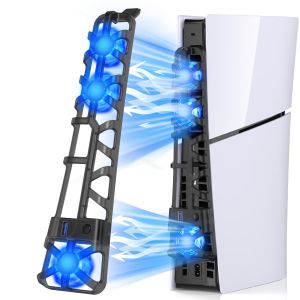
PS5 Slim Cooling Fans Cooling Fan for Playstation 5 Slim Disc Edition/Digital With RGB Lighting and USB 3.0 Port For New PS5
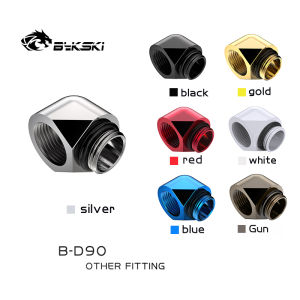
Bykski Black White Silver Gold G1/4 Thread 90 Degree Fitting Adapter Water Cooling Adaptors Thread Length 10MM B-D90
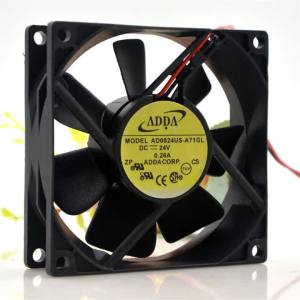
Adda AD0824US-A71GL 8025 24V 0.26A 8CM Converter Cooling Fan 2-Wire
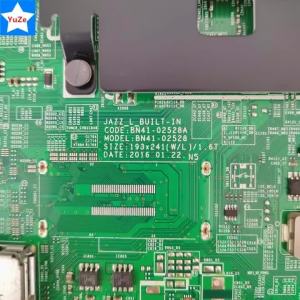
Good Working BN94-10790A BN97-10970A Motherboard for UN55KU7500FXZA UN55KU7500F UN55KU7500 TV Main Board Version FA01

Arctic Mx-4 Thermal Paste Graphics Card Cpu Cooler Thermal Grease