



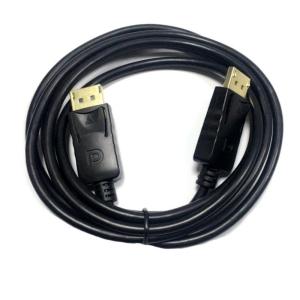
DisplayPort Cable DP to DP Extension Cable for HDTV Boxes & Gaming Monitors
DisplayPort Cable DP to DP Extension Cable for HDTV Boxes & Gaming Monitors
What is a DisplayPort Cable?
A DisplayPort cable is a high-definition video cable used to connect devices like gaming monitors, HDTV boxes, and other display devices. These cables transmit digital audio and video signals, ensuring high-quality visual and audio experiences.
Core Components & Benefits
DisplayPort cables consist of four main components: data lanes, auxiliary channel, clock lane, and hot plug detect. These components work together to provide a reliable connection and deliver high-quality video and audio.
Benefits of using DisplayPort cables include:
- High-definition video and audio transmission
- Compatibility with various devices
- Support for multiple display outputs
- Lower power consumption compared to other cables
How It Works
DisplayPort cables use a digital protocol to transmit data between devices. The cable transmits digital signals through its four data lanes, which carry audio and video information. The auxiliary channel and clock lane ensure proper synchronization and communication between devices.
Selecting the Right DisplayPort Cable
Choosing the right DisplayPort cable depends on various factors, such as the device's compatibility, length, and quality.
Factors to Consider
When selecting a DisplayPort cable, consider the following factors:
- Device compatibility: Ensure the cable is compatible with your gaming monitor or HDTV box.
- Length: Choose a cable length that suits your setup, considering factors like distance and placement.
- Quality: Opt for high-quality cables that provide reliable connections and prevent signal degradation.
Types of Cables Available
There are two types of DisplayPort cables available: passive and active cables. Passive cables are ideal for shorter distances, while active cables provide better performance over longer distances.
Connecting Your HDTV Box & Gaming Monitor
To connect your HDTV box and gaming monitor using a DisplayPort cable, follow these steps:
Step-by-Step Guide
- Turn off both devices to avoid potential damage during connection.
- Connect one end of the DisplayPort cable to your HDTV box's DisplayPort port.
- Connect the other end of the cable to your gaming monitor's DisplayPort port.
- Turn on both devices and adjust settings as needed.
Troubleshooting Common Issues
If you encounter issues during connection, try the following troubleshooting steps:
- Check connections: Ensure both ends of the cable are securely connected to the respective ports.
- Update drivers: Update your display adapter drivers to ensure compatibility.
- Reset settings: Reset your device's display settings to default values.
Maximizing Your DisplayPort Cable Experience
To get the most out of your DisplayPort cable, follow these best practices and tips:
Best Practices & Tips
- Use high-quality cables to ensure reliable connections and prevent signal degradation.
- Regularly clean ports to maintain optimal performance.
- Avoid bending or twisting cables, which may cause damage.
Enhancing Performance
To enhance your DisplayPort cable's performance, consider the following tips:
- Choose the right cable length for your setup.
- Opt for active cables if you require long-distance connections.
- Update your device drivers regularly to ensure compatibility.

Armandg Judithw
Review

You May Also Like
Portable Hollow-carved Transparent Acrylic Stand for Mobile Phones and Tablets YN262
✅100% Original Smilee NeePho NP-L7 1.8 Multi-function Beauty Fill Light Selfie Stick Travel Portable Live
Stainless Steel Mixer Bowl for KitchenAid Artisan & Classic Series: The Ultimate Guide
Silicone Phone Case for iQOOZ1X V2012A: Protective Cover & Anti-Fall Shell
HT-10 Digital Egg Boiler Controller Automatic Turn Thermostat Hygrostat with Temperature Humidity Sensor
Universal Adjustable Phone Holder Clip Lazy Bracket Double Pull Mobile Phone Soft Tube Clamp Versatile Rotation Live Broadcast
Mobile Phone Mount Tripod Adapter with 1/4in Screw 360 Degree Rotating Clamp Connect to Tripod Monopod Adjustable
Universal Water Cooler Smart Seat Water Bottle Holder Water Dispenser Seat
Xundd PU Leather Non-Slip Fingerprint Resistant Magnetic Magsafe Case for iPhone 14 Pro Max & Beyond
Outdoor home portable all-metal rotating mobile phone stand tablet decompression multi-function folding hollow heat dissipation aluminum alloy stand
Simple Macaron Solid Color Matte Texture Wireless Charge Magnetic Phone Cover Case for iPhone 13 14 15 16 17 Pro Max
![[PERNG] Tehe Conditioner Air Conditioning Remote Control Suitable For Panasonic Controller A75C3407 A75C3623 A75C3625 KTSX003 A75C3297](https://img.lazcdn.com/g/p/f1465ca481d71e05150dd16560958ff4.jpg_300x300q80.jpg)

















