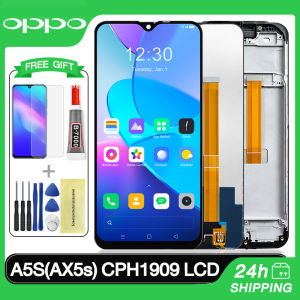
Original LCD With Frame For OPPO A5S A3S A1K LCD Touch Screen Display Digitizer Assembly
Original LCD With Frame For OPPO A5S A3S A1K LCD Touch Screen Display Digitizer Assembly
What is the Replacement LCD for OPPO Devices?
The replacement LCD for OPPO devices refers to the process of replacing the original liquid crystal display (LCD) screen on OPPO smartphones, such as the A5S, A3S, and A1K models. This process typically involves installing a new LCD with frame, which includes the touch screen display and digitizer assembly. By doing so, users can restore their phone's functionality and improve its overall performance.
Key Features of OPPO A5S LCD Screen
The OPPO A5S LCD screen is known for its high resolution, bright colors, and clear display. Some key features include:
- High-resolution display
- Bright and vivid colors
- Clear and sharp images
- Touch screen functionality
Benefits of Using a High-Quality LCD with Frame for OPPO
Using a high-quality LCD with frame for OPPO devices offers several benefits, such as:
- Improved display quality
- Enhanced touch screen functionality
- Increased durability
- Better overall performance
How to Choose the Right LCD Touch Screen Display Digitizer Assembly
Choosing the right LCD touch screen display digitizer assembly for your OPPO device is crucial to ensure proper installation and optimal performance. Here are some tips:
Identifying Compatible Models: A1K, A3S, A5S
Before purchasing a new LCD touch screen display digitizer assembly, make sure it is compatible with your specific OPPO model. The A1K, A3S, and A5S models require different assemblies, so choose the one that matches your device.
Factors to Consider When Selecting a LCD Touch Screen Display Digitizer Assembly
When selecting a new LCD touch screen display digitizer assembly, consider the following factors:
- Compatibility with your OPPO model
- Quality of the display
- Touch screen functionality
- Durability
- Price
Installation Guide for OPPO A5S A3S A1K LCD Touch Screen Display Digitizer Assembly
Installing a new LCD touch screen display digitizer assembly on your OPPO device requires some technical knowledge and specific tools. Here's a step-by-step guide:
Tools Required for the Installation Process
Before starting the installation process, make sure you have the following tools:
- Screwdriver set
- Prying tool
- Plastic opening tool
- Adhesive tape
Step-by-Step Instructions for Replacing the LCD Touch Screen Display Digitizer Assembly
- Power off your OPPO device and remove the battery.
- Use a screwdriver to remove the screws securing the back cover.
- Carefully pry open the back cover using a prying tool.
- Disconnect the battery connector.
- Remove the screws securing the LCD touch screen display digitizer assembly.
- Carefully disconnect the LCD touch screen display digitizer assembly from the motherboard.
- Remove the old LCD touch screen display digitizer assembly and replace it with the new one.
- Reconnect the LCD touch screen display digitizer assembly to the motherboard.
- Secure the new LCD touch screen display digitizer assembly with screws.
- Reconnect the battery connector.
- Reattach the back cover and secure it with screws.
- Insert the battery and power on your OPPO device.
Troubleshooting Common Issues with OPPO A5S A3S A1K LCD Touch Screen Display Digitizer Assembly
Even after installing a new LCD touch screen display digitizer assembly, some issues may still arise. Here are some common problems and solutions:
Identifying and Fixing Display Problems
If you encounter display problems after installing a new LCD touch screen display digitizer assembly, try the following steps:
- Power cycle your OPPO device.
- Check if the LCD touch screen display digitizer assembly is properly connected to the motherboard.
- Reinstall the LCD touch screen display digitizer assembly.
- If the problem persists, consider seeking professional help.
Common Mistakes to Avoid During Installation
To avoid common mistakes during the installation process, keep the following tips in mind:
- Make sure you have the correct tools and parts.
- Follow the step-by-step instructions carefully.
- Double-check connections before powering on your OPPO device.
- If you're unsure about any steps, seek professional help.

LEIX Mobile
Review

You May Also Like
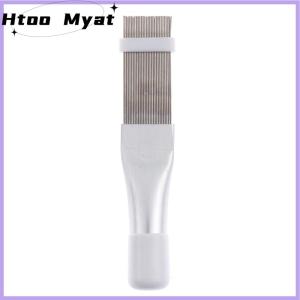
tantuoye Air Conditioner Repair Tool Comb A C Hvac Radiator Universal Folding Brush

High Definition Mirror Silicone Phone Case for Samsung S24 Rose Line Design Protective Cover with Makeup Mirror for Women

Punk Dark Lilac Acrylic Art Case Elite Simplicity Ins Vintage for iPhone 17 pro Max Apple 17 Air plus 16 pro Protect Shell Phones

💯【Phone Case】+FREE Shipping 💯 2025 Luxury Oriental Style Glitter Gold Snake Graphic Phone Case Suitable For iPhone 16 15 14 13 Pro Max Shockproof Silicone Protective Cover

New Casing Tecno Spark Go 1 Spark30 Spark 30 Pro 30C 4G 5G Ins Cute Cartoon Fashion Bear Phone Case All-inclusive Anti-fall Shockproof Soft Back Cover 2024
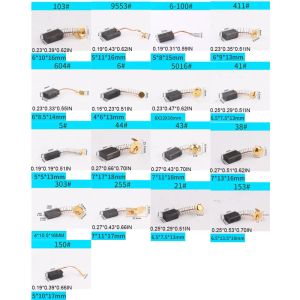
10 Pcs Angle Grinder Carbon Brushes Selected Spring Carbon Brush for Electric Motors Spare Part Replacement

One-click Installation HD Tempered Glass For Vivo X50 X60 X70 V15 V9 V20 se Pro V21 V21E V23 V23e V29e V25 V25E V27E V40 V50 Lite S1 Pro Y200 Y100 4G 5G Dust Free Screen Protector Film
Oppo R17 & R17pro: New Year Edition Privacy Film & Drop-Proof Protection
Huawei Mate10 pro Phone Case Crossbody Strap Cloud Kuroko Baku Anti-fall Protection Soft Silicone Original Cute Girl Style

Ultimate Guide to Bear Design & Protective Cases for Vivo X100 X100s Pro Ultra Casing

COMAN Phone Tripod: A Comprehensive Guide to the Ultimate Travel & Vlogging Companion