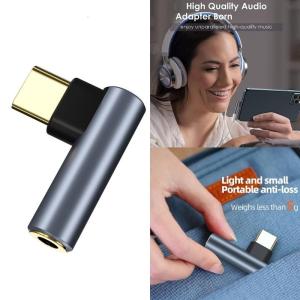
Right Angle Type C to 3.5mm Headphone Plugs Dongle Type C to 3.5mm Auxiliary Sound Adapter Aluminum Adapter for Smartphones Use

Experience smooth Sound connection with our Type C to 3.5mm Sound Adapter, designs for and devices, ensuring fidelities sound quality and uninterrupted music enjoyment. Featuring a 90 degree L design, this adapter minimizes cable wear and enhances durability, making it perfect for gaming and video watching without obstructing your view. Ideal for individuals who value high quality Sound experiences, this adapter caters to users of smartphones lacking a 3.5mm Plugs. Right Angle Type C to 3.5mm Headphone Plugs Dongle Type C to 3.5mm Auxiliary Sound Adapter Aluminum Adapter for Smartphones Use. Features: Experience smooth Sound connection with our Type C to 3.5mm Sound Adapter, designs for and devices, ensuring fidelities sound quality and uninterrupted music enjoyment. Featuring a 90 degree L design, this adapter minimizes cable wear and enhances durability, making it perfect for gaming and video watching without obstructing your view. Ideal for individuals who value high quality Sound e

xingaoye00
xingaoye00

Seller ratings 96%

Review

Oops
This video has no reviews.

You May Also Like

COOLER MASTER ELITE NEX W500 230W WHITE 80 PLUS  PSU MPW-5001-ACBW-BPH BLACK 120MM FAN ACTIVE PFC  ATX  NON MODULAR
01:01

COOLER MASTER ELITE NEX W500 230W WHITE 80 PLUS PSU MPW-5001-ACBW-BPH BLACK 120MM FAN ACTIVE PFC ATX NON MODULAR

Strong Engine Cooling System Upgrades with High Temperature Resistance High Performances Engine Cooling Kit for LS Series
00:14

Strong Engine Cooling System Upgrades with High Temperature Resistance High Performances Engine Cooling Kit for LS Series

AOC A24A99-1 AIO All in One Desktop PC Computer 24 inch PC Full Set Intel Core i7 12th/13th Generation processor 16G RAM 1TB SSD Built-in bluetooth、WiFi、speaker For Home/Office/Gaming 1920*1080 Large IPS FHD Monitor
00:57

AOC A24A99-1 AIO All in One Desktop PC Computer 24 inch PC Full Set Intel Core i7 12th/13th Generation processor 16G RAM 1TB SSD Built-in bluetooth、WiFi、speaker For Home/Office/Gaming 1920*1080 Large IPS FHD Monitor

14 Inch Laptop LCD Screen B140UAN01.1 Display Matrix Panel Replacement 1920x1200 Non-Touch
00:24

14 Inch Laptop LCD Screen B140UAN01.1 Display Matrix Panel Replacement 1920x1200 Non-Touch

Samsung | Asus 27 Inch 2K 300Hz High Refresh Rate Esports Monitor Curved Non-Touchscreen No Built-In Speakers New Condition 36 Month Warranty
00:41

Samsung | Asus 27 Inch 2K 300Hz High Refresh Rate Esports Monitor Curved Non-Touchscreen No Built-In Speakers New Condition 36 Month Warranty

=Bonkyo F999 SoundCard + M999 Mic combination set Bluetooth wireless mixer noise reduction live set.
00:55

=Bonkyo F999 SoundCard + M999 Mic combination set Bluetooth wireless mixer noise reduction live set.

Crucial 8GB & 4GB DDR3 1866Mhz RAM: A Comprehensive Guide\\n\\n What is Crucial DDR3 Laptop RAM?\\n\\nCrucial DDR3 Laptop RAM is a type of Random Access Memory (RAM) designed specifically for laptops and notebooks. This particular RAM module is available in two capacities - 8GB and 4GB - and operates at various speeds including 1866MHz, 1600MHz, 1333MHz, and 1066MHz. It supports PC3-14900, PC3-12800, PC3-10600, and PC3-8500 speed ratings, making it compatible with a wide range of notebook models.\\n\\n Key Features of Crucial DDR3 RAM\\n\\n- **Capacity**: Available in 8GB and 4GB configurations\\n- **Speed**: Supports 1866MHz, 1600MHz, 1333MHz, and 1066MHz speeds\\n- **Voltage**: 1.5V 204pin SO-DIMM memory\\n- **Compatibility**: PC3-14900, PC3-12800, PC3-10600, and PC3-8500 speed ratings\\n\\n Compatibility with Various Notebooks\\n\\nCrucial DDR3 Laptop RAM is compatible with a wide range of notebook models, including those from popular manufacturers like Dell, HP, Lenovo, and Acer. To ensure compatibility with your specific laptop model, refer to the manufacturer's specifications or consult Crucial's compatibility checker.\\n\\n How to Choose the Right Crucial RAM for Your Notebook\\n\\nChoosing the right Crucial DDR3 Laptop RAM for your notebook involves understanding your laptop's RAM requirements and identifying the appropriate speed rating.\\n\\n Understanding PC3-14900 & Other Speed Ratings\\n\\nThe speed ratings of Crucial DDR3 Laptop RAM include PC3-14900, PC3-12800, PC3-10600, and PC3-8500. These ratings represent the theoretical peak transfer rate of the memory module, measured in megabytes per second (MB/s).\\n\\n- **PC3-14900**: 1866MHz speed, 14,900 MB/s transfer rate\\n- **PC3-12800**: 1600MHz speed, 12,800 MB/s transfer rate\\n- **PC3-10600**: 1333MHz speed, 10,600 MB/s transfer rate\\n- **PC3-8500**: 1066MHz speed, 8,500 MB/s transfer rate\\n\\n Identifying Your Laptop's RAM Requirements\\n\\nTo determine the appropriate Crucial DDR3 Laptop RAM for your notebook, consult the manufacturer's specifications or use Crucial's compatibility checker. Consider factors such as the maximum supported capacity, voltage, and speed rating when selecting the right RAM module for your laptop.\\n\\n Installing Crucial DDR3 RAM: A Step-by-Step Guide\\n\\nInstalling Crucial DDR3 Laptop RAM is a straightforward process that involves preparing for installation, inserting the RAM module into your notebook, and verifying installation success.\\n\\n Preparing for Installation\\n\\nBefore installing Crucial DDR3 Laptop RAM, ensure that your laptop is powered off and unplugged from any power sources. Gather necessary tools, such as a screwdriver, and prepare a clean, static-free workspace.\\n\\n Inserting the RAM Module into Your Notebook\\n\\n1. Open your laptop's RAM compartment by removing the screws securing the panel.\\n2. Align the notches on the Crucial DDR3 Laptop RAM module with the slots on your notebook's motherboard.\\n3. Gently press the RAM module into place until it clicks.\\n4. Replace the screws securing the RAM compartment panel.\\n\\n Verifying Installation Success\\n\\nAfter installing Crucial DDR3 Laptop RAM, power on your laptop and enter the BIOS/UEFI settings to verify that the new RAM module is recognized. Check your operating system's system information to confirm that the correct amount of RAM is installed.\\n\\n Maximizing Performance with Crucial DDR3 RAM\\n\\nTo maximize performance with Crucial DDR3 Laptop RAM, optimize your laptop's settings and enhance system stability and speed.\\n\\n Optimizing Your Laptop's Settings\\n\\nAdjust your laptop's power settings, disable unnecessary startup programs, and configure the operating system's virtual memory settings to improve overall performance.\\n\\n Enhancing System Stability & Speed\\n\\nRegularly update your operating system and drivers, defragment your hard drive, and run system maintenance tasks to maintain optimal system stability and speed.\\n\\n Conclusion: Upgrade Your Notebook with Crucial DDR3 RAM\\n\\nUpgrading your notebook with Crucial DDR3 Laptop RAM can significantly enhance performance and stability. By understanding your laptop's RAM requirements, choosing the right Crucial DDR3 Laptop RAM, and following the installation process, you can enjoy faster system speeds and improved overall performance.\"
00:40

Crucial 8GB & 4GB DDR3 1866Mhz RAM: A Comprehensive Guide\\n\\n What is Crucial DDR3 Laptop RAM?\\n\\nCrucial DDR3 Laptop RAM is a type of Random Access Memory (RAM) designed specifically for laptops and notebooks. This particular RAM module is available in two capacities - 8GB and 4GB - and operates at various speeds including 1866MHz, 1600MHz, 1333MHz, and 1066MHz. It supports PC3-14900, PC3-12800, PC3-10600, and PC3-8500 speed ratings, making it compatible with a wide range of notebook models.\\n\\n Key Features of Crucial DDR3 RAM\\n\\n- **Capacity**: Available in 8GB and 4GB configurations\\n- **Speed**: Supports 1866MHz, 1600MHz, 1333MHz, and 1066MHz speeds\\n- **Voltage**: 1.5V 204pin SO-DIMM memory\\n- **Compatibility**: PC3-14900, PC3-12800, PC3-10600, and PC3-8500 speed ratings\\n\\n Compatibility with Various Notebooks\\n\\nCrucial DDR3 Laptop RAM is compatible with a wide range of notebook models, including those from popular manufacturers like Dell, HP, Lenovo, and Acer. To ensure compatibility with your specific laptop model, refer to the manufacturer's specifications or consult Crucial's compatibility checker.\\n\\n How to Choose the Right Crucial RAM for Your Notebook\\n\\nChoosing the right Crucial DDR3 Laptop RAM for your notebook involves understanding your laptop's RAM requirements and identifying the appropriate speed rating.\\n\\n Understanding PC3-14900 & Other Speed Ratings\\n\\nThe speed ratings of Crucial DDR3 Laptop RAM include PC3-14900, PC3-12800, PC3-10600, and PC3-8500. These ratings represent the theoretical peak transfer rate of the memory module, measured in megabytes per second (MB/s).\\n\\n- **PC3-14900**: 1866MHz speed, 14,900 MB/s transfer rate\\n- **PC3-12800**: 1600MHz speed, 12,800 MB/s transfer rate\\n- **PC3-10600**: 1333MHz speed, 10,600 MB/s transfer rate\\n- **PC3-8500**: 1066MHz speed, 8,500 MB/s transfer rate\\n\\n Identifying Your Laptop's RAM Requirements\\n\\nTo determine the appropriate Crucial DDR3 Laptop RAM for your notebook, consult the manufacturer's specifications or use Crucial's compatibility checker. Consider factors such as the maximum supported capacity, voltage, and speed rating when selecting the right RAM module for your laptop.\\n\\n Installing Crucial DDR3 RAM: A Step-by-Step Guide\\n\\nInstalling Crucial DDR3 Laptop RAM is a straightforward process that involves preparing for installation, inserting the RAM module into your notebook, and verifying installation success.\\n\\n Preparing for Installation\\n\\nBefore installing Crucial DDR3 Laptop RAM, ensure that your laptop is powered off and unplugged from any power sources. Gather necessary tools, such as a screwdriver, and prepare a clean, static-free workspace.\\n\\n Inserting the RAM Module into Your Notebook\\n\\n1. Open your laptop's RAM compartment by removing the screws securing the panel.\\n2. Align the notches on the Crucial DDR3 Laptop RAM module with the slots on your notebook's motherboard.\\n3. Gently press the RAM module into place until it clicks.\\n4. Replace the screws securing the RAM compartment panel.\\n\\n Verifying Installation Success\\n\\nAfter installing Crucial DDR3 Laptop RAM, power on your laptop and enter the BIOS/UEFI settings to verify that the new RAM module is recognized. Check your operating system's system information to confirm that the correct amount of RAM is installed.\\n\\n Maximizing Performance with Crucial DDR3 RAM\\n\\nTo maximize performance with Crucial DDR3 Laptop RAM, optimize your laptop's settings and enhance system stability and speed.\\n\\n Optimizing Your Laptop's Settings\\n\\nAdjust your laptop's power settings, disable unnecessary startup programs, and configure the operating system's virtual memory settings to improve overall performance.\\n\\n Enhancing System Stability & Speed\\n\\nRegularly update your operating system and drivers, defragment your hard drive, and run system maintenance tasks to maintain optimal system stability and speed.\\n\\n Conclusion: Upgrade Your Notebook with Crucial DDR3 RAM\\n\\nUpgrading your notebook with Crucial DDR3 Laptop RAM can significantly enhance performance and stability. By understanding your laptop's RAM requirements, choosing the right Crucial DDR3 Laptop RAM, and following the installation process, you can enjoy faster system speeds and improved overall performance.\"

V8S F998 Sound Card Microphone Mixer Kit 16 SoundEffects Audio Recording Sound MixerAudio Mixing Console Amplifier for Phone
00:45

V8S F998 Sound Card Microphone Mixer Kit 16 SoundEffects Audio Recording Sound MixerAudio Mixing Console Amplifier for Phone

Case Cell Module 18V Charging Protective Board Power Circuit Board Module
00:12

Case Cell Module 18V Charging Protective Board Power Circuit Board Module

DC UPS Optical Cat Router Uninterruptible Power Supply Box 5V9V12V Peak 60W 6*18650 Li-ion Battery Solder Free Power Box DIY Kit
00:09

DC UPS Optical Cat Router Uninterruptible Power Supply Box 5V9V12V Peak 60W 6*18650 Li-ion Battery Solder Free Power Box DIY Kit

40mm Server Fan For Sanyo Denki 109P0424H7D01 40x40x15mm 24V 0.08A 7700RPM 6.4CFM CNC Inverter Fan
00:38

40mm Server Fan For Sanyo Denki 109P0424H7D01 40x40x15mm 24V 0.08A 7700RPM 6.4CFM CNC Inverter Fan

AMD RYZEN 7 5700G / A520M /  (BRAND NEW) WHITE BUILD / GAMING DESKTOP COMPUTER / WITH HDD AND SSD / FREE INSTALLATION OF GAMES AND APPS
00:28

AMD RYZEN 7 5700G / A520M / (BRAND NEW) WHITE BUILD / GAMING DESKTOP COMPUTER / WITH HDD AND SSD / FREE INSTALLATION OF GAMES AND APPS