Understanding EPSON Ink 73N Genuine & Compatible Options
Understanding EPSON Ink 73N Genuine & Compatible Options
What Are Original Inks for Stylus Printers?
Original inks for Stylus printers, such as the Epson Stylus C110, C79, C90, CX3900, CX4900, CX5500, CX5900, CX6900F, CX7300, and CX8300, are designed specifically for these models by the manufacturer, Epson. These original inks are formulated to provide optimal print quality, color accuracy, and durability.
How to Identify Original EPSON Inks
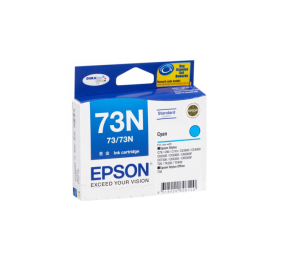
Original EPSON inks come in packaging that includes the Epson logo and model-specific ink codes, such as the EPSON Ink 73N genuine ink for black, cyan, yellow, and magenta colors. These inks are easily identifiable by their unique cartridge shape and design, which is specific to each printer model.
Benefits of Using Original Inks
Using original inks for Stylus printers offers several advantages:
- Color accuracy: Original inks ensure accurate color reproduction, providing vibrant prints that match the intended design.
- Print quality: Original inks produce sharp, crisp images with minimal smudging or bleeding.
- Durability: Original inks are designed to resist fading and smudging, ensuring long-lasting prints.
- Compatibility: Original inks are guaranteed to work seamlessly with your printer, reducing the risk of issues such as clogged print heads or ink cartridge malfunctions.
Compatible Inks for CX Series: A Comprehensive Guide
Compatible inks are third-party alternatives to original EPSON inks that are designed to work with specific printer models, including the CX series. These inks offer cost savings compared to original inks, but may vary in quality and compatibility.
Finding Reliable Compatible Ink Suppliers
When choosing compatible inks for your CX series printer, it's essential to find reliable suppliers that offer high-quality products. Look for suppliers that:
- Provide clear product descriptions and compatibility information.
- Offer customer support and return policies.
- Have positive reviews and ratings from other customers.
Pros & Cons of Using Compatible Inks
Using compatible inks has both advantages and disadvantages:
Pros:
- Cost savings: Compatible inks are generally less expensive than original inks.
- Availability: Compatible inks may be easier to find in some regions compared to original inks.
Cons:
- Quality variation: Compatible inks may not provide the same level of color accuracy, print quality, or durability as original inks.
- Compatibility risks: Some compatible inks may cause issues such as clogged print heads or ink cartridge malfunctions.
Choosing the Right Colors: Black, Cyan, Yellow, & Magenta
Selecting the right colors for your EPSON printer is crucial for achieving optimal print quality. The four primary colors used in most printers are black, cyan, yellow, and magenta.
Tips for Color Matching
To achieve accurate color matching, consider the following tips:
- Calibrate your printer: Regularly calibrating your printer can help maintain consistent color output.
- Use high-quality paper: Using high-quality paper can improve print quality and color accuracy.
- Adjust printer settings: Experiment with different printer settings, such as ink density and brightness, to find the optimal balance for your desired output.
Mixing Colors for Custom Results
Mixing colors can help you achieve custom results, such as creating unique shades or adjusting the saturation of specific colors. To mix colors effectively, consider the following tips:
- Start with small adjustments: Begin by making small changes to your ink levels and gradually increase or decrease until you achieve the desired result.
- Keep accurate records: Document your ink mixing ratios to help you reproduce specific colors in the future.
Maximizing Your Investment: EPSON Ink 73N Genuine Ink
Investing in EPSON Ink 73N genuine ink can help you get the most out of your CX series printer. Here are some tips for maximizing your investment:
Where to Buy EPSON Ink 73N
EPSON Ink 73N genuine ink can be purchased from authorized Epson retailers, online marketplaces, and authorized resellers. Be sure to verify the authenticity of the ink before purchasing.
Tips for Extending Ink Life
To extend the life of your EPSON Ink 73N genuine ink, consider the following tips:
- Store ink cartridges properly: Keep ink cartridges in a cool, dry place away from direct sunlight.
- Clean print heads regularly: Regularly cleaning your printer's print heads can help prevent clogs and extend ink life.
- Print only when necessary: Printing only when needed can help conserve ink.
Troubleshooting Common Issues with EPSON Inks
Despite using high-quality inks, issues may still arise. Here are some common problems and their solutions:
Ink Cartridge Not Detected
If your printer does not recognize an ink cartridge, try the following steps:
- Ensure the cartridge is properly installed.
- Check that the cartridge is not damaged or expired.
- Clean the cartridge contacts with a soft, lint-free cloth.
Print Quality Decline
If you notice a decline in print quality, try the following steps:
- Clean the print head.
- Check that the ink levels are sufficient.
- Verify that the printer settings are correct.
By following these guidelines, you can ensure optimal performance and longevity for your EPSON printer and its ink cartridges.

TRACALA
Review

You May Also Like
5.7 Inch Android 12 Handheld PDA Terminal with Black Lanyard Barcode Scanner 1D/2D QR Code 4G GPS WiFi Bluetooth NFC Support for Google Store RAM4G ROM64G 4000mAh for Inventory Warehouse Cold Chain
Shenglong HP-241B Desktop Automatic Ribbon Printer Small Production Date Production Batch Number Printer Electric Stamping Machine Convenient Paper Box Film Leather Coding Machine Label Printing Machine

【🔥🔥🔥Hot sale &fast delivery】Eyoyo 2D QR Desktop Barcode Scanner with Automatic Sensing Scanning Omnidirectional Hands-Free QR Screen Scan Platform Bar code Reader for POS PC Supermarket Bookstore Library Retail Mall

Soonpos Portable Mini Wireless Thermal Pocket Printer 80mm Pos Receipt Printer With Leather Case Compatible with Loyverse Salesplay Kyte UTAK POS App
AOS Compatible toner cartridge TN2480 TN-2480 TN 2480 for Brother Printer
Xiaomi Portable Pocket Photo Printer Kit Bluetooth Zink Printer Bluetooth Wireless Thermal Printer Work with Mijia for Mobile Phone
C13S210057 S210057 Ink Maintenance Tank Chip for EPSON T2100 T2170 T3100 T3160 T3170 T5100 T5160 T5170 F500 F560 F570 F551 S2100
58MM Pocket Printer: A Comprehensive Guide
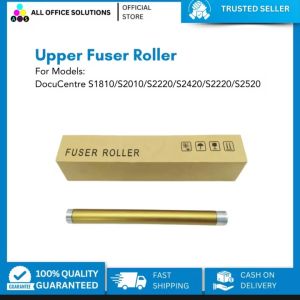
Compatible Upper Fuser Roller/ Fusing Roller for Fuji Xerox DC S1810/ S2010/ S2011/ S2220/ S2420 S2320

KODAK MINI SHOT 3 & Retro C300R: A Comprehensive Guide to 3x3\" Square Paper Printers
Kyocera 100% Original CCMT CCMT09T308HQ CCMT09T304HQ CCMT09T302HQ CCMT 060204 HQ CCMT. 060202 HQ CCMT. 060202 HP TN60 Turning Inserts