3W Dual Way Window Intercom System Anti-Interference Microphone for Office/Station/Snack Bar/Business/Store (E321)
3W Dual Way Window Intercom System Anti-Interference Microphone for Office/Station/Snack Bar/Business/Store (E321)
Introduction to the E321 Intercom System
The E321 Intercom System is a high-quality, reliable communication device designed specifically for businesses and establishments such as offices, stations, snack bars, and stores. It features a dual-way window intercom system and an anti-interference microphone, providing crystal-clear sound quality and effective communication.
Key Features of the E321 Intercom System
- Dual-way counter interphone for clear two-way communication
- External speaker for loud and clear audio playback
- Anti-interference microphone for optimal sound quality
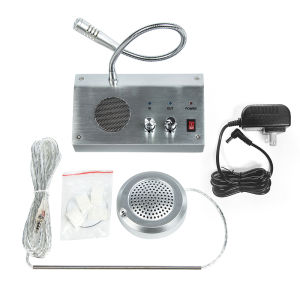
- Easy-to-install components: 1 x Dual-way counter interphone, 1 x External speaker, 1 x Power adapter, 1 x English manual, 5 x Double-sided tape, and 4 x Fixed buckle
Benefits of Using the E321 Intercom System
The E321 Intercom System offers numerous benefits for businesses and establishments, including:
- Improved communication: With its dual-way window intercom system and anti-interference microphone, the E321 ensures clear and effective communication between staff and customers.
- Enhanced customer experience: Customers will appreciate the improved communication, leading to increased satisfaction and loyalty.
- Cost-effective: The E321 Intercom System is a cost-effective solution for businesses, providing reliable communication at a fraction of the cost of other systems.
Setting Up Your E321 Intercom System
Setting up the E321 Intercom System is simple and straightforward, thanks to its easy-to-use components and step-by-step instructions.
Installing the Dual-way Counter Interphone
To install the dual-way counter interphone, follow these steps:
- Attach the double-sided tape to the back of the interphone.
- Place the interphone on the desired surface and press firmly.
- Secure the interphone with the fixed buckle.
Configuring the External Speaker
Configuring the external speaker is just as simple:
- Connect the speaker cable to the interphone.
- Position the speaker at the desired location.
Powering Up the E321 Intercom System
To power up the E321 Intercom System, plug the power adapter into the interphone and connect it to a power source.
Using the E321 Intercom System
Using the E321 Intercom System is easy and intuitive, thanks to its user-friendly design and features.
Communicating Through the Anti-Interference Microphone
To communicate through the anti-interference microphone:
- Press the talk button on the interphone.
- Speak clearly into the microphone.
- Release the talk button to listen to the response.
Utilizing the Dual Way Window Intercom System
To utilize the dual way window intercom system:
- Press the talk button on the interphone.
- Speak clearly into the microphone.
- Release the talk button to listen to the response.
Customizing the E321 Intercom System for Your Business Needs
The E321 Intercom System can be customized to meet the specific needs of your business, including:
- Adjusting the volume level
- Changing the microphone sensitivity
- Setting up multiple intercom systems for larger establishments
Maintaining and Troubleshooting the E321 Intercom System
Maintaining and troubleshooting the E321 Intercom System is simple and straightforward, thanks to its durable design and user-friendly features.
Cleaning and Maintaining the E321 Intercom System
To clean and maintain the E321 Intercom System:
- Wipe the interphone and speaker with a soft, dry cloth.
- Keep the power adapter and cables free from dust and debris.
Troubleshooting Common Issues
If you encounter any issues with the E321 Intercom System, try these troubleshooting steps:
- Check the power connection and ensure it is secure.
- Verify that the volume level is set correctly.
- Test the microphone sensitivity by speaking into it and listening to the response.
Contacting Support for Further Assistance
If you require further assistance with the E321 Intercom System, please contact our support team at [support email or phone number]. Our dedicated team is here to help you with any questions or concerns you may have.

CYSSJF Window Intercom
You May Also Like
TOLSEN Industrial Grade Long Nose Pliers(6)GRIPro Series " 8"
280ML Tile Gap Beauty Grout Epoxy Beauty Tools Sealant Aide Repair Seam Filling Reform Household Tile Gap Wall Glue

Stainless Steel Thickened Solid Link Hook for Hanging Meat Commercial And Household Use Suitable for Pork Beef And Mutton
M5Stack Cardputer v1.1 StampS3A Development Board ESP32-S3 Portable Computer 1.14 Inch Screen 56Key Keyboard Card Microcontrolle
Flickers Easy Lighting Control Switches Programmable Brightness Ranges Suitable for Task Ambient & Relaxation Situation

Portable Hotel Toilet Seat Cover Edge Dirty Film Disposable Isolation Film for Traveling Anti-Bacterial Filth Avoidance
100/50PCS Solder Seal Wire Connector Kit Butt Terminal Waterproof Insulated Electrical Wire Splice

Tolsen Industrial Grade Chain Wrench Oil Filter Remover (9\" | 12\") Non-Slip Tooth Design

10/20m² Waterproof Self Adhesive Vinyl Tiles & Linoleum Flooring

Groove cleaning tool doors and windows track cleaning slot sewing cleaning brush Creative handheld window slot cleaning tool

Swivel Clamp / Scaffolding Clamp 1 1/2 (SOLD PER PIECE)