



Compatible Canon PIXMA G Series Printer Models: A Comprehensive Guide
Compatible Canon PIXMA G Series Printer Models: A Comprehensive Guide
Introduction to Compatible Canon G Series Printers
Canon PIXMA G series printers are known for their versatility and user-friendly design, offering a wide range of models suitable for various needs. These printers are compatible with numerous models, including the G1010, G2010, G3010, G4010, G1110, G2110, G3110, G4110, G1810, G2810, G3810, G4810, G3040, G3140, G3240, G3400, G3410, G3411, G3540, G4400, G3811, G1900, G2900, G3800, G3900, G2210, G2245, G2540, G2840, G1200, and G1300.
Key Features & Benefits
The Canon PIXMA G series printers offer several key features and benefits, including:
- High-quality printing, scanning, and copying capabilities
- Fast print speeds and energy-efficient operation
- User-friendly interface and intuitive controls
- Compatibility with a wide range of paper sizes and media types
- Wireless connectivity options for seamless integration with your devices
Understanding Printer Compatibility
When selecting a Canon PIXMA G series printer, it's essential to understand printer compatibility. This includes ensuring the printer is compatible with your computer's operating system, as well as any additional hardware or software requirements. Additionally, it's important to consider the printer's connectivity options, such as Wi-Fi, Ethernet, or USB, to ensure seamless integration with your devices.
How to Select the Right Canon PIXMA G Series Printer
Selecting the right Canon PIXMA G series printer requires careful consideration of your needs and preferences. By following these steps, you can make an informed decision and find the perfect printer for your requirements.
Identifying Your Needs
Before selecting a Canon PIXMA G series printer, it's crucial to identify your specific needs and preferences. Consider the following factors:
- Print volume: Determine how many pages you typically print per month to ensure the printer can handle your workload.
- Print quality: Evaluate your requirements for print quality, including resolution, color accuracy, and speed.
- Connectivity: Consider your preferred connectivity options, such as Wi-Fi, Ethernet, or USB, to ensure seamless integration with your devices.
- Additional features: Determine if you require any additional features, such as scanning, copying, or faxing capabilities.
Evaluating Printer Specifications
Once you've identified your needs and preferences, it's time to evaluate the specifications of various Canon PIXMA G series printers. Pay attention to the following factors:
- Print speed: Consider the printer's print speed to ensure it can handle your workload efficiently.
- Print quality: Evaluate the printer's resolution, color accuracy, and speed to ensure it meets your requirements.
- Connectivity options: Consider the printer's connectivity options, such as Wi-Fi, Ethernet, or USB, to ensure seamless integration with your devices.
- Additional features: Determine if the printer offers any additional features, such as scanning, copying, or faxing capabilities.
Tips for Maximizing Printer Performance
To maximize the performance of your Canon PIXMA G series printer, follow these tips:
Proper Setup & Maintenance
- Follow the manufacturer's instructions for proper setup and maintenance to ensure optimal performance.
- Regularly clean the printer's components, such as the print head and rollers, to prevent clogs and ensure consistent print quality.
- Replace ink cartridges as needed to maintain color accuracy and prevent smudging.
Troubleshooting Common Issues
If you encounter any issues with your Canon PIXMA G series printer, try the following troubleshooting steps:
- Check the printer's connectivity settings to ensure proper connection with your devices.
- Clean the print head and rollers to prevent clogs and ensure consistent print quality.
- Replace ink cartridges as needed to maintain color accuracy and prevent smudging.
Conclusion: Choosing the Best Canon PIXMA G Series Printer
Choosing the best Canon PIXMA G series printer requires careful consideration of your needs and preferences. By understanding printer compatibility, identifying your specific requirements, evaluating printer specifications, and following tips for maximizing printer performance, you can find the perfect printer for your needs.

E-official
You May Also Like
External Bracket for Barcode Printer Large Roll Self-Adhesive Stickers Washing Tags Hanging Labels outside Support Frame

Soonpos Android 14 Dual Screen 8+2.66 / 8+3.95 Inch Handheld POS Terminal with 58mm Thermal Receipt Ticket Label Printer NFC Reader Compatible With Loyverse Salesplay POS Bluetooth & GPS WiFi Can Connect Cash Drawer Barcode Scanner
LIOTOG Adhesive Print Paper Sticker Thermal Paper for C9, C15, and C19 Smart Mini Portable Bluetooth Thermal Printers 57mm
【PH Ready Stock】L&C for Epson 003 Ink Set Dye Ink For Inkjet Printer L3110 L3150 L3116 L3156 L5190 L1110 70ML

Canon MC-G04 Maintenance Cartridge Chip Resetter for Canon Pixma G1730 G2730 G3730 G4770
Sharp Color Toner Powder 250g Compatible with MX-C2010 C3111 C2700 C2600 C3100 C3060 C2610 C2640 C3110 C3610 C310 C3500 C4500 C4100 C4110 C 5111
Eyoyo 1D Finger Ring Barcode Scanner Compatible with Bluetooth Function & 2.4G Wireless & Wired Connection Portable Wearable Mini Finger Bar Code Reader Work with Windows MacOS Android 4.0+ iOS
Metal Textured Bed Plate Cold Plate Strong Adhesion Double Sided Epoxy Coated For H2D 3D Printer Accessories
2D Barcode Scanner Mini 2.4G Wireless Bluetooth Handheld Portable 1D 2D QR Code Data Matrix PDF417 Reader With Storage Function
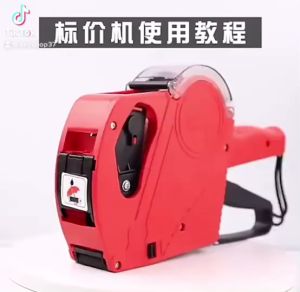
Price Tag Gun Crown MX-5500 Price Labeller With Labels Introductory package (Free ink roll and Tag)
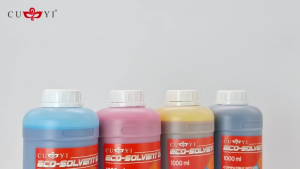
MP00 CUYI Eco-Solvent Ink 1000ML (C M Y K)



















