HD 4K USB Camera IMX415: Plug & Play Webcam with Varifocal CS Lens
HD 4K USB Camera IMX415: Plug & Play Webcam with Varifocal CS Lens
What is HD 4K USB Camera IMX415?
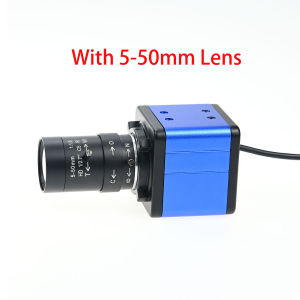
The HD 4K USB Camera IMX415 is a high-quality webcam designed for various applications, including video conferencing, surveillance, and live streaming. It features a 4K resolution, making it ideal for capturing crystal-clear images. This article will provide a comprehensive overview of the camera, its key features, technical specifications, installation guide, and how to use it effectively.
Key Features
- Resolution: 3840x2160 pixels (8MP)
- Frame Rate: 25 fps
- Image Sensor: CMOS IMX415
- Lens: Varifocal CS lens (5-50mm, 2.8-12mm)
- Interface: USB
- Supported Operating Systems: Linux, Android, Windows, Mac OS
- Certifications: CE, FCC, RoHS
Technical Specifications
- Brand Name: GXIVISION
- Origin: Mainland China
- Model Number: GXIVISION-S4K01W
- Picture Format: MJPEG or YUY2
Installation Guide
Unboxing and Setup
Unboxing the HD 4K USB Camera IMX415 is a straightforward process. Once unpacked, you'll find the camera, varifocal CS lens, and a USB cable. Before setting up the camera, ensure that your computer meets the system requirements mentioned earlier.
Connecting to Your Computer
Connect the camera to your computer using the provided USB cable. After connecting, your computer will automatically detect the device and install the necessary drivers. In some cases, you may need to manually install the drivers from the manufacturer's website.
How to Use HD 4K USB Camera IMX415
Configuring Settings
Once the camera is connected and drivers installed, open the camera settings on your computer. Here, you can adjust various parameters, such as resolution, frame rate, and exposure. To access these settings, refer to your operating system's documentation or the camera's user manual.
Troubleshooting Common Issues
If you encounter any issues while using the HD 4K USB Camera IMX415, here are some troubleshooting tips:
- Camera not detected: Ensure that the camera is properly connected to your computer and that the drivers are installed correctly.
- Low image quality: Adjust the resolution, frame rate, and exposure settings to improve image quality.
- Audio issues: Check if the audio device is properly connected and functioning.
Conclusion
Summary of HD 4K USB Camera IMX415
The HD 4K USB Camera IMX415 is a versatile webcam that offers high-resolution video capture, making it suitable for various applications. With its advanced features, easy installation, and compatibility with multiple operating systems, it is an excellent choice for users looking for a reliable webcam solution.
Final Thoughts
In conclusion, the HD 4K USB Camera IMX415 is a high-quality webcam that delivers exceptional performance and reliability. Its advanced features, such as 4K resolution, varifocal CS lens, and compatibility with multiple operating systems, make it an ideal choice for users who demand the best in video capture technology.

U Enjoying
Review

You May Also Like

9D Soft Film Case for VIVO V27: Unveiling the New Design Phone Casing

Cute GiiKawaii Transparent Protective Case for Apple Airpods pro 3rd Gen 2nd Gen Bluetooth Earphones Soft Shell Cartoon Style

OPPO RENO 11 PRO 5G / RENO 11 5G YIGOUMO Full Glue Tempered Glass Curved Screen Protector

Trackpad Keyboard Case for Samsung Tab S10 FE Plus 13.1 2025 Soft Tablet Protective Case Kickstand Magnetic Detachable Wireless Backlit Keyboard S Pen SlotKeyboard Case for Galaxy Tab S10 PlusS9 PlusS9 Fe PlusS8 PlusS7 FeS7 PlusS10 Fe S9Fe

Note60x 2024 3 Pieces Packaging Matte Back Film For Realme Note 60x 4G & Carbon Fiber Screen Protector for Vivo X200 Pro 5G
SHUNAICHI Band for Xiaomi Redmi Watch 5 Active Bands 22mm Adjustable Nylon Replacement Wrist correa Bracelet Redmi Watch 5 Lite Straps

UCUC Phone Cases: Luxury Plating & Cartoon Luffy Designs

All Models Of Mobile Phone Battery Repair Device Intelligent Fast Activation Device Stable Battery Repair Tool Efficient Repair Tool
Applicable to oppo 65W Fast charging Cable Reno5/5pro data Cable Realme 65W mobile phone USB TypeC
TP-Link Official | TL-MR6400 | 300Mbps Openline 4G LTE Wi-Fi Globe/Smart/Sun All Network Supported Portable Prepaid WiFi Modem with Sim Card Slot

Wear Resistant Washing Machine Rotating Plate 37.5cm with Durability Washer Turntable PP Texture Suitable for Washer