HCWE USB Sector LED Mixed Flashing Stage Lights: Ultimate Guide for Festival & Wedding Lighting
HCWE USB Sector LED Mixed Flashing Stage Lights: Ultimate Guide for Festival & Wedding Lighting
What Are HCWE USB Sector LED Mixed Flashing Stage Lights?
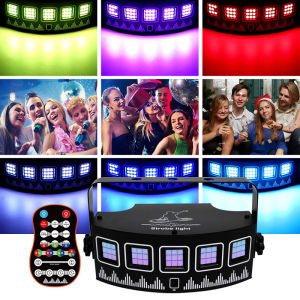
HCWE USB Sector LED Mixed Flashing Stage Lights are versatile lighting solutions designed for festivals, parties, weddings, and other events. These remote sound-activated disco lights provide an array of mixed flashing effects that can transform any venue into a vibrant, dynamic space.
Key Features
- USB-powered: Easy to connect and power using a standard USB port.
- Sound activation: Automatically adjust the lighting effects based on the music or sound input.
- Multiple lighting modes: Choose from various pre-programmed lighting patterns to suit different occasions.
- UV light: Includes a built-in UV light for added atmosphere.
How They Work
These stage lights work by connecting to a USB port, either directly to a computer or through a power adapter. Once connected, they automatically activate their lighting effects based on the sound input. The built-in microphones detect the music or sound and adjust the intensity and speed of the lights accordingly.
Benefits & Applications
HCWE USB Sector LED Mixed Flashing Stage Lights offer numerous benefits, including:
- Enhanced atmosphere: Create a lively and engaging environment for any event.
- Easy setup: Simply plug in and turn on to start enjoying the lighting effects.
- Versatile: Suitable for festivals, parties, weddings, and other events.
- Energy-efficient: LED lights consume less power compared to traditional lighting solutions.
How to Set Up HCWE USB Sector LED Mixed Flashing Stage Lights
Setting up these stage lights is simple and straightforward. Follow the step-by-step guide below to get started.
Required Equipment
- HCWE USB Sector LED Mixed Flashing Stage Lights
- USB cable (included)
- Power source (computer or power adapter)
Step-by-Step Setup Guide
- Connect the USB cable to the stage lights and the power source.
- Turn on the power source and wait for the lights to activate.
- Adjust the sound input by placing the built-in microphones near the music source.
- Experiment with different lighting modes to find the perfect setting for your event.
Troubleshooting Common Issues
If you encounter any issues during setup, refer to the troubleshooting guide below:
- Lights not turning on: Ensure that the USB cable is securely connected to both the stage lights and the power source.
- No sound activation: Check if the built-in microphones are positioned correctly near the music source.
- Incorrect lighting mode: Refer to the user manual for instructions on how to change the lighting modes.
Maximizing HCWE USB Sector LED Mixed Flashing Stage Lights for Festival Parties
Festival parties require vibrant and dynamic lighting to create a memorable experience. Follow these tips to maximize the potential of HCWE USB Sector LED Mixed Flashing Stage Lights:
Selecting the Right Lighting Effects
Choose lighting effects that complement the music and atmosphere of the festival party. Experiment with different patterns and colors to find the perfect combination.
Creating a Dynamic Lighting Experience
Combine multiple stage lights to create a cohesive and engaging lighting setup. Position the lights strategically around the venue to ensure even coverage.
Integrating with Other Lighting Equipment
Pair HCWE USB Sector LED Mixed Flashing Stage Lights with other lighting equipment, such as spotlights or uplights, to enhance the overall lighting design.
Enhancing Weddings with HCWE USB Sector LED Mixed Flashing Stage Lights
Weddings require a romantic and elegant atmosphere. Follow these tips to enhance weddings with HCWE USB Sector LED Mixed Flashing Stage Lights:
Choosing the Right Lighting Effects for Weddings
Select lighting effects that complement the wedding theme and venue. Soft, warm colors are ideal for creating a romantic ambiance.
Setting Up for Different Wedding Venues
Adjust the lighting setup according to the size and layout of the wedding venue. Position the lights to highlight key areas, such as the dance floor or reception area.
Pairing with Other Wedding Lighting Equipment
Combine HCWE USB Sector LED Mixed Flashing Stage Lights with other wedding lighting equipment, such as chandeliers or uplights, to create a cohesive and elegant lighting design.
Conclusion: Why HCWE USB Sector LED Mixed Flashing Stage Lights Are Perfect for Your Next Event
HCWE USB Sector LED Mixed Flashing Stage Lights offer a versatile and energy-efficient solution for enhancing any event. With remote sound activation, multiple lighting modes, and built-in UV light, these stage lights are perfect for festivals, parties, weddings, and other occasions. Follow the step-by-step setup guide and tips for maximizing their potential to create a memorable experience for your guests.

Global Merch Park
You May Also Like
3.5mm/6.5mm Interface Piano Synthesizer Stomper Single Foot Switch Electronic Drum MIDI Keyboard
Suitable for Kalimba Piezo Contact Microphone 3 Transducer Pickups with end pin jack
The Art of Impossible: A Peak Performance Primer (PB)
Morning Light Mathematics Textbook Accompanying Five-Row Counter 1-3 Grade One Touch Clear Zero Nine Person Digital Learning Tools
Guitar Trusses Rod Two Way Guitar Adjusting Tool Guitar Wrench Trusses Rod with L Shaped Wrench Guitar Repair Wrench
M-Vave Cube Baby Bass High quality PhaserChorusDelayReverb Effect Pedal

Childrens Library - Smart Kids Life Cycle / Board Book / Set / Early Learning Books For Toddlers / Science Book / Childrens Book
TinkerActive Workbooks: Kindergarten Math Paperback – Sticker Book by Nathalie Le Du Original English books

Power Up Level 2 Pupils Book (Cambridge Primary Exams) New Edition
Portable 61-Keys Roll Up Soft Silicone Flexible Electronic Digital Music Keyboard Piano
![[COD] SHPYHT SPORTS 17PCS Clarinet key Pads White Musical Woodwind Wind Music Instrument Replacement](https://img.lazcdn.com/g/p/37927167ee962e25e42c88c218898b0a.jpg_300x300q80.jpg)
[COD] SHPYHT SPORTS 17PCS Clarinet key Pads White Musical Woodwind Wind Music Instrument Replacement