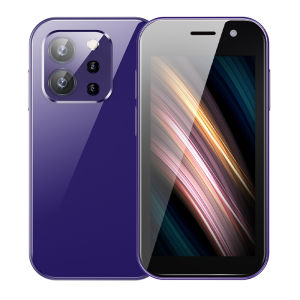
SOYES XS15 PRO Quad Core 4G Mini Smartphone 3.0 Inches 3GB RAM 64GB ROM 5MP Rear Camera WIFI Bluetooth GPS FM Radio Dual SIM Android 9.0 Face Recognition Mobile Phone
SOYES XS15 PRO Quad Core 4G Mini Smartphone 3.0 Inches 3GB RAM 64GB ROM 5MP Rear Camera WIFI Bluetooth GPS FM Radio Dual SIM Android 9.0 Face Recognition Mobile Phone
What is the SOYES XS15 PRO?
The SOYES XS15 PRO is a compact 4G mini smartphone designed for budget-conscious consumers who desire a reliable device with essential features. It boasts a 3.0-inch display, 3GB RAM, 64GB ROM, and a 5MP rear camera, making it a great choice for those looking for a feature-packed yet affordable option.
Key Features
- 3.0-inch display
- 3GB RAM and 64GB ROM
- 5MP rear camera
- 4G connectivity
- WiFi and Bluetooth capabilities
- GPS and FM radio support
- Dual SIM functionality
- Android 9.0 operating system
- Face recognition technology
Technical Specifications
- Display: 3.0 inches
- Processor: Quad-core
- RAM: 3GB
- Storage: 64GB
- Rear Camera: 5MP
- Connectivity: 4G, WiFi, Bluetooth, GPS, FM Radio
- Operating System: Android 9.0
- SIM Card Slots: Dual SIM
- Security: Face Recognition
Included Accessories
- Original phone
- Quality battery
- Phone case
- Tempered glass film
- Data cable
- User manual
- Box
How to Use the SOYES XS15 PRO
Setting Up Your Device
To set up your SOYES XS15 PRO, follow these simple steps:
- Insert the battery and SIM card(s) into their respective slots.
- Connect the data cable to your computer and the phone to charge the battery.
- Once charged, turn on the device by pressing the power button.
- Follow the on-screen instructions to complete the initial setup.
Using the 5MP Rear Camera
The SOYES XS15 PRO comes equipped with a 5MP rear camera, allowing you to capture moments and memories with ease. To take photos, simply swipe up from the home screen to access the camera app, then tap the shutter button to capture your photo.
Connecting to WiFi & Bluetooth
To connect to WiFi, swipe down from the top of the screen to open the notification panel, then tap the WiFi icon and select your preferred network. For Bluetooth connectivity, navigate to Settings > Connections > Bluetooth, and enable the feature.
SOYES XS15 PRO: A Great Choice for Budget-Conscious Consumers
Why Choose the SOYES XS15 PRO?
The SOYES XS15 PRO offers a great combination of affordability and functionality, making it an ideal choice for budget-conscious consumers. Its compact size, essential features, and long-lasting battery life ensure that you have a reliable device at your fingertips.
Comparing with Other Mini Smartphones
Compared to other mini smartphones in its price range, the SOYES XS15 PRO stands out for its 3GB RAM, 64GB ROM, and 5MP rear camera. Additionally, its dual SIM functionality and face recognition technology set it apart from its competitors.
Tips for Maximizing Your Experience
- Customize your home screen layout by rearranging icons and widgets.
- Download and install apps from the Google Play Store to enhance your device's capabilities.
- Keep your software up-to-date to ensure optimal performance and security.
- Take advantage of the dual SIM functionality by using different numbers for personal and professional purposes.
- Use the face recognition feature to quickly unlock your device and access your apps and files.

Rainbuvvy
Review

You May Also Like

𝐕𝐈𝐕𝐎 Y36 5G Smartphone 12GB RAM + 512GB ROM | 6.64" HD+ Display | 50MP AI Camera | 5000mAh Battery

Brand New Original OPP0 A78s 5G cellphone 12GB+512GB 5000mAh Android 14 Moblie phone Smartphone COD

Xiaomi Redmi 14C | MediaTek Helio G81-Ultra | 8GB RAM + 256GB | Dual 50MP Camera | 5160mAh Battery | 6.88" Display
HTC U11 EYES: A Comprehensive Guide

Elegant New Chinese Aesthetic Cellphone Lanyard Bracelet Mobile Phone Strap Beaded Pendant Antilost Wrist Chain

Desk Landline Telephone Mechanical Bells Ringing Retro Dialling Pad Corded Operation Redial Capability ABS Materials

IIIF150 B3 Pro 5G Rugged Smartphone Android 14 10800mAh 16GB 512GB Mobile Phone 100MP 30W 6.6\" Dual Display Ultra-Thin Cellphone

Rabbit Phone Charm Phone Pendant Stylish Accessory Acrylic Material Rabbit Phone Chain Perfect Gift for Women and Girls
OPPO k13 turbo pro 5G smartphone Snapdragon 8s Gen4 6.80inch 7000mAh IP68

Pad 7 Ultra Tablet: A Comprehensive Overview

LG Nexus 5X H790: A Comprehensive Guide