



MOUGOL H61M Gaming Motherboard: A Complete Guide
MOUGOL H61M Gaming Motherboard: A Complete Guide
Introduction to MOUGOL H61M Gaming Motherboard
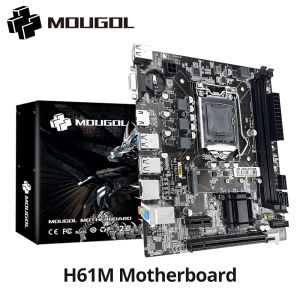
The MOUGOL H61M Gaming Motherboard is a high-performance motherboard designed specifically for LGA1155 desktop PCs. It supports Intel Core 2/3 Gen CPUs and offers dual-channel DDR3 RAM support, making it an ideal choice for gaming enthusiasts and power users alike. The MOUGOL H61M Gaming Motherboard also includes M.2 NVME PCIEx16 support, providing faster data transfer rates and improved system performance.
Overview of the MOUGOL H61M Gaming Motherboard
The MOUGOL H61M Gaming Motherboard features a robust design with high-quality components and advanced cooling solutions. It is compatible with a wide range of LGA1155 processors and supports up to 16GB of dual-channel DDR3 RAM. Additionally, the motherboard includes multiple USB ports, audio jacks, and network connectivity options, ensuring seamless integration with various peripherals and devices.
Key Features & Specifications
- LGA1155 socket for Intel Core 2/3 Gen CPUs
- Dual-channel DDR3 RAM support (up to 16GB)
- M.2 NVME PCIEx16 support
- Multiple USB ports, audio jacks, and network connectivity options
How to Set Up Dual-channel DDR3 RAM
Dual-channel DDR3 RAM offers several benefits over single-channel configurations, including improved system performance, faster data transfer rates, and reduced latency. To take advantage of these benefits, it is essential to configure your MOUGOL H61M Gaming Motherboard correctly.
Benefits of Dual-channel DDR3 RAM
- Improved system performance
- Faster data transfer rates
- Reduced latency
Step-by-step Guide to Setting Up Dual-channel DDR3 RAM
- Ensure that your MOUGOL H61M Gaming Motherboard supports dual-channel DDR3 RAM.
- Install the first RAM module in the appropriate slot, following the motherboard's documentation.
- Install the second RAM module in the corresponding slot, ensuring that both modules are of the same capacity and speed.
- Power on your computer and enter the BIOS settings to verify that dual-channel mode is enabled.
Optimizing Intel Core 2/3 Gen CPU Performance
To get the most out of your Intel Core 2/3 Gen CPU, it is essential to choose the right processor and optimize its performance. This section provides tips and best practices for maximizing CPU performance on the MOUGOL H61M Gaming Motherboard.
How to Choose the Right Intel Core 2/3 Gen CPU
When selecting an Intel Core 2/3 Gen CPU, consider the following factors:
- Clock speed
- Number of cores
- Cache size
- Thermal design power (TDP)
Tips for Maximizing CPU Performance
- Overclocking: Increase the clock speed of your CPU to boost performance.
- Cooling: Invest in a high-quality cooling solution to maintain optimal operating temperatures.
- BIOS settings: Adjust BIOS settings to optimize CPU performance.
M.2 NVME PCIEx16 Support & Benefits
The MOUGOL H61M Gaming Motherboard supports M.2 NVME PCIEx16, providing faster data transfer rates and improved system performance. This section explains what M.2 NVME PCIEx16 is and highlights its advantages.
Understanding M.2 NVME PCIEx16
M.2 NVME PCIEx16 is a high-speed interface that enables fast data transfer rates and low latency. It is commonly used for solid-state drives (SSDs) and other storage devices.
Advantages of Using M.2 NVME PCIEx16
- Faster data transfer rates
- Improved system performance
- Low latency
Compatibility with LGA1155 Desktop PC
Ensuring compatibility with LGA1155 desktop PCs is crucial when using the MOUGOL H61M Gaming Motherboard. This section provides tips for ensuring compatibility and troubleshooting any issues that may arise.
Ensuring Compatibility with LGA1155 Desktop PC
To ensure compatibility with LGA1155 desktop PCs, consider the following factors:
- Processor socket type
- Memory configuration
- Expansion slots
Troubleshooting Compatibility Issues
If you encounter compatibility issues, try the following steps:
- Verify that your processor and memory are compatible with the MOUGOL H61M Gaming Motherboard.
- Check that all cables and connectors are properly connected.
- Update the BIOS to the latest version.

GlobalSuperBazaar
Review

You May Also Like
GenMachine Mini PC: A Comprehensive Guide to AMD Ryzen 5 3550H & Windows 11
PANTHON DC4010 40mm Quiet Cooling Fan: A Simple & Long-lasting Solution
SOYO AMD B450M Motherboard Dual-channel DDR4 M.2 PCIE 3.0 NVME SATA3.0 Supports Ryzen 5600G for Desktop Gaming Computer Host
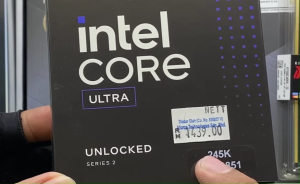
INTELCORE ULTRA 5 245K BOXTYPE 14CORE 14 THREADS UPTO 5.2 GHZ I WITH INTEL GRAPHICS I REQUIRED CPUCOOLER
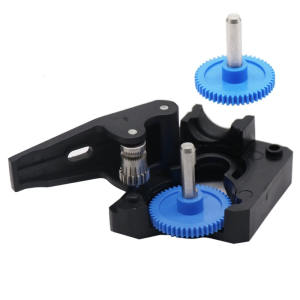
3D Printer Extruder Shaft Extrusion Assembly Gear For VORON Btech Extruder Shaft Extrusion POM Gear Idler Drive Gear

High Temperature Resistant Quick Connect Cooling Adapter Hasco Mold Temperature Controller Water And Oil Passing Compression Iron Fluorine Tube Converter Z807
NICE-POWER DC Lab Power Supply Titanium Anodized Motor Starts Short Killer OCP OVP Adjustable 160V 2A 30V 10A 5A
EXPOSE Gaming Monitor for PC 27 Inch 165Hz 1ms 1K FHD IPS Frameless Curved Design with a speaker Laptop Home

Circuitrocks Battery Pack Lithium Ion 3.7V 6600mAh
USB A to SPDIF Optical Sound Adapter Laptop Computer Converter Digital Transmission Adapter For Home Theater
Advanced Pyroelectric Sensory Switches Wide Compatibility Module For Electronic Engineering And Industrial Use
![[PERNG] Tehe ESP8266 Development Board Integrates 0.96 Inch OLED Display With Protector CaseCH340ESP12E WiFi Wireless Module TypeC](https://img.lazcdn.com/g/p/9680a791cb6c0bddf399bf1b8531ff14.jpg_300x300q80.jpg)

















