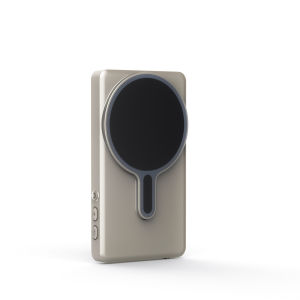
Mobile Screen Splitter Selfie Wireless Display Screen Long-Distance Transmission Monitor Synchronized Live Broadcast Vlog Screen
Mobile Screen Splitter Selfie Wireless Display Screen Long-Distance Transmission Monitor Synchronized Live Broadcast Vlog Screen
Introduction to Wireless Screen Splitter
Wireless screen splitters have revolutionized the way vloggers and content creators share their work. These devices enable users to display their smartphone screens on larger monitors, allowing for better visibility and interaction with audiences. A wireless screen splitter is a versatile tool that connects to your mobile device and broadcasts its screen to a TV or monitor without the need for cables.
What is a Wireless Screen Splitter?
A wireless screen splitter is a compact device that transmits your mobile device's screen to a larger display wirelessly. This technology enables users to share their content on a bigger screen, making it perfect for vlogging, gaming, and live streaming. The device connects to your smartphone via Bluetooth, Wi-Fi, or USB and then transmits the signal to a compatible monitor or TV.
Key Features of Wireless Screen Splitters
Wireless screen splitters offer several advantages:
- Easy Setup: Connect your device to the wireless screen splitter and then to your monitor or TV, and you're ready to go.
- High-Quality Display: Enjoy crisp and clear visuals with minimal lag.
- Compatibility: Works with various devices, including smartphones, tablets, and laptops.
- Long Battery Life: Most wireless screen splitters have long-lasting batteries, making them perfect for extended use.
Long-Distance Transmission Monitor Explained
Long-distance transmission monitors take wireless screen splitting to the next level by allowing users to transmit their screen over greater distances. This feature is particularly useful for vloggers who want to share their content with audiences in different locations.
Advantages of Long-Distance Transmission Monitors
Long-distance transmission monitors offer several benefits:
- Extended Range: Transmit your screen over greater distances, perfect for large events or venues.
- Multiple Monitors: Connect multiple monitors to display your content on several screens simultaneously.
- Easy to Use: Set up and use just like a regular wireless screen splitter.
Synchronized Live Broadcast Capabilities
With synchronized live broadcast capabilities, long-distance transmission monitors enable users to share their content on multiple screens simultaneously. This feature is ideal for live streaming events, concerts, and conferences, ensuring that everyone in the audience has a clear view of the action.
Vlog Screen & Selfie Display Screen Overview
Vlog screens and selfie display screens are essential tools for any content creator. These devices allow users to view their camera feed while recording, making it easier to frame shots and interact with their audience.
How to Use Vlog Screens for Selfie Display
Using a vlog screen or selfie display screen is simple:
- Connect your device to the vlog screen via Bluetooth, Wi-Fi, or USB.
- Adjust the screen settings to your liking.
- Start recording and view your camera feed on the vlog screen.
Tips for Maximizing Vlog Screen Performance
To get the most out of your vlog screen, follow these tips:
- Adjust Settings: Customize your screen settings to match your preferences.
- Practice: Get comfortable using your vlog screen before recording.
- Experiment: Try different angles and positions to find what works best for you.
Setting Up Your Wireless Screen Splitter
Setting up your wireless screen splitter is straightforward and can be done in just a few steps.
Step-by-Step Guide to Installation
- Connect your device to the wireless screen splitter via Bluetooth, Wi-Fi, or USB.
- Connect the wireless screen splitter to your monitor or TV.
- Adjust the settings to your liking.
- Start streaming!
Troubleshooting Common Issues
If you encounter any issues while setting up your wireless screen splitter, try the following solutions:
- Check Connections: Ensure all connections are secure and properly connected.
- Restart Devices: Restart your device and wireless screen splitter to resolve any connectivity issues.
- Update Software: Ensure your device and wireless screen splitter software are up to date.
Conclusion: Enhancing Your Vlog Experience with Wireless Screen Splitter & Long-Distance Transmission Monitor
Wireless screen splitters and long-distance transmission monitors are powerful tools that can elevate your vlogging experience. With these devices, you can share your content on larger screens, transmit over greater distances, and enjoy synchronized live broadcasts. Whether you're a seasoned vlogger or just starting out, investing in a wireless screen splitter and long-distance transmission monitor can take your content creation to the next level.

GlobalTechMart
Review
You May Also Like
LOOPER YAMATO Y33059 MODEL DCZ-361: A Comprehensive Guide
2x Screen Protector Film fit 14.0" Asus Vivobook S 14 Flip16:10 Screen Laptop (TN3402)
OnePlus Ace6 Phone Case Full Lens Protection Anti Slip Dirt Resistant Shockproof TPU Cover for OnePlus Ace6T Anti Fingerprint
Ultra-Thin Transparent Magnetic Absorption OnePlus 13T Phone Case Full Cover Soft Edge Shockproof Protective Shell for Men And Women
BlueWow Phone Cooler Portable Mobile Phone Radiator USB Phone Cooling Fan Mobile Phone Cooler Accessories TL16
Silicone Protective Case for iPad Ninth Generation 2021 New Pure Color 10.2 Inch Transparent Airbag Mini6 Tablet Shell 8.3 with Pen Slot Air5/4 Thin
Vivo S9 Original Tempered Glass Screen Protector Full Screen Coverage Privacy Protection Anti Blue Light Fingerprint Resistant
NEEWER Phone Cage Rig for iPhone 16 Pro/Pro Max with 67mm Filter Adapter & Phone Lens Adapter Quick Release Video Rig for Video Recording Vlog PA073/PA074
4in1 Multifunctional Selfie Stick 360° Rotation with LED Fill Light Monopod Tripod with Wireless Remote and Phone Holder 1.6M Extendable Selfie Stick Tripod for Group Selfie/Live Streaming/Video Recording Compatible with iPhone/Android/GoPro
Phone Shaker for Steps USB Counter Rechargeable Compatible for Pokemon Go Walker Brush Step Artifact Mute Timed Swinger Stand
Transparent Magnetic Acrylic iPhone Case Shockproof Protective Cover for Apple 17Air 16 14promax 15plus 16E 11 13mini 12promax XR