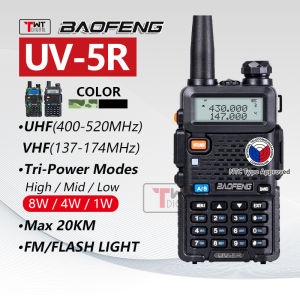
Baofeng UV-5R Walkie Talkie: A Comprehensive Guide
Baofeng UV-5R Walkie Talkie: A Comprehensive Guide
The Baofeng UV-5R Walkie Talkie is a highly versatile and reliable communication device that offers both UHF and VHF bands, making it an excellent choice for a wide range of applications. In this comprehensive guide, we will explore what's included in the box, the features and specifications of the Baofeng UV-5R, how to use it, and maintenance tips to ensure its longevity.
What's Inside the Box
Included Accessories
When you purchase the Baofeng UV-5R Walkie Talkie, you will receive the following items:
- 1 x BaoFeng UV-5R Two-Way Radio
- 1 x 1800mAh Battery
- 1 x Antenna
- 1 x Power Adapter
- 1 x Belt Clip
- 1 x Hand Strap
- 1 x Battery Charger
Setting Up Your Walkie Talkie
Once you have all the necessary accessories, setting up your Baofeng UV-5R is straightforward. Begin by charging the battery using the included charger and power adapter. Once charged, insert the battery into the radio and attach the antenna. Finally, connect the belt clip or hand strap for added convenience.
Features & Specifications
Dual Band UHF/VHF Radio
The Baofeng UV-5R supports both UHF (400-470 MHz) and VHF (136-174 MHz) bands, allowing you to communicate with other radios operating on either frequency range.
128CH Portable Radio
With 128 channels available, the Baofeng UV-5R provides ample options for communication. You can program multiple channels to suit your specific needs, whether you're coordinating with a group or communicating with a single individual.
10km Long Range Walkie Talkie
Thanks to its 8W output power, the Baofeng UV-5R offers a remarkable 10km range in ideal conditions. This makes it an excellent choice for outdoor activities, emergency communication, and any situation where long-range communication is essential.
How to Use Your Baofeng UV-5R Walkie Talkie
Programming Channels
To program channels on your Baofeng UV-5R, press the 'Menu' button and navigate through the menu options using the 'Up' and 'Down' buttons. Select the 'Channel' option, then choose the desired channel number and frequency. Save your changes and repeat the process for additional channels.
Basic Operation
Operating the Baofeng UV-5R is simple. Press the 'Power' button to turn the radio on or off. To transmit a message, press the 'Push-to-Talk' (PTT) button and speak into the microphone. To receive messages, simply release the PTT button and listen through the speaker.
Advanced Settings
The Baofeng UV-5R offers a range of advanced settings, including squelch control, scan mode, and more. Access these settings through the menu options, adjusting them to suit your specific communication needs.
Maintenance & Troubleshooting
Battery Care
To prolong the life of your Baofeng UV-5R's battery, avoid exposing it to extreme temperatures and charge it regularly. When not in use, store the battery in a cool, dry place.
Cleaning & Storage
Keep your Baofeng UV-5R clean and free of dust and debris to ensure optimal performance. Store it in a dry location away from direct sunlight and moisture.
Common Issues & Solutions
If you encounter any issues with your Baofeng UV-5R, consult the user manual for troubleshooting tips. Some common problems include low battery life, interference, and difficulty programming channels. Addressing these issues promptly will help maintain the performance and reliability of your walkie talkie.
In conclusion, the Baofeng UV-5R Walkie Talkie is a powerful and reliable communication device that offers dual band UHF/VHF support, 128 channels, and a 10km range. By following the guidelines outlined in this comprehensive guide, you can ensure optimal performance and longevity for your Baofeng UV-5R.

TWT DIGITAL
You May Also Like
CORSAIR VOID WIRELESS v2 Gaming Headset - Carbon CA-9011379-WW
CH-6605 portable bluetooth Karaoke speaker With Wired Mic
Speaker GTS-2065 Greatnice Bluetooth Speaker with Wireless Microphone
Zeus Cool Bluetooth Wireless Earphones LED Display Touch Stereo Sports Gaming Earphones with Charging Box (Z-KG01)

Sony Ericsson S-55 Bluetooth Audio Subwoofer: High Sound Quality & Waterproof Outdoor Speaker
DISOUR X9 Mini Wireless Bluetooth Earphone: A Comprehensive Guide
V2S S8Q10 HI-FI 5D SURROND SOUND PARTY SPEAKER WITH DUAL SHOULDER STRAP AUDIO
The SH-899 Heavy duty wired mic 6meters SH899 Professional Vocal Dynamic Heavy duty Microphone

Voice Activated Recorder For Stuffed Toy Easy Installation Replays Feature Creative Voice Box For Craft Plush Dolls

(Bundle) NB-35 Professional Recording Microphone Stand Suspension Flexible Arm Stand Holder (Black) with Microphone Pop Filter Dual Layer Mic Pop Shield with Clip Stabilizing Arm for Recording Vocals Home Studio Broadcasting (Black)
Replacement Ear Pads Ear Cushions Repair for Biz 620/1100/1500/1900/2400/2400II/GN2000/UC Headphone Sponge Earpads