ADP-45ZD & 45W AC Adapter: A Comprehensive Guide
ADP-45ZD & 45W AC Adapter: A Comprehensive Guide
Introduction to the ADP-45ZD Charger
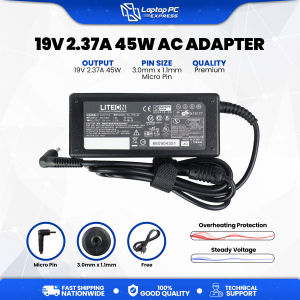
The ADP-45ZD charger, also known as the KP.04503.001 charger, is a 45W AC adapter designed specifically for laptops. This high-quality power adapter provides a stable 19V output at 2.37A, ensuring optimal charging performance for compatible devices. In this guide, we will discuss the key features, compatibility, purchasing options, and usage tips for the ADP-45ZD charger.
What is the ADP-45ZD Charger?
The ADP-45ZD charger is a versatile 45W AC adapter designed to power and charge laptops. It features a micro pin connector with dimensions of 3.0mm x 1.1mm, making it compatible with a wide range of laptop models. The charger is capable of delivering a stable 19V output at 2.37A, providing efficient charging performance for your device.
Key Features of the ADP-45ZD Charger
Here are some key features of the ADP-45ZD charger:
- Output rating: 19V 2.37A 45W
- Pin size: 3.0mm x 1.1mm (micro pin)
- Compatible with 19V 2.15A output devices
- Guaranteed to work on Acer V3-371 Series laptops
How to Identify the ADP-45ZD Charger
The ADP-45ZD charger can be identified by its distinct features, including the micro pin connector and the specified output rating. Additionally, the charger may have one of the following part numbers: ADP-45ZD, B PA-1450-26, KP.04503.001, or PA-1450-79.
Compatible Brands & Models
The ADP-45ZD charger is compatible with a wide range of laptop brands and models. Here, we will discuss the compatibility with Acer V3-371 Series laptops and other compatible models.
Acer V3-371 Series Compatibility
The ADP-45ZD charger is guaranteed to work on the Acer V3-371 Series laptops. This includes the V3-371G-51H6, V3-371G-51L6, and V3-371G-51P6 models.
Other Compatible Laptop Models
Apart from the Acer V3-371 Series, the ADP-45ZD charger may also be compatible with other laptop models that require a 19V output at 2.37A or 2.15A. However, it is essential to verify compatibility before purchasing.
How to Check Compatibility with Your Laptop
To check if the ADP-45ZD charger is compatible with your laptop, refer to the laptop's user manual or consult the manufacturer's website. Look for the required output rating and pin size, and compare them with the ADP-45ZD charger specifications.
Where to Buy the ADP-45ZD Charger
LAPTOP PC EXPRESS is a trusted source for high-quality aftermarket products, including laptop chargers like the ADP-45ZD charger.
LAPTOP PC EXPRESS: Your Trusted Source
LAPTOP PC EXPRESS offers a wide range of replacement items that may be difficult to find in the tech market, including batteries and chargers sourced from reputable third-party manufacturers who share the same factory origin as the original products.
Quality Assurance & Aftermarket Products
LAPTOP PC EXPRESS is committed to providing high-quality aftermarket products that meet or exceed the standards of original equipment manufacturers (OEMs). Their products undergo rigorous testing to ensure reliable performance and longevity.
Free Assistance for Seamless Compatibility
LAPTOP PC EXPRESS offers free assistance to ensure seamless compatibility with your unit. By reaching out to their customer support team, you can avoid the inconvenience of returning items due to incompatibility.
How to Use the ADP-45ZD Charger
To get the most out of your ADP-45ZD charger, follow these guidelines for proper charging techniques, troubleshooting common issues, and extending battery life.
Proper Charging Techniques
- Always use the charger with the correct output rating and pin size.
- Charge your laptop in a well-ventilated area to prevent overheating.
- Unplug the charger when it is no longer needed to conserve energy.
Troubleshooting Common Issues
If you experience any issues with your ADP-45ZD charger, refer to the troubleshooting tips below:
- Ensure the charger is properly connected to both the laptop and power outlet.
- Check if the charger is compatible with your laptop model.
- Verify that the laptop's battery is functioning correctly.
Tips for Extending Battery Life
To extend the life of your laptop's battery, follow these tips:
- Charge your laptop when the battery level reaches around 20%.
- Unplug the charger when the battery is fully charged.
- Keep your laptop cool by using it on a flat surface and avoiding direct sunlight.
In conclusion, the ADP-45ZD charger is a reliable and versatile 45W AC adapter designed for laptops. By understanding its key features, compatibility, purchasing options, and usage tips, you can make the most out of this high-quality power adapter.

Laptop Pc Express
You May Also Like

Cute Supreme Version Mobile Phone Case for OnePlus 15 Retro Party Bear 13T Airbag Anti-fall Transparent Full Cover Soft Shell
Flexible 200mm Aluminum Camera 1/4 Inches Screw Extension Rod For DSLR Tripods Security Monitors

YUWO Metal Desktop Mobile Phone Stand For Smartphone 13 Inch Tablet Desk Holder Portable Storage Bracket Drop-resistant Phone Holder

Fur Rabbit Hair Diamond Glitter Phone Case for iPhone 11 13 pro Max 12 Trendy Brand Apple Net Red Velvet Plush Skin Compatible
Electromagnetic Pen For Lenovo 500e Helix Yoga12 Thinkpad 10 Yogabook x220 Samsung Galaxy Tablet Tab L Without Bluetooth

Lightweight Huawei MatePad Pro13.2 Silicone Protective Case with Wrist Strap Airbag Soft Cover for 25 Models Transparent Single Shell

Blue Ocean Dolphin Starfish Pattern Case For Redmi Note 14 Pro Plus 5G 14S 13 A3 A3X 14C 13C A5 Xiaomi 14T 13T Phone Cover Sea
High Definition Type-C to HDMI Video Capture Card Extension Converter 4K 60Hz Mother to Mother Adapter Digital Accessories

High Resilience Silk Thread & DIY Shoe Thread: A Comprehensive Guide

Applicable Iqoo7 Tempered Film & Vivoiqoo7 Mobile Phone Film

Fashion Casing OPPO A5i Pro OPPOA5i Pro OPPOA5iPro New Cute Cartoon Pacha Dog Kuromi Doraemon Bread Bear Laboo Anti-fall Phone Case with Lanyard 2025