Western Digital WD Green 2.5 SATA III SSD: The Ultimate Laptop & Desktop Storage Solution
Understanding the Western Digital WD Green 2.5 SATA III SSD
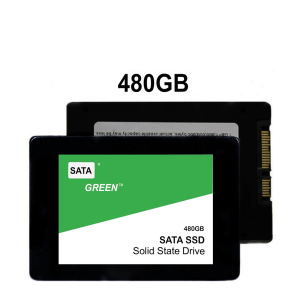
Western Digital's WD Green 2.5 SATA III SSD is a top-of-the-line internal solid state drive designed specifically for laptops and desktops. This cutting-edge storage solution offers a range of capacities to suit various needs, including 120GB, 240GB, 480GB, and 960GB options.
Key Features & Benefits
The Western Digital WD Green 2.5 SATA III SSD boasts several key features and benefits:
- Fast Read/Write Speeds: With SATA III interface, this SSD delivers lightning-fast read/write speeds, allowing you to boot up your computer, launch applications, and access files in a matter of seconds.
- Low Power Consumption: Designed with energy efficiency in mind, the WD Green SSD consumes less power than traditional hard drives, extending battery life on laptops and reducing overall energy consumption.
- Durable & Reliable: Built to last, this SSD features robust construction and advanced error correction algorithms, ensuring long-lasting reliability and data integrity.
- Quiet Operation: Unlike traditional hard drives, SSDs produce minimal noise during operation, providing a more pleasant computing experience.
Available Capacities: 120GB, 240GB, 480GB, 960GB
The Western Digital WD Green 2.5 SATA III SSD comes in four different capacities, allowing you to choose the perfect fit for your storage needs. Whether you're looking for a compact solution or a large capacity drive, there's an option to suit your requirements.
Choosing the Right Capacity for Your Needs
Selecting the appropriate capacity for your Western Digital WD Green 2.5 SATA III SSD depends on your specific storage requirements. Consider the following factors before making your decision:
- Operating System: Determine how much space your operating system will require.
- Applications: Assess the storage needs of your frequently used applications and software.
- Files & Media: Calculate the amount of space needed for storing files, documents, photos, videos, and other media.
- Future Growth: Anticipate potential increases in storage requirements as your computing needs evolve.
Comparing 120GB, 240GB, 480GB & 960GB Options
- 120GB: Ideal for users who primarily rely on cloud storage and only require a small amount of local storage for essential files and applications.
- 240GB: Suitable for individuals who need more storage space for their operating system, applications, and files, but don't require extensive media storage.
- 480GB: Perfect for users who want ample space for their operating system, applications, files, and a moderate amount of media storage.
- 960GB: Best suited for power users who demand large capacity storage for their operating system, applications, files, and extensive media collections.
Installation & Setup: A Step-by-Step Guide
Installing the Western Digital WD Green 2.5 SATA III SSD in your laptop or desktop computer is a straightforward process. Follow these steps to ensure a successful installation:
Preparing Your Laptop or Desktop
Before installing the SSD, make sure your laptop or desktop is powered off and unplugged. Gather all necessary tools, such as a screwdriver and anti-static wrist strap.
Installing the SSD: A Comprehensive Walkthrough
- Open your laptop or desktop case by removing screws and accessing the internal components.
- Locate an available 2.5-inch drive bay or SATA port.
- Connect the SATA data cable and power cable to the SSD.
- Secure the SSD in place using screws or clips.
- Close the laptop or desktop case and reconnect any external cables.
- Power on your device and install the necessary drivers and firmware updates.
Maximizing Performance & Lifespan
To get the most out of your Western Digital WD Green 2.5 SATA III SSD, follow these tips:
Optimizing Your System for Optimal SSD Performance
- Enable TRIM support to ensure optimal performance and longevity.
- Configure your operating system to use SSD-friendly settings.
- Regularly defragment your SSD to maintain optimal performance.
Extending the Life of Your Western Digital WD Green SSD
- Avoid exposing the SSD to extreme temperatures, humidity, or physical shock.
- Regularly backup important data to prevent loss in case of drive failure.
- Monitor the health of your SSD using built-in tools or third-party software.
Upgrade your laptop or desktop computer with the Western Digital WD Green 2.5 SATA III SSD today and experience lightning-fast performance, energy efficiency, and long-lasting reliability.

harrisjuv99uhgmail.com1729262009544
You May Also Like

DC51 Motor Speed Regulator for Packaging and Printing Machinery with Low Power Consumption Adjustable Motor Control

Precision 2cm 9g Servo For Linear Motion Control 3D Printing Projects Education Kits Invention Arm Protection

Kingston SSD A400: A Comprehensive Guide to Internal SSD Solid State Drives

USB3.0 to RJ45 Ethernet Networking Adapter Dongle USB Networking Adapter USB3.0 Fast Ethernet Adapter For PC Desktop
![[🇵🇭 24h Delivery] Dollyy Desktop RAM DDR2 DDR3 2GB 800MHz 1333MHz PC Memory Laptop DIMM Memory For AMD intel 8gb 4gb](https://img.lazcdn.com/g/ff/kf/S7a4393b4d3f1411dbe65ace83cf2e8a6Z.jpg_300x300q80.jpg)
[🇵🇭 24h Delivery] Dollyy Desktop RAM DDR2 DDR3 2GB 800MHz 1333MHz PC Memory Laptop DIMM Memory For AMD intel 8gb 4gb

UPERFECT 18.5 120Hz Portable Monitors 1080P Touch Screen Gaming displays Freesync for PS5 4 3 Switch Xbox Laptop Mac PC

85mm 4Pin Video Fan Easy Installation Replacement for GTX1660 2060 StormX Graphics Management Computer Accessories

Black Shark FunCooler 2 Pro/ 3 Pro/ 4 Pro/5/5 Pro With Temperature Display Back Clip For Black Shark 4 3 Pro Phone Radiator For Rog 5 OnePlus 9

Engineered Oil Cooling Hose For P370 P410 P450 P500 G360 G370 L280 Optimized Thermal Stability And Pressure Resistance

UNA Portable Monitor 16.1 Inch for Laptop FHD 144Hz 100%SRGB for Laptop PC Phone Xbox PS4/5 Switch Portable Screen Monitor

Cost-Effective ESP32C3-LCDkit Development Board: Build Intelligent Displaying 240x240 Resolution & Low Power Consumption