Uniarch Uho-P1A-M5F4D 5MP HD Outdoor Pan & Tilt Wi-Fi Camera

Uniarch Uho-P1A-M5F4D 5MP HD Outdoor Pan & Tilt Wi-Fi Camera

What is the Uniarch Uho-P1A-M5F4D?

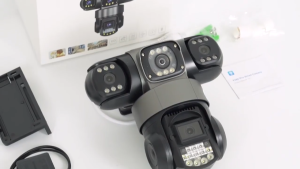
The Uniarch Uho-P1A-M5F4D is a top-of-the-line outdoor security camera designed to provide unparalleled protection for your home or business. This 5MP HD outdoor pan & tilt Wi-Fi camera delivers crystal-clear images and smooth, precise movement, making it an ideal choice for any outdoor surveillance application.

Key Features and Capabilities

Some of the key features and capabilities of the Uniarch Uho-P1A-M5F4D include:

  • 5MP HD Image Quality: Capture every detail with this high-definition outdoor security camera, which provides stunningly clear images even in low-light conditions.
  • Pan & Tilt Functionality: The camera can move both horizontally and vertically, allowing you to monitor a wide area with ease.
  • Wi-Fi Connectivity: Connect the camera to your home network using Wi-Fi, enabling remote access and monitoring from anywhere.
  • Motion Detection: Set up motion detection alerts to receive notifications when movement is detected in your monitored area.
  • Weatherproof Design: The camera is built to withstand harsh weather conditions, ensuring reliable performance even in challenging environments.

Comparison with Other High Definition Surveillance Cameras

While there are many high-definition surveillance cameras available on the market, the Uniarch Uho-P1A-M5F4D stands out for several reasons:

  • Superior Image Quality: With its 5MP resolution, the Uniarch Uho-P1A-M5F4D provides higher image quality than many competing models.
  • Advanced Pan & Tilt Functionality: Unlike some other cameras, the Uniarch Uho-P1A-M5F4D offers both horizontal and vertical movement, giving you greater flexibility in monitoring your surroundings.
  • Easy Wi-Fi Setup: Connecting the camera to your home network is quick and easy, thanks to its built-in Wi-Fi capabilities.
  • Robust Weatherproof Design: The Uniarch Uho-P1A-M5F4D is built to withstand harsh weather conditions, ensuring reliable performance in any environment.

How to Install the Uniarch Uho-P1A-M5F4D

Installing the Uniarch Uho-P1A-M5F4D is a straightforward process. Follow these steps to set up your new outdoor security camera:

  1. Mount the Camera: Choose a suitable location for your camera and mount it securely using the included hardware.
  2. Connect Power: Plug in the power adapter and connect it to the camera.
  3. Connect to Wi-Fi: Connect the camera to your home network using Wi-Fi.
  4. Configure Settings: Access the camera's settings via the Uniarch app or web interface and configure your desired settings.

Troubleshooting Common Issues

If you encounter any issues during installation or operation, refer to the troubleshooting guide below:

  • Camera Not Connecting to Wi-Fi: Ensure that your Wi-Fi network is within range and that the camera's Wi-Fi settings are configured correctly.
  • Image Quality Issues: Check the camera's lens for obstructions or dirt, and adjust the camera's position if necessary.
  • Motion Detection Not Working: Verify that motion detection is enabled in the camera's settings and that the camera's field of view is clear.

Maximizing Security with the Uniarch Uho-P1A-M5F4D

To get the most out of your new outdoor security camera, consider implementing the following strategies:

Setting Up Motion Detection Alerts

Motion detection alerts can help you stay informed about activity in your monitored area. Follow these steps to set up motion detection alerts:

  1. Enable Motion Detection: In the camera's settings, enable motion detection and configure the sensitivity level.
  2. Set Up Alerts: Configure alerts to be sent to your email or mobile device whenever motion is detected.

Integrating with Home Automation Systems

Integrating the Uniarch Uho-P1A-M5F4D with your home automation system can enhance your security even further. Many popular home automation platforms, such as SmartThings and HomeKit, offer integration options for this camera.

Maintenance and Upkeep of the Uniarch Uho-P1A-M5F4D

To ensure optimal performance and longevity, follow these maintenance and upkeep tips:

Cleaning and Storage Tips

  • Clean the Lens Regularly: Use a soft, lint-free cloth to clean the camera's lens periodically.
  • Store in a Safe Location: When not in use, store the camera in a safe, dry location away from extreme temperatures and humidity.

Updating Firmware and Software

Regularly updating the camera's firmware and software can help improve its performance and address any potential security vulnerabilities. Check the manufacturer's website for updates and follow the instructions to install them.

Conclusion: Why Choose the Uniarch Uho-P1A-M5F4D for Your Home Security Needs?

The Uniarch Uho-P1A-M5F4D is a top-of-the-line outdoor security camera that offers unparalleled protection for your home or business. With its advanced features, easy installation, and robust design, it's the perfect choice for anyone looking to enhance their home security. So why wait? Invest in the Uniarch Uho-P1A-M5F4D today and enjoy peace of mind knowing that your home is protected.

ESV Electronics Enterprises

ESV Electronics Enterprises

Seller ratings 98%

Review

Oops
This video has no reviews.