Tuya WiFi Humidifier 400ml: A Smart Home Essential
Tuya WiFi Humidifier 400ml: A Smart Home Essential
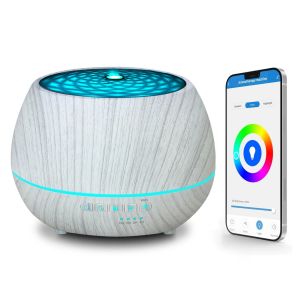
The Tuya WiFi Humidifier 400ml is a versatile smart home ultrasonic air humidifier that offers numerous features and compatibility options, making it a perfect addition to any household. This article will guide you through the key features, usage instructions, essential aroma oil diffuser tips, and frequently asked questions related to this innovative device.
Key Features & Compatibility
Smart Home Integration
The Tuya WiFi Humidifier seamlessly integrates with popular smart home systems, including Amazon Alexa and Google Assistant. This allows you to control and monitor the humidifier remotely, set schedules, and customize settings according to your preferences.
Voice Control with Alexa & Google Assistant
With voice control capabilities, you can easily adjust the humidity levels, turn the humidifier on or off, and access other features using simple voice commands. Simply ask Alexa or Google Assistant to perform the desired action, and the Tuya WiFi Humidifier will respond accordingly.
How to Use the Tuya WiFi Humidifier
Setting Up Your Humidifier
To get started with the Tuya WiFi Humidifier, follow these steps:
- Unpack the humidifier and remove any protective materials.
- Fill the water tank with clean, fresh water, up to the recommended level.
- Connect the humidifier to your Wi-Fi network using the Tuya app.
- Follow the app instructions to complete the setup process.
Customizing Your Experience
Once your Tuya WiFi Humidifier is set up, you can customize your experience by adjusting the humidity levels, setting schedules, and configuring other settings through the Tuya app. This allows you to maintain optimal humidity levels and enjoy a comfortable living environment tailored to your preferences.
Essential Aroma Oil Diffuser
The Tuya WiFi Humidifier features an essential aroma oil diffuser, allowing you to enhance the air quality and ambiance in your home with fragrant oils. Here are some tips for using this feature:
Choosing the Right Oils
Select high-quality essential oils that are safe for use in a diffuser. Some popular choices include lavender, eucalyptus, peppermint, and lemon. Always read the labels and follow the manufacturer's instructions for proper usage.
Maintaining Your Diffuser
To keep your Tuya WiFi Humidifier's aroma oil diffuser functioning optimally, clean it regularly by removing any residue or buildup. Follow the manufacturer's guidelines for cleaning and maintenance to ensure a long-lasting and effective diffuser experience.
Frequently Asked Questions
Troubleshooting Tips
If you encounter any issues with your Tuya WiFi Humidifier, refer to the troubleshooting guide provided in the user manual or contact customer support for assistance. Common problems may include connectivity issues, water leakage, or malfunctioning features.
Customer Support & Warranty
For any questions or concerns regarding your Tuya WiFi Humidifier, reach out to the customer support team through the Tuya app or their official website. The humidifier comes with a warranty, which covers defects and malfunctions within a specified period. Be sure to review the warranty terms and conditions to understand your rights and responsibilities as a customer.

GlobalLifestyle
Review

You May Also Like
High-Speed Handheld Fans: A Comprehensive Guide
Kemei Wireless Professional Mens Hair Clipper 9000rpm Magnetic Motor Hair Clipper
12V 24V Car Inner Warmer Heater Comfortable Cabin Temperature Maintenance for Warmth&Visibility Defroster Heating Device
wallfan standard recon no issue no. rust new paint
Professional IPL Permanent Hair Removal Device with 5 Energy Levels for Body & Face 990000 Flashes IPL Laser Hair Removal System for Bikini Legs Underarm Arm Hair Removal

2023 New Mini Portable Coffee Machine: American Drip Coffee & Multifunctional Home Tea Brewer

Dreepor 3.5L Large Capacity Electric Cooker Pot: Multifunctional Non-Stick Cooking Solution

FUJIAS4 TPU Meridian Brush Massage Veins Stovepipe Enhance Immunity Brush Body Massager Guasha Tool Body Health Gift
Car Heater 12V Portable Heater2in1 Heating/Cooling Air Heater with Plug-in Lighter Mini Car Demister

3in1-10000mAh Camping Fan: LED Lighting, Tripod Rotating, Wireless Ceiling & Desk Fan

Electric Foot Massager: A Comprehensive Guide