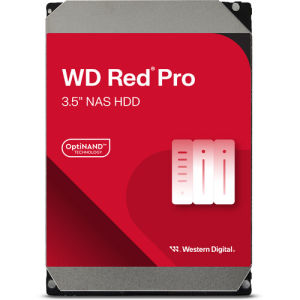
Western Digital 26TB WD Red Pro 7200 rpm SATA III 3.5\" Internal NAS HDD
Western Digital 26TB WD Red Pro 7200 rpm SATA III 3.5" Internal NAS HDD
Introduction to Western Digital 26TB WD Red Pro NAS HDD
Western Digital has recently released the 26TB WD Red Pro 7200 rpm SATA III 3.5" Internal NAS HDD, a high-capacity storage solution designed for small and medium-sized businesses, as well as home users who require reliable and high-performance storage. This NAS HDD offers a significant boost in capacity compared to its predecessors, making it an excellent choice for storing large amounts of data.
Key Features & Specifications
The WD Red Pro 26TB HDD boasts several impressive features and specifications:
- Capacity: 26TB
- Rotational Speed: 7200 RPM
- Interface: SATA III
- Form Factor: 3.5"
- Cache Size: 256MB
- Warranty: 5 years
These specifications make it ideal for various applications, including video surveillance, media streaming, and data backup.
Ideal Applications & Performance
The WD Red Pro 26TB HDD is designed for use in network-attached storage (NAS) systems, offering excellent performance and reliability. Its high rotational speed ensures fast data transfer rates, while its large cache size helps improve overall system performance.
In addition to its impressive specifications, the WD Red Pro 26TB HDD is optimized for NAS environments, making it an ideal choice for businesses and home users who require reliable and high-performance storage solutions.
How to Choose the Right High-Capacity Storage Solution
When selecting a high-capacity storage solution, it's essential to consider your specific needs and requirements. Here are some factors to keep in mind:
- Storage Capacity: Determine how much data you need to store and choose a solution that offers sufficient capacity.
- Performance: Consider the rotational speed, interface, and cache size to ensure optimal performance.
- Reliability: Look for solutions with long warranties and proven reliability.
By assessing these factors, you can choose the best high-capacity storage solution for your needs.
Setting Up & Using Your WD Red Pro NAS HDD
To set up and use your WD Red Pro NAS HDD, follow these steps:
- Installation Process: Carefully install the HDD in your NAS system, ensuring proper connections and power supply.
- Best Practices for Optimal Performance: Follow manufacturer guidelines for optimal performance, including regular firmware updates and maintenance.
By following these steps, you can ensure your WD Red Pro NAS HDD operates at its best.
Troubleshooting Common Issues
If you encounter any issues with your WD Red Pro NAS HDD, here are some steps to identify and resolve problems:
- Identifying & Resolving Problems: Check error messages and consult the manufacturer's support resources for troubleshooting tips.
- Maximizing Your Investment: Regularly maintain your NAS system and HDD to extend its lifespan and ensure optimal performance.
By addressing common issues promptly, you can maximize the value of your investment in the WD Red Pro NAS HDD.
Conclusion: Western Digital 26TB WD Red Pro NAS HDD - A Smart Choice for High-Capacity Storage
In conclusion, the Western Digital 26TB WD Red Pro NAS HDD offers a high-capacity storage solution designed for businesses and home users who require reliable and high-performance storage. With its impressive specifications and ideal applications, it's a smart choice for anyone looking to store large amounts of data.
By considering your specific needs and requirements, setting up and using the HDD properly, and troubleshooting common issues, you can make the most of this excellent storage solution.

RSB MDSE
Review

You May Also Like
godessing 1 2Pcs 1.09 Inch OLED Display Bare Screen SSD1312 Controller Module 64x128 Monochrome Screen For Arduino
High Airflow 180mm 12V Brushless Cooling Fan 80CFM For PC Case Server Cabinet Electronics Exhaust
ND0603PC Converters Module With Auto Boost Functionality 1-6V to 3V 3.3V 4.2V 5V Regulator For Regulation
UPSIREN UF-9 PRISM 4 PRO Computer Chassis Fan 92mm ARGB 4 Pin PWM Quiet Cooling Fan 12V Large Air Volume 40CFM/800-2500RPM
Mini Electric Motor 260 Micro Motor for DIY Toy Wind Electric Generator Stable Function DC Micro Motor Accessories
YGT SLIM FHD PC Monitor 19“/20\"/21\"/24\"/27\" 1080P 75Hz LED Desktop Computer Laptop Monitor

Thermaltake Colorful Pineapple Computer Desktop CPU Push-Down Radiator RGB Silent Fan Amd/Intel Intel 1155/1151/1150/1366
LG 42LW5700-UE power supply board # EAX62865401/8
MXQ TV BOX 2GB eMMC Memory Upgrade Option 8GB Storage for Select Models (Not Compatible with All Devices)
BAREN 10pcs CPU Clamshell Tray Box AMD Case Holder Protection For AMD AM2 AM3 FM1 FM2
B650M PRO Motherboard AMD Ryzen 9000/8000/7000 Series Processors AM5 DDR5 PCIe 4.0 M.2 SATA 6Gb/s USB 3.2 Gen 2 HDMI Desktop