Asus Zenfone 4 Max Battery Replacement: A Comprehensive Guide
Asus Zenfone 4 Max Battery Replacement: A Comprehensive Guide
Understanding the C11P1612 Compatible Battery
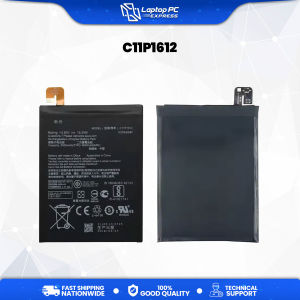
When considering a battery replacement for your Asus Zenfone 4 Max (ZC554KL), it is crucial to identify the correct battery model, which is C11P1612. This battery is compatible with the Zenfone 4 Max models X00ID, X00IS, and X00HDA, ensuring optimal performance and longevity.
Identifying the Right Battery for Your Zenfone 4 Max
The C11P1612 battery is a 4850mAh 3.8V battery, offering a capacity of 19.2Whr. This battery model is specifically designed for the 2017 Zenfone 4 Max, providing a seamless replacement experience. When shopping for a new battery, make sure to look for the C11P1612 model number to guarantee compatibility.
Verifying Compatibility with X00ID, X00IS, X00HDA Models
Before purchasing a new battery, double-check the compatibility with your specific Zenfone 4 Max model. The C11P1612 battery is compatible with the X00ID, X00IS, and X00HDA models, so ensure your device falls within this range.
Preparing for Battery Replacement
To successfully replace the battery on your Asus Zenfone 4 Max, gather the necessary tools and materials and familiarize yourself with safety precautions.
Tools and Materials Needed
- C11P1612 compatible battery
- Phillips head screwdriver
- Plastic opening tool
- Anti-static wrist strap (optional)
Safety Precautions and Precautions
- Disconnect the device from any power sources before beginning the replacement process.
- Remove any accessories, such as cases or screen protectors, to avoid interference.
- Ground yourself using an anti-static wrist strap to prevent static electricity from damaging sensitive components.
Step-by-Step Battery Replacement Process
Follow these steps to safely and effectively replace the battery on your Asus Zenfone 4 Max.
Removing the Back Cover and Old Battery
- Power off your device and remove any accessories.
- Use the plastic opening tool to gently pry open the back cover.
- Remove the four screws securing the battery.
- Gently disconnect the battery connector from the motherboard.
- Carefully remove the old battery from the device.
Installing the New C11P1612 Compatible Battery
- Align the new C11P1612 battery with the existing battery slots.
- Connect the battery connector to the motherboard.
- Secure the battery with the four screws removed earlier.
- Replace the back cover and press firmly until it clicks into place.
Reassembling Your Zenfone 4 Max
After installing the new battery, reassemble your device by replacing any removed accessories and powering it on. Test the device to ensure proper functionality.
Troubleshooting Common Issues
If you encounter issues after replacing the battery, consider these troubleshooting tips.
Addressing Battery Swelling or Leaking
Battery swelling or leaking may indicate a defective battery. If this occurs, immediately power off the device and seek professional assistance to prevent potential damage or injury.
Resolving Connectivity Problems After Replacement
If you experience connectivity issues after replacing the battery, try restarting the device or resetting network settings. If problems persist, consult the device manual or contact customer support for further assistance.
Conclusion and Final Thoughts
Replacing the battery on your Asus Zenfone 4 Max is a straightforward process that can significantly improve your device's performance and longevity. By following the guidelines outlined in this comprehensive guide, you can successfully replace the C11P1612 compatible battery and enjoy a seamless experience with your Zenfone 4 Max.

Laptop Pc Express
Review

You May Also Like
Thickened 3 in 1 Vertical Laptop Stand Adjustable Dual Slot Tablet Phone Desktop Laptop PVC Stand Dock Up To 17.3 Inch

Transparent Silicone Protective Case for OPPOK1 Shockproof Full Cover Anti-Fall Womens Version with Stand Mens High-End Feel Tempered Glass Shell

Universal Rear Camera Mounting Bracket Dash Cam Mirror Cam Backup Camera Mount Rearview Camera Holder Back Up Camera Bracket

Outdoor Phone 2W Flexible Solar Panel with USB Port Camping Charging for Mobilephone

3pcs Santorini Zakynthos Travel Souvenir Landscape Decorative Magnet Stickers for Fridge Home Decorations Chinese Origin

COCOQAC iPad Mini 6 Case with Keyboard Ultra Slim Smart Folio Type of Keyboard Power Display Switch Between Horizontal and Vertical Support iPad Mini 6th Generation 2021

ZEUS 7 in 1 Multifunctional Mini Cleaning Brush and Keyboard Brush Headphone Cleaning Set Keyboard Cleaning Set

CrashStar Universal Adhesive Wristband & Telescopic Stand: A Comprehensive Guide

Kawaii Cartoon Crayon Shinchan Dynamic Superman Creative Airbag Stand Universal Magnetic Absorption Mobile Phone Case

Double Layer Seaming Quilting Hemming Crimper Foot for Industrial Sewing Machine Flat Car Hemming Presser Foot
Transparent Protective Case For Huawei MatePad Air 2023 11.5 Inch Clear Soft Tablet Cover for Mate Pad Matepad 11.5 BTK-W00 2023 Back Cover