80mm Portable Thermal Printer: A Wireless Bluetooth Printer for Android & PC

80mm Portable Thermal Printer: A Wireless Bluetooth Printer for Android & PC

Introduction to 80mm Portable Thermal Printer

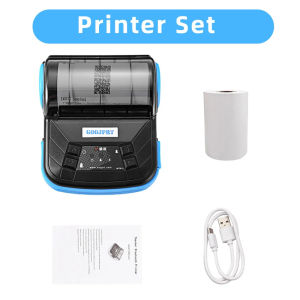
The MTP-3 Thermal Printer is a compact, portable wireless Bluetooth printer designed for Android phones and PCs. This versatile device offers a convenient solution for printing receipts, invoices, and other documents on-the-go. The 80mm portable thermal printer provides reliable performance and easy setup, making it an ideal choice for small businesses and individuals who require a mobile pocket bill printer.

Key Features of MTP-3 Thermal Printer

  • Wireless Bluetooth Connectivity: Connect your printer wirelessly to your Android phone or PC, eliminating the need for cables and wires.
  • Compact and Portable: The MTP-3 Thermal Printer is lightweight and easy to carry, making it perfect for mobile businesses and professionals.
  • High-Quality Printing: Print clear and legible receipts, invoices, and documents with high-resolution thermal printing technology.
  • Customizable Print Settings: Adjust print settings to meet your specific needs, including font size, line spacing, and more.

Benefits of Using a Portable Thermal Printer

  • Convenience: With its wireless Bluetooth connectivity, the MTP-3 Thermal Printer allows you to print from anywhere, without the need for a wired connection.
  • Cost-Effective: Printing receipts and invoices on-the-go eliminates the need for expensive paper and ink, saving you money in the long run.
  • Time-Saving: Quickly and easily print documents using the MTP-3 Thermal Printer, saving you time and increasing productivity.
  • Professional Appearance: High-quality printing ensures that your receipts and invoices look professional and polished, leaving a positive impression on your customers.

How to Set Up Your Wireless Bluetooth Printer

Setting up your MTP-3 Thermal Printer is quick and easy. Follow these steps to get started:

Connecting Your Printer to Android Phone

  1. Turn on your MTP-3 Thermal Printer by pressing the power button.
  2. On your Android phone, go to Settings > Bluetooth and enable Bluetooth.
  3. Tap on the MTP-3 Thermal Printer in the list of available devices.
  4. Once connected, you can start printing from your Android phone.

Pairing Your Printer with PC

  1. Turn on your MTP-3 Thermal Printer by pressing the power button.
  2. On your PC, go to Control Panel > Devices and Printers and click on Add a printer.
  3. Select Add a local printer and choose Bluetooth as the printer type.
  4. Follow the on-screen instructions to pair your printer with your PC.

Maximizing the Potential of Your Mobile Pocket Bill Printer

To get the most out of your MTP-3 Thermal Printer, consider the following tips:

Printing Receipts & Invoices

Use the MTP-3 Thermal Printer to print receipts and invoices for your customers, ensuring that they look professional and legible. You can customize the print settings to meet your specific needs, including font size, line spacing, and more.

Customizing Print Settings

Adjust the print settings on your MTP-3 Thermal Printer to meet your specific needs. You can change the font size, line spacing, and other settings to create the perfect printout every time.

Troubleshooting Common Issues

If you're experiencing issues with your MTP-3 Thermal Printer, try the following troubleshooting tips:

Printer Not Responding

  • Check that the printer is turned on and connected to your device via Bluetooth.
  • Restart your printer and device to ensure a stable connection.
  • Update the firmware on your printer if necessary.

Connection Problems

  • Ensure that your device's Bluetooth is enabled and that the printer is within range.
  • Restart your printer and device to reset the connection.
  • Unpair and re-pair the printer with your device if necessary.

By following these tips, you can ensure that your MTP-3 Thermal Printer works smoothly and reliably, helping you to stay productive and efficient on-the-go.

GlobalLifestyle
GlobalLifestyle

Seller ratings 97%

You May Also Like

Pos Machine Stand display Bracket 360 Degree Rotate Pos Claws Holder Machine Flexible Adjustable Cashier Display
00:38

Pos Machine Stand display Bracket 360 Degree Rotate Pos Claws Holder Machine Flexible Adjustable Cashier Display

Mini Bluetooth Thermal Printer Wireless Portable 58mm Receipt Bill POS System Printer Loyverse POS Free App on Android FREE 1 Roll
00:58

Mini Bluetooth Thermal Printer Wireless Portable 58mm Receipt Bill POS System Printer Loyverse POS Free App on Android FREE 1 Roll

BrotherR TN-2260 (TN2260) Black Original Toner Cartridge
00:22

BrotherR TN-2260 (TN2260) Black Original Toner Cartridge

【First Batch】Custom Replacement Head Upgrade Kit For Newage NA XM2 XM-02 DUEL Megatank--XIAO ZHAO
00:14

【First Batch】Custom Replacement Head Upgrade Kit For Newage NA XM2 XM-02 DUEL Megatank--XIAO ZHAO

HP 680 Black and Tri-Color Original Ink Advantage Cartridge 1 set
00:12

HP 680 Black and Tri-Color Original Ink Advantage Cartridge 1 set

Kedida 2D Wireless Ring Barcode Scanner with Display Screen 1D 2D QR Bluetooth Barcode Reader Portable Wearable Mini Finger Bar Code Reader with Bluetooth & 2.4GHz Wireless & USB Wired Connection
02:16

Kedida 2D Wireless Ring Barcode Scanner with Display Screen 1D 2D QR Bluetooth Barcode Reader Portable Wearable Mini Finger Bar Code Reader with Bluetooth & 2.4GHz Wireless & USB Wired Connection

Film Free Multi USE Full Package Personalized Printer Water Slide Transfer DIY Custom Printable Water-Slide Decals
00:58

Film Free Multi USE Full Package Personalized Printer Water Slide Transfer DIY Custom Printable Water-Slide Decals

AOS Compatible APEOS 2150/2350 CT203553 Toner Cartridge
00:10

AOS Compatible APEOS 2150/2350 CT203553 Toner Cartridge

Compuprint Premium Inkjet Dye Ink Universal Ink Continuous ink CISS and DIY Refill 100ml Non squeeze - gravity full cap for EcoTank printer\\n\\n What is Compuprint Premium Inkjet Dye Ink?\\n\\nCompuprint Premium Inkjet Dye Ink is a high-quality, universal ink solution designed specifically for continuous ink systems (CISS) and DIY refills. This premium dye ink comes in a convenient 100ml bottle, making it perfect for refilling ink cartridges for various printers, including those from leading brands such as Epson, Canon, and HP. This ink is compatible with EcoTank printers, allowing users to enjoy high-quality prints at a fraction of the cost compared to using original ink cartridges.\\n\\n Key Features\\n\\n- **Color:** CMYK\\n- **Volume/Content:** 100ml\\n- **Easy-fill nozzle:** Designed for easy refilling of ink cartridges\\n- **Non squeeze - gravity full cap:** Ensures a smooth and efficient ink refill process\\n- **Supported ink cartridges/printers/devices:** CISS and DIY Refill\\n- **Packaging:** Vacuum sealed to maintain ink quality\\n\\n Supported Printers\\n\\nCompuprint Premium Inkjet Dye Ink is compatible with a wide range of printers from popular brands, including:\\n\\n- **Epson:** Various models\\n- **Canon:** Various models\\n- **HP:** Various models\\n\\n How to Refill EcoTank Printer with Compuprint Ink\\n\\nRefilling your EcoTank printer with Compuprint Premium Inkjet Dye Ink is a straightforward process that can save you money and improve print quality. Follow these steps to refill your EcoTank printer:\\n\\n Preparing the Refill Kit\\n\\n1. Gather the necessary tools and materials, including the Compuprint Premium Inkjet Dye Ink, a clean workspace, and any required safety equipment.\\n2. Ensure the printer is turned off and unplugged before beginning the refill process.\\n3. Remove the ink cartridge from the printer, taking care not to touch the print head or any other sensitive components.\\n\\n Refilling Process\\n\\n1. Carefully remove the ink cartridge cap and insert the easy-fill nozzle from the Compuprint Premium Inkjet Dye Ink bottle.\\n2. Allow the ink to flow into the cartridge using the non-squeeze gravity full cap method. This ensures a smooth and efficient refill process.\\n3. Once the cartridge is full, remove the easy-fill nozzle and securely reattach the cartridge cap.\\n4. Insert the refilled cartridge back into the printer and turn the printer on.\\n\\n Benefits of Using Compuprint Premium Inkjet Dye Ink\\n\\nUsing Compuprint Premium Inkjet Dye Ink offers several advantages over using original ink cartridges, including:\\n\\n Cost Savings\\n\\nRefilling ink cartridges with Compuprint Premium Inkjet Dye Ink can save you up to 80% compared to purchasing new ink cartridges from the printer manufacturer. This makes it an excellent choice for budget-conscious users.\\n\\n Compatibility\\n\\nCompuprint Premium Inkjet Dye Ink is compatible with a wide range of printers, including those from leading brands such as Epson, Canon, and HP. This ensures that users can enjoy high-quality prints regardless of their printer model.\\n\\n Quality\\n\\nCompuprint Premium Inkjet Dye Ink is designed to produce high-quality prints with vibrant colors and sharp details. This makes it an excellent choice for both personal and professional use.\\n\\n Shipping Information\\n\\nFor orders outside Luzon, please expect additional fifteen (15) days shipping due to airline safety restrictions. This may affect delivery times, so please plan accordingly.\\n\\nIn conclusion, Compuprint Premium Inkjet Dye Ink is a cost-effective, high-quality solution for refilling ink cartridges for various printers, including EcoTank printers. By following the steps outlined above, users can enjoy significant cost savings and improved print quality.\n}
00:17

Compuprint Premium Inkjet Dye Ink Universal Ink Continuous ink CISS and DIY Refill 100ml Non squeeze - gravity full cap for EcoTank printer\\n\\n What is Compuprint Premium Inkjet Dye Ink?\\n\\nCompuprint Premium Inkjet Dye Ink is a high-quality, universal ink solution designed specifically for continuous ink systems (CISS) and DIY refills. This premium dye ink comes in a convenient 100ml bottle, making it perfect for refilling ink cartridges for various printers, including those from leading brands such as Epson, Canon, and HP. This ink is compatible with EcoTank printers, allowing users to enjoy high-quality prints at a fraction of the cost compared to using original ink cartridges.\\n\\n Key Features\\n\\n- **Color:** CMYK\\n- **Volume/Content:** 100ml\\n- **Easy-fill nozzle:** Designed for easy refilling of ink cartridges\\n- **Non squeeze - gravity full cap:** Ensures a smooth and efficient ink refill process\\n- **Supported ink cartridges/printers/devices:** CISS and DIY Refill\\n- **Packaging:** Vacuum sealed to maintain ink quality\\n\\n Supported Printers\\n\\nCompuprint Premium Inkjet Dye Ink is compatible with a wide range of printers from popular brands, including:\\n\\n- **Epson:** Various models\\n- **Canon:** Various models\\n- **HP:** Various models\\n\\n How to Refill EcoTank Printer with Compuprint Ink\\n\\nRefilling your EcoTank printer with Compuprint Premium Inkjet Dye Ink is a straightforward process that can save you money and improve print quality. Follow these steps to refill your EcoTank printer:\\n\\n Preparing the Refill Kit\\n\\n1. Gather the necessary tools and materials, including the Compuprint Premium Inkjet Dye Ink, a clean workspace, and any required safety equipment.\\n2. Ensure the printer is turned off and unplugged before beginning the refill process.\\n3. Remove the ink cartridge from the printer, taking care not to touch the print head or any other sensitive components.\\n\\n Refilling Process\\n\\n1. Carefully remove the ink cartridge cap and insert the easy-fill nozzle from the Compuprint Premium Inkjet Dye Ink bottle.\\n2. Allow the ink to flow into the cartridge using the non-squeeze gravity full cap method. This ensures a smooth and efficient refill process.\\n3. Once the cartridge is full, remove the easy-fill nozzle and securely reattach the cartridge cap.\\n4. Insert the refilled cartridge back into the printer and turn the printer on.\\n\\n Benefits of Using Compuprint Premium Inkjet Dye Ink\\n\\nUsing Compuprint Premium Inkjet Dye Ink offers several advantages over using original ink cartridges, including:\\n\\n Cost Savings\\n\\nRefilling ink cartridges with Compuprint Premium Inkjet Dye Ink can save you up to 80% compared to purchasing new ink cartridges from the printer manufacturer. This makes it an excellent choice for budget-conscious users.\\n\\n Compatibility\\n\\nCompuprint Premium Inkjet Dye Ink is compatible with a wide range of printers, including those from leading brands such as Epson, Canon, and HP. This ensures that users can enjoy high-quality prints regardless of their printer model.\\n\\n Quality\\n\\nCompuprint Premium Inkjet Dye Ink is designed to produce high-quality prints with vibrant colors and sharp details. This makes it an excellent choice for both personal and professional use.\\n\\n Shipping Information\\n\\nFor orders outside Luzon, please expect additional fifteen (15) days shipping due to airline safety restrictions. This may affect delivery times, so please plan accordingly.\\n\\nIn conclusion, Compuprint Premium Inkjet Dye Ink is a cost-effective, high-quality solution for refilling ink cartridges for various printers, including EcoTank printers. By following the steps outlined above, users can enjoy significant cost savings and improved print quality.\n}

Canon NPG 84 Toner FOR CANON Ordinary Toner Price Ti 84 Calculator Cheap - Lazada
00:15

Canon NPG 84 Toner FOR CANON Ordinary Toner Price Ti 84 Calculator Cheap - Lazada

Soonpos  3GB 32GB 4GB 64GB Android 12 Handheld POS Terminal With 58mmThermal Receipt Printer 3G 4G WiFi GPS Bluetooth Smart Cashier Mobile POS Machine Compatible With Food Panda Loyverse POS Salesplay UTAK POS System
00:58

Soonpos 3GB 32GB 4GB 64GB Android 12 Handheld POS Terminal With 58mmThermal Receipt Printer 3G 4G WiFi GPS Bluetooth Smart Cashier Mobile POS Machine Compatible With Food Panda Loyverse POS Salesplay UTAK POS System

Xprinter XP423B WAYBILL PRINTER with BLUETOOTH
00:12

Xprinter XP423B WAYBILL PRINTER with BLUETOOTH