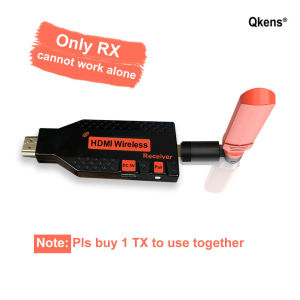
150m Wireless HDMI Extender Video Transmitter Receiver 1TX 2RX 3RX 4RX for PC Laptop To TV Projector
150m Wireless HDMI Extender Video Transmitter Receiver 1TX 2RX 3RX 4RX for PC Laptop To TV Projector
Introduction to Wireless HDMI Extenders
What is a Wireless HDMI Extender?
A wireless HDMI extender is a device that transmits video and audio signals wirelessly from a source device, such as a PC laptop, to a display device, like a TV or projector. This allows users to enjoy high-definition video and audio content without being limited by the length of HDMI cables.
How Does a Wireless HDMI Extender Work?
Wireless HDMI extenders work by using radio frequency (RF) technology to transmit HDMI signals over a specified range. They consist of two main components: a transmitter and one or more receivers. The transmitter connects to the source device via HDMI, while the receiver(s) connect to the display device(s).
Key Features of 150m Video Transmitter Receiver
1TX 2RX 3RX 4RX Configuration
Our 150m wireless HDMI extender features a versatile configuration, allowing users to choose between 1TX 2RX, 1TX 3RX, or 1TX 4RX setups. This flexibility makes it suitable for various applications, including multi-monitor setups and remote presentations.
Compatibility with PC Laptops and TVs
The 150m wireless HDMI extender is compatible with a wide range of devices, including PC laptops, desktop computers, gaming consoles, and media players. It supports resolutions up to 1080p and can be used with any HDMI-compatible display, such as TVs, projectors, and monitors.
Range and Performance
With a transmission range of up to 150 meters (492 feet), our wireless HDMI extender ensures reliable performance even in large spaces. It uses advanced RF technology to minimize signal loss and maintain high-quality video and audio output.
Installation and Setup
Connecting the Transmitter and Receivers
To set up the wireless HDMI extender, connect the transmitter to your source device using an HDMI cable. Then, connect the receiver(s) to your display device(s) using another HDMI cable. Make sure to power on both the transmitter and receiver(s) before use.
Configuring the System for Optimal Performance
For best results, position the transmitter and receiver(s) within line-of-sight and avoid placing them near other electronic devices that may interfere with the signal. If needed, adjust the settings on your source device to optimize video and audio output.
Troubleshooting Common Issues
If you experience any issues with your wireless HDMI extender, check the following:
- Ensure that both the transmitter and receiver(s) are powered on.
- Verify that the HDMI cables are securely connected to both devices.
- Check if any other electronic devices are interfering with the signal.
- Reset the system by turning off and then turning back on the transmitter and receiver(s).
Applications and Use Cases
Projector Integration
The 150m wireless HDMI extender is ideal for integrating with projectors in various settings, such as classrooms, conference rooms, and home theaters. It allows users to position the projector away from the source device, providing more flexibility in terms of placement and setup.
Multi-Monitor Setups
With its 1TX 2RX, 1TX 3RX, and 1TX 4RX configurations, the wireless HDMI extender is perfect for multi-monitor setups. Users can easily extend their desktop across multiple displays, increasing productivity and enhancing the overall viewing experience.
Remote Presentations and Meetings
For remote presentations and meetings, the wireless HDMI extender enables users to share their screen wirelessly with participants located in different rooms or even buildings. This eliminates the need for long HDMI cables and makes it easier to collaborate and communicate effectively.

China grocery store adventure
Review

You May Also Like
Case for tecno spark 10 pro TECNO SPARK 10 C SPARK 10C phone casing softcase TPU Protector shockproof Cover new design aesthetic Coffee Creative Cartoon SPSNKF01
Efficient Cleaner Powerful Cleaning Machine Cleaning Device Cleaning Machine Glasses Cleaner for Glasses
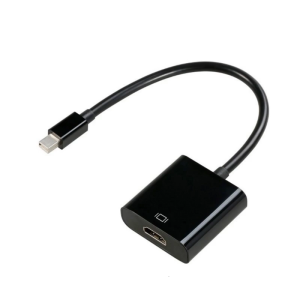
Mini DisplayPort to HDTV Cable Adapter Male to Female Cord Converters Digital Video Monitors Cable Support for Monitors
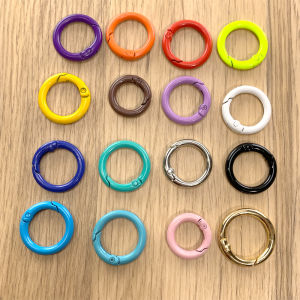
Colorful Metal Keychain Spring Clip Phone Case Accessory Book Binding Circle DIY Handmade Journal Decorations Key Holder
9H 2.5D Coated Front+Back Tempered Glass For iPhone 5 5S SE 2016 ExplosionProof Screen Protector Film
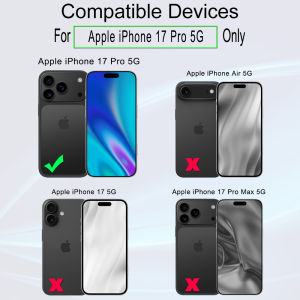
Ibywind For iPhone 17 Pro 5G Screen Protector(Pack of 2) with 1PC Metal Lens Protector 1PC Carbon Fiber Back Film Easy Install Kit
17mm Universal Ball Joint Phone Mount With Adhesive Base Ball Head Adapter Socket Arm Mounting Connector

97011723 Bathroom Ceiling Fan Grille with Springs for Square Ceiling or Wall-Mount Exhaust Fan Replacement Vent Cover Fits Models 663 670 671 675 688 Ventilation Fan - Plastic Cover White
Applicable to Xiaomi Civi4pro Mobile Phone Film: A Comprehensive Guide
PB SOLAR Power Station 256WH 300w 80000MAH Lithium Battery Multi-Function Portable Big Capacity Solar Generator Station Powerbank
3in1 Cord less Vacuum Cleaner HVC50WHT