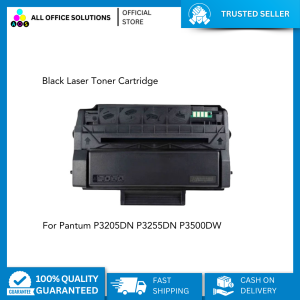
AOS Pantum PC-310X Laser Toner Cartridge - BLACK
AOS Pantum PC-310X Laser Toner Cartridge - BLACK
Laser printers are essential tools for both personal and business use, and high-quality toner cartridges are crucial for achieving clear and crisp prints. In this article, we will discuss compatible laser toner cartridges, specifically focusing on the AOS Pantum PC-310X Laser Toner Cartridge - BLACK. We will cover how these cartridges work, their benefits, choosing the right toner for your printer, installing your new toner cartridge, and maintaining your printer and toner cartridge.
What Are Compatible Laser Toner Cartridges?
Compatible laser toner cartridges are third-party alternatives to original equipment manufacturer (OEM) cartridges. They are designed to work seamlessly with specific printer models, providing high-quality prints at a lower cost than OEM cartridges.
How Do Compatible Laser Toner Cartridges Work?
Compatible laser toner cartridges function similarly to OEM cartridges. They contain toner powder, which is transferred onto paper through a series of electrical charges. The toner is then fused to the paper using heat, creating a permanent image.
Benefits of Using Compatible Laser Toner Cartridges
Using compatible laser toner cartridges offers several advantages:
- Cost-effective: Compatible cartridges are generally less expensive than OEM cartridges, helping you save money on printing costs.
- High-quality prints: Many compatible cartridges provide excellent print quality, rivaling that of OEM cartridges.
- Environmental benefits: Compatible cartridges often have a lower environmental impact due to reduced waste and energy consumption during production.
Choosing the Right Toner for Your Printer
Selecting the correct toner cartridge for your printer is crucial to ensure optimal performance and print quality. Follow these steps to identify the right toner cartridge:
- Check your printer model number and consult the manufacturer's documentation to find the appropriate toner cartridge.
- Look for third-party compatible cartridges that match your printer model and toner color.
AOS Pantum PC-310X Laser Toner Cartridge - BLACK: Key Features & Benefits
The AOS Pantum PC-310X Laser Toner Cartridge - BLACK is a high-quality compatible toner cartridge designed specifically for the Pantum PC-310X laser printer. Key features include:
- High-quality prints: This cartridge produces sharp, clear text and images.
- Cost-effective: It offers significant savings compared to OEM cartridges.
- Reliable performance: The AOS Pantum PC-310X Laser Toner Cartridge - BLACK is built to last, providing consistent performance over time.
Installing Your New Toner Cartridge
Installing a new toner cartridge is a straightforward process. Follow this step-by-step guide to ensure proper installation:
- Turn off your printer and unplug it from the power source.
- Open the front cover of your printer and remove the old toner cartridge.
- Carefully remove the new toner cartridge from its packaging, taking care not to touch the toner powder.
- Insert the new toner cartridge into the designated slot and close the front cover.
- Plug your printer back in and turn it on.
Tips for Properly Storing Your Toner Cartridge
To maintain the quality and longevity of your toner cartridge, store it properly:
- Keep the cartridge in its original packaging until ready for use.
- Store the cartridge in a cool, dry place away from direct sunlight and extreme temperatures.
- Avoid touching the toner powder to prevent contamination.
Maintaining Your Printer and Toner Cartridge
Regular maintenance can help extend the life of your toner cartridge and printer, ensuring optimal performance and print quality.
Best Practices for Extending the Life of Your Toner Cartridge
To get the most out of your toner cartridge, follow these tips:
- Clean the printer regularly to remove dust and debris that may interfere with the toner cartridge.
- Replace the toner cartridge before it runs out completely to avoid damaging the printer.
- Store the toner cartridge properly when not in use.
Troubleshooting Common Issues with Toner Cartridges
If you encounter issues with your toner cartridge, try these troubleshooting steps:
- Check if the cartridge is properly installed and aligned.
- Clean the printer's toner cartridge slot and drum unit.
- Replace the toner cartridge if it is empty or damaged.
- Consult the printer's user manual or contact customer support for further assistance." }

AllOfficeSolutions Reference Number: 250923-161608
Review

You May Also Like
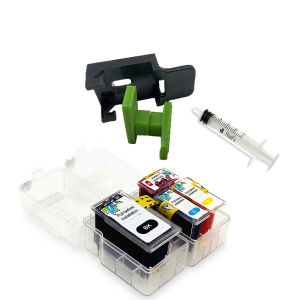
PG-540 PG540 CL541 CL-541 Smart Ink Cartridge For Canon Pixma MG3250 MG3255 MG3550 mg4150 MG4200 mg4250 PG540XL
Peripage A40 200DPI BLUE Portable A4 Printer: Mini Inkless Thermal Paper Wireless Bluetooth Phone Photo Printer
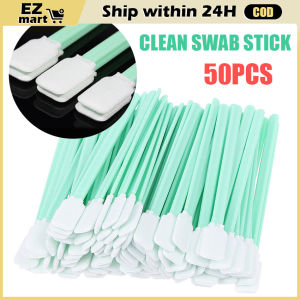
Fast Shipping: 50pcs Eco Solvent Foam Tipped Cleaning Swab Stick Maintenance Tool for Roland Mimaki Mutoh Ricoh Epson Seiko Knica Printhead UV Printer LZC-Cleaning-Swabs-50PCS/Set
Minos 6 in1 Multifunction Heat Press Machine mini printer for T-Shirt / Mug / Plate / Capprinter for small business
Printer Cartridges for Canon IP100B IP100 TR150 Ink Cartridges PGI-35BK Black CLI-36C Colour

26a (CF226a) 26X CF226X Toner Cartridge for Use and Compatible with HPM402 HPM426
WELLSHOW PLA 3D Filament 1.75mm PLA+PRO Filament Food Safe 3D Printer Filament PETG ABS 1.75mm1KG

TN2480 TN760 TN2450 Toner Cartridge/DR2455 DRUM Unit for Use and Compatible with DCPL2550 HL-L2370 L2375 MFC-L2750
80mm POS Printer With Auto Cutter USB/LAN/Serial/WIFI/Bluetooth Interface Option Connect With Cash Box Kitchen Printer
Soonpos Wired USB 2.4G Wireless Bluetooth 1D 2D Barcode Scanners Inventory Portable QR Code Scanner CMOS Sensor Bar Code Reader With Stand Support Self-sensing
![[🇵🇭 Stock&COD] Original 3D Printer Pen Full Set with Filament 3M 3 Colors Toy for Kids Scratch Pen For Chicken DIY 3d Printer pen Crafting Doodle Drawing Arts Printer Tools Childrens Toys Magic Pen Drawing](https://img.lazcdn.com/g/p/ae704b70a3df905ba21aba78343f8095.jpg_300x300q80.jpg)
[🇵🇭 Stock&COD] Original 3D Printer Pen Full Set with Filament 3M 3 Colors Toy for Kids Scratch Pen For Chicken DIY 3d Printer pen Crafting Doodle Drawing Arts Printer Tools Childrens Toys Magic Pen Drawing