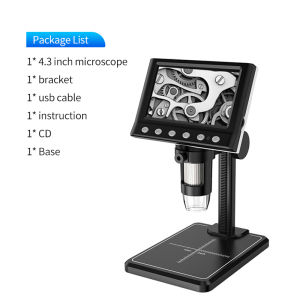
4.3 In LCD Digital Microscope 40-1000X Coin Microscope for Error Coins USB Magnifier Micro Scope with High Stand 8 LED For Kids
4.3 In LCD Digital Microscope 40-1000X Coin Microscope for Error Coins USB Magnifier Micro Scope with High Stand 8 LED For Kids
What is a 4.3 In LCD Digital Microscope?
A 4.3 In LCD Digital Microscope is a compact, portable, and user-friendly device designed specifically for kids and hobbyists who want to explore the world of microscopy. It features a high-resolution 4.3-inch LCD screen, which allows users to observe specimens in real-time, making it perfect for studying error coins and other small objects.
Key Features
- Magnification Range: 40x to 1000x
- LCD Screen: 4.3 inches
- Light Source: 8 LED lights
- Connectivity: USB magnifier microscope
- Stand: High stand design
Benefits for Kids
Introducing kids to the world of microscopy through a 4.3 In LCD Digital Microscope offers numerous benefits, including:
- Developing critical thinking skills
- Enhancing observation abilities
- Encouraging curiosity and exploration
- Providing hands-on learning experiences
Applications
A 4.3 In LCD Digital Microscope can be used for various applications, such as:
- Studying error coins
- Observing small objects and specimens
- Conducting simple experiments
- Learning about biology and other sciences
How to Choose the Right Microscope
When selecting a 4.3 In LCD Digital Microscope, consider the following factors:
Key Specifications
- Magnification range
- LCD screen size
- Light source
- Connectivity options
Features to Look For
- Adjustable focus
- Zoom capabilities
- Image capture and storage
- Easy-to-use interface
Top Brands
Some reputable brands that manufacture high-quality 4.3 In LCD Digital Microscopes include:
- AmScope
- Celestron
- Carson
How to Use a 4.3 In LCD Digital Microscope
Follow these steps to get the most out of your 4.3 In LCD Digital Microscope:
Setting Up the Microscope
- Place the microscope on a stable surface
- Connect the USB cable to your computer or power source
- Turn on the microscope
Using the Magnification Settings
- Adjust the magnification knob to select the desired magnification level
- Focus the image by turning the focus knob
Capturing Images
- Press the capture button to save images to your computer or storage device
- Share your findings with friends and family
Tips for Maximizing Your Experience
Enhance your microscopy experience with these tips:
Cleaning and Maintenance
- Clean the lens and stage regularly using a soft cloth
- Store the microscope in a safe place when not in use
Troubleshooting Common Issues
- If the image is blurry, adjust the focus knob
- If the LED lights are dim, check the power source
Expanding Your Knowledge
- Research microscopy techniques and applications
- Join online forums and communities to connect with other enthusiasts
Conclusion
A 4.3 In LCD Digital Microscope is an excellent tool for kids and hobbyists who want to explore the world of microscopy. With its 40x to 1000x magnification range, 4.3-inch LCD screen, and 8 LED lights, this compact and portable device offers endless opportunities for learning and discovery.

Global Joy
You May Also Like

304 sus stainless steel sink type kitchen faucet
Small Kitchen Cabinet Sensors Switches Door Cabinet Touch Sensors Motion Sensors Easy Installation No Wiring Need

HCCM Hook: A Strong & Versatile Punch-Free 304 Stainless Steel Solution

10/20M Electrical Cable Threader Cable Wire Puller Cable Through Wall Wire Guide
400PCS Steel Nails Round For Steel Nail Gun 16mm Pneumatic Nailing Gun Wall Fastening Tool Nailer Special Nails
Public Toilets Door Partition Accessories Toilet Hardware sets

Multifunctional Stainless Steel Floor Drain Filter: Anti-clog Slag Strainer & Hair Trap

Anti-Fog Welding Goggles Motorcycle Goggles High Definition Windproof Protective Goggles

Multi-Purpose Steel Rack: A Comprehensive Guide

Self Adhesive Power Strip Wall Mount Fixator Socket Holder Wall Mounted
100N & 150N Gas Strut Cabinet Door Stay: A Comprehensive Guide