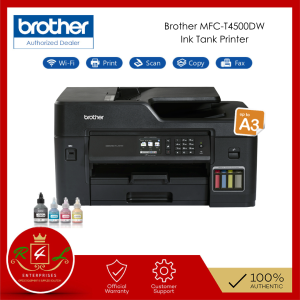
Brother MFC-T4500DW Ink Tank Printer A3 Refill Ink Tank Multi-Function
Brother MFC-T4500DW Ink Tank Printer A3 Refill Ink Tank Multi-Function
Efficiency Engineered with A3 Refill Ink Tank Multi-Function Centre, the Brother MFC-T4500DW printer offers a versatile solution for businesses and individuals seeking a reliable and cost-effective printing experience. This article delves into the key features and benefits of this multi-function printer, as well as how to use it effectively and expand its capabilities.
Key Features & Benefits
Low Cost, High Quality Printing
Brother MFC-T4500DW printer is designed to save you money on printing costs while delivering high-quality prints. With ultra high-yield ink bottles, you can print up to 6,500 pages (black) and 5,000 pages (color), resulting in a 50% cost savings compared to traditional inkjet printers. Automatic 2-sided printing further enhances efficiency, reducing paper usage and minimizing environmental impact.
Easy Refill System
Brother's Refill Tank System allows for quick and fuss-free refills, making it easy to maintain your printer's ink levels. Monitor your ink supply effortlessly, and enjoy uninterrupted printing without the hassle of constantly replacing cartridges.
Superior Print Quality & Resolution
Create striking artwork and sleek reports with the Brother MFC-T4500DW printer's superior color vibrancy and high print resolution of 1200x4800 dpi. This level of detail ensures that every print is a masterpiece, whether you're printing photos, documents, or graphics.
How to Use Brother MFC-T4500DW Ink Tank Printer
Setting Up Your Printer
Setting up your Brother MFC-T4500DW printer is simple and straightforward. Follow these steps to get started:
- Unpack your printer and connect it to a power source.
- Connect the ink tanks to the printer.
- Install the ink bottles and prime the ink tanks.
- Connect your printer to a computer or network using Wi-Fi Direct, Ethernet, or USB.
Refilling Ink Tanks
Refilling your Brother MFC-T4500DW printer's ink tanks is easy with Brother's Refill Tank System. Follow these steps to refill your ink tanks:
- Open the ink tank cover.
- Remove the ink tank cap.
- Insert the ink bottle into the ink tank.
- Press down on the ink bottle until it clicks into place.
- Close the ink tank cover and allow the printer to prime the ink tanks.
Wireless & Ethernet Connectivity
Connect your Brother MFC-T4500DW printer to your network using Wi-Fi Direct, Ethernet, or USB. With wireless connectivity, you can print from anywhere in your home or office, while Ethernet provides a stable connection for larger networks.
A3 Printing & Larger Options
Printing Large Format Documents
The Brother MFC-T4500DW printer supports A3 printing, making it ideal for businesses and individuals who require large format documents. Print stunning graphics, charts, and maps with ease, and enjoy the convenience of automatic 2-sided printing.
Expanding Your Printing Capabilities
Expand your printing capabilities by connecting your Brother MFC-T4500DW printer to a computer or network using Wi-Fi Direct, Ethernet, or USB. With wireless connectivity, you can print from anywhere in your home or office, while Ethernet provides a stable connection for larger networks.
Additional Functions & Convenience
Automatic 2-Sided Printing
Save paper and reduce environmental impact with the Brother MFC-T4500DW printer's automatic 2-sided printing feature. This function allows you to print on both sides of the page, reducing paper usage and minimizing waste.
Scan/Copy/Fax Capabilities
The Brother MFC-T4500DW printer offers scan, copy, and fax capabilities, making it a versatile multi-function printer. Scan documents and images directly to your computer or network, make copies of important documents, and send faxes with ease.
Mobile & USB Print Support
Print from your mobile device or USB drive using the Brother MFC-T4500DW printer's mobile and USB print support. With Wi-Fi Direct, you can print from anywhere in your home or office, while USB connectivity allows you to print directly from a USB drive.
In conclusion, the Brother MFC-T4500DW Ink Tank Printer A3 Refill Ink Tank Multi-Function is a versatile and cost-effective solution for businesses and individuals seeking a reliable printing experience. With its low-cost, high-quality printing capabilities, easy refill system, and superior print quality, this multi-function printer is sure to meet your printing needs." }

R4L ENTERPRISES Reference Number: 250923-16160830
Review

You May Also Like
5.7 Inch Android 12 Handheld PDA Terminal with Black Lanyard Barcode Scanner 1D/2D QR Code 4G GPS WiFi Bluetooth NFC Support for Google Store RAM4G ROM64G 4000mAh for Inventory Warehouse Cold Chain
Shenglong HP-241B Desktop Automatic Ribbon Printer Small Production Date Production Batch Number Printer Electric Stamping Machine Convenient Paper Box Film Leather Coding Machine Label Printing Machine
【🔥🔥🔥Hot sale &fast delivery】Eyoyo 2D QR Desktop Barcode Scanner with Automatic Sensing Scanning Omnidirectional Hands-Free QR Screen Scan Platform Bar code Reader for POS PC Supermarket Bookstore Library Retail Mall

Soonpos Portable Mini Wireless Thermal Pocket Printer 80mm Pos Receipt Printer With Leather Case Compatible with Loyverse Salesplay Kyte UTAK POS App
AOS Compatible toner cartridge TN2480 TN-2480 TN 2480 for Brother Printer
Xiaomi Portable Pocket Photo Printer Kit Bluetooth Zink Printer Bluetooth Wireless Thermal Printer Work with Mijia for Mobile Phone
C13S210057 S210057 Ink Maintenance Tank Chip for EPSON T2100 T2170 T3100 T3160 T3170 T5100 T5160 T5170 F500 F560 F570 F551 S2100
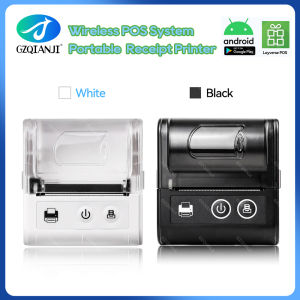
58MM Pocket Printer: A Comprehensive Guide
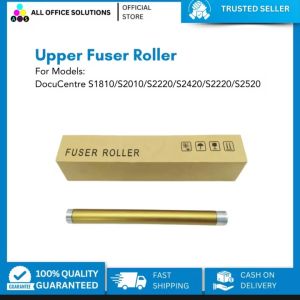
Compatible Upper Fuser Roller/ Fusing Roller for Fuji Xerox DC S1810/ S2010/ S2011/ S2220/ S2420 S2320

KODAK MINI SHOT 3 & Retro C300R: A Comprehensive Guide to 3x3\" Square Paper Printers
Kyocera 100% Original CCMT CCMT09T308HQ CCMT09T304HQ CCMT09T302HQ CCMT 060204 HQ CCMT. 060202 HQ CCMT. 060202 HP TN60 Turning Inserts